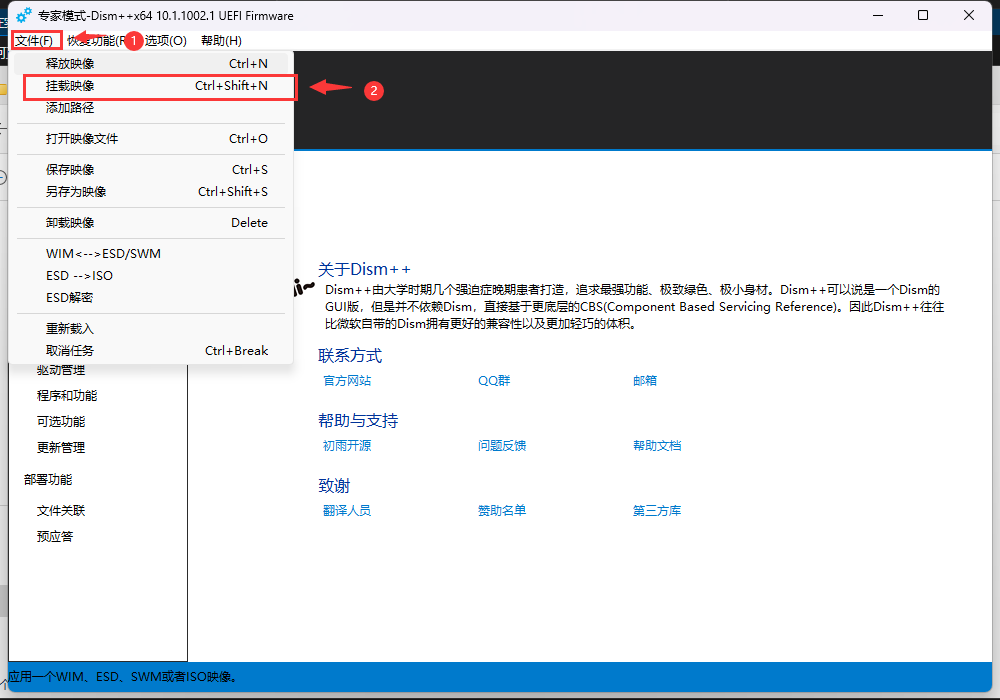
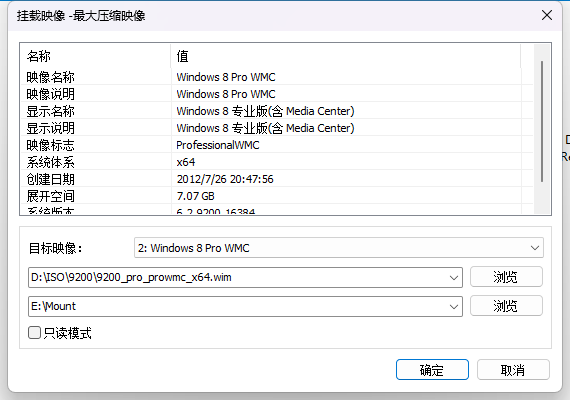
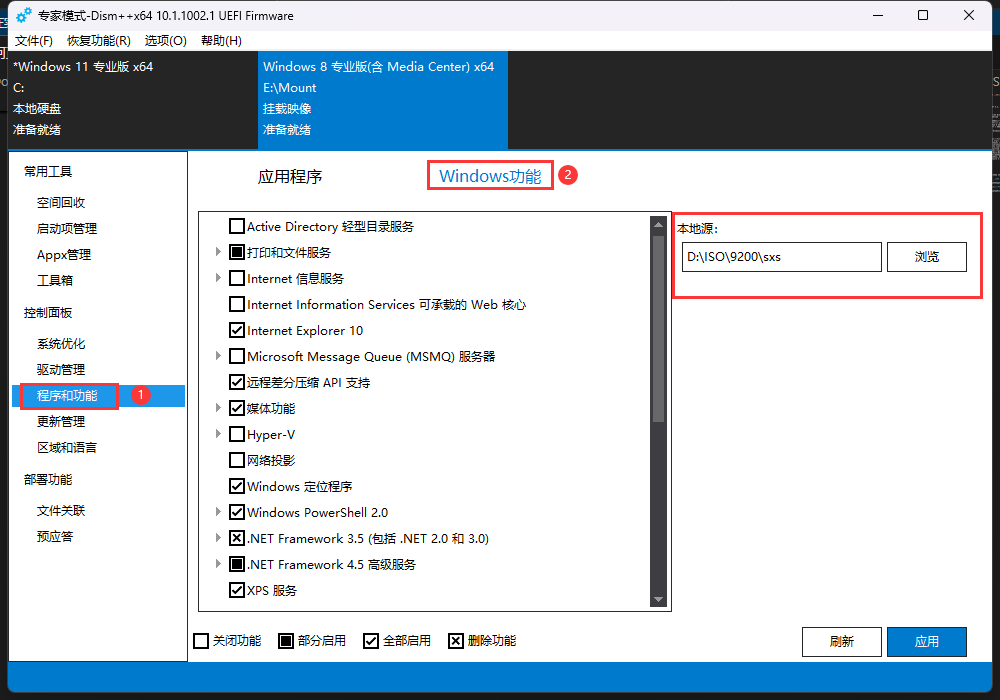
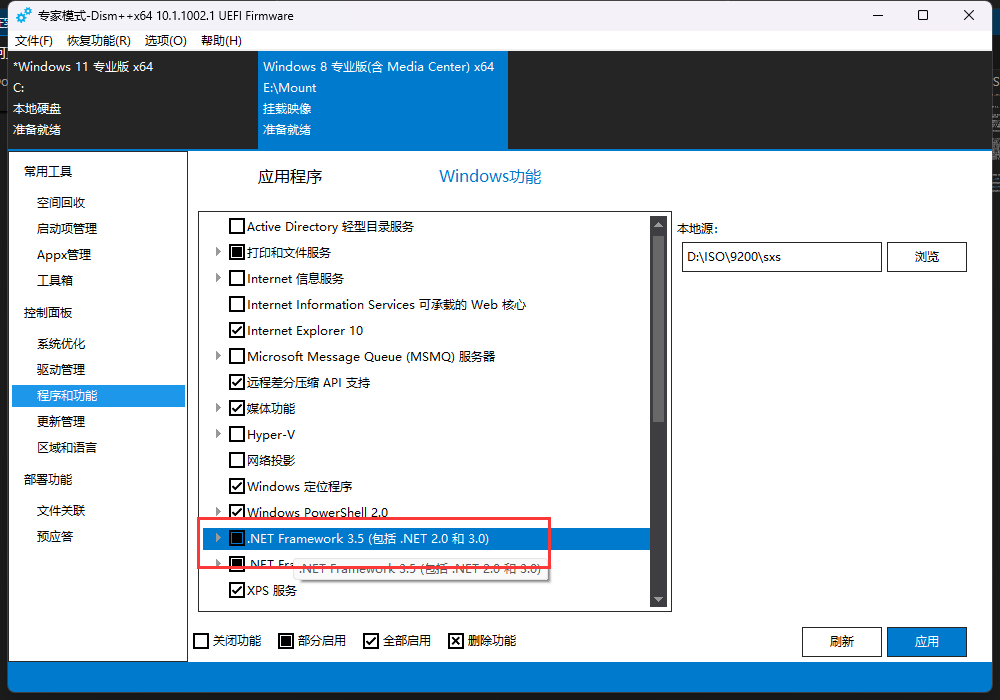
<?xml version="1.0" encoding="utf-8"?>
<feed xmlns="http://www.w3.org/2005/Atom">
  <author>
    <name>Dora Honor</name>
  </author>
  <generator uri="https://hexo.io/">Hexo</generator>
  <id>https://blog.dorahonor.me/</id>
  <link href="https://blog.dorahonor.me/" rel="alternate"/>
  <link href="https://blog.dorahonor.me/atom.xml" rel="self"/>
  <rights>All rights reserved 2026, Dora Honor</rights>
  <subtitle>大家我都喜欢哦</subtitle>
  <title>mskk 的个人博客</title>
  <updated>2026-05-07T14:55:59.402Z</updated>
  <entry>
    <author>
      <name>Dora Honor</name>
    </author>
    <category term="经验总结" scheme="https://blog.dorahonor.me/categories/%E7%BB%8F%E9%AA%8C%E6%80%BB%E7%BB%93/"/>
    <category term="GitHub Pages" scheme="https://blog.dorahonor.me/tags/GitHub-Pages/"/>
    <category term="折腾" scheme="https://blog.dorahonor.me/tags/%E6%8A%98%E8%85%BE/"/>
    <category term="网络" scheme="https://blog.dorahonor.me/tags/%E7%BD%91%E7%BB%9C/"/>
    <category term="部署" scheme="https://blog.dorahonor.me/tags/%E9%83%A8%E7%BD%B2/"/>
    <category term="博客" scheme="https://blog.dorahonor.me/tags/%E5%8D%9A%E5%AE%A2/"/>
    <category term="Vercel" scheme="https://blog.dorahonor.me/tags/Vercel/"/>
    <category term="运维" scheme="https://blog.dorahonor.me/tags/%E8%BF%90%E7%BB%B4/"/>
    <category term="站长" scheme="https://blog.dorahonor.me/tags/%E7%AB%99%E9%95%BF/"/>
    <category term="GitHub" scheme="https://blog.dorahonor.me/tags/GitHub/"/>
    <category term="Cloudflare" scheme="https://blog.dorahonor.me/tags/Cloudflare/"/>
    <content>
      <![CDATA[<p>从去年 6 月份折腾博客开始，平时我一直在网上冲浪，学习前辈们的各种搭建博客经验。</p><h2 id="部署博客的开始"><a class="markdownIt-Anchor" href="#部署博客的开始"></a> 部署博客的开始</h2><p>刚开始折腾 <a href="https://hexo.io/">Hexo</a> 加 <a href="https://butterfly.js.org/">Butterfly 主题</a> 的时候，我还是用的 GitHub Pages 默认的 <code>username.github.io</code> 域名。众所周知，GitHub 和 GitHub Pages 的服务器位于美国，在国内访问速度并不理想。</p><h2 id="添加自定义域名和加速访问"><a class="markdownIt-Anchor" href="#添加自定义域名和加速访问"></a> 添加自定义域名和加速访问</h2><p>在去年 11 月份的时候，为了配合 Cloudflare CDN 加速访问，我购买了 <code>dorahonor.me</code> 这个域名。不得不说这个域名很符合我口味，既有我网名，结尾的 <code>.me</code> 顶级域名不仅价格实惠，也凸显了个人站点性质。</p><p>虽然说加 CDN 的过程还算顺利，速度感觉也还行，就先用了。而且测下来在国内也没被墙，挺好。</p><p>然而，有段时间我闲得无聊使用 <a href="https://zhale.me/">炸了么</a> 进行测速，发现国内速度并不是特别理想……</p><p>而使用 Vercel 搭建且部署在新加坡的评论系统，速度要比 Cloudflare CDN 加 GitHub Pages 理想不少。</p><h3 id="开始换到-vercel-新加坡区部署"><a class="markdownIt-Anchor" href="#开始换到-vercel-新加坡区部署"></a> 开始换到 Vercel 新加坡区部署</h3><p>考虑到根域名要换成个人引导页，于是在 Vercel 部署的博客域名则使用 <code>blog.dorahonor.me</code> 子域名，这样能凸显博客页。</p><p>在一通部署和换部署地区到新加坡后，访问速度终于提升！在 <a href="https://zhale.me/">炸了么</a> 的速度表现也符合预期。</p><p>虽然说 Vercel 免费的 Hobby 计划有一定的限制，但是给的用量对于访问量不多的博客站点来说，非常合适。因此，以后就只在 Vercel 新加坡区部署了！</p><h2 id="为什么用-vercel-新加坡区"><a class="markdownIt-Anchor" href="#为什么用-vercel-新加坡区"></a> 为什么用 Vercel 新加坡区？</h2><p>国内访问速度比 Cloudflare CDN 和 GitHub Pages 快许多，而且新加坡属东南亚，距离国内不远，加上新加坡华人不少和用华文，就选择了新加坡区。</p>]]>
    </content>
    <id>https://blog.dorahonor.me/posts/3361145490/</id>
    <link href="https://blog.dorahonor.me/posts/3361145490/"/>
    <published>2026-03-03T14:50:38.000Z</published>
    <summary>
      <![CDATA[<p>从去年 6 月份折腾博客开始，平时我一直在网上冲浪，学习前辈们的各种搭建博客经验。</p>
<h2 id="部署博客的开始"><a class="markdownIt-Anchor" href="#部署博客的开始"></a> 部署博客的开始</h2>
<p>刚开始折腾 <a]]>
    </summary>
    <title>我为什么将部署平台从 GitHub Pages 加 Cloudflare CDN 换到了 Vercel 新加坡区</title>
    <updated>2026-05-07T14:55:59.402Z</updated>
  </entry>
  <entry>
    <author>
      <name>Dora Honor</name>
    </author>
    <category term="体验报告" scheme="https://blog.dorahonor.me/categories/%E4%BD%93%E9%AA%8C%E6%8A%A5%E5%91%8A/"/>
    <category term="米哈游" scheme="https://blog.dorahonor.me/tags/%E7%B1%B3%E5%93%88%E6%B8%B8/"/>
    <category term="米游" scheme="https://blog.dorahonor.me/tags/%E7%B1%B3%E6%B8%B8/"/>
    <category term="耳机" scheme="https://blog.dorahonor.me/tags/%E8%80%B3%E6%9C%BA/"/>
    <category term="TWS" scheme="https://blog.dorahonor.me/tags/TWS/"/>
    <category term="数码" scheme="https://blog.dorahonor.me/tags/%E6%95%B0%E7%A0%81/"/>
    <category term="周边" scheme="https://blog.dorahonor.me/tags/%E5%91%A8%E8%BE%B9/"/>
    <category term="原神" scheme="https://blog.dorahonor.me/tags/%E5%8E%9F%E7%A5%9E/"/>
    <category term="芙宁娜" scheme="https://blog.dorahonor.me/tags/%E8%8A%99%E5%AE%81%E5%A8%9C/"/>
    <content>
      <![CDATA[<p>前段时间，我在官店入手了芙宁娜款无线耳机。</p><p>无论是外观还是保护套，都符合我口味。</p><p>芙芙款支持的编码更多，不仅有 SBC、AAC、LDAC，还有 LHDC 和 LC3，兼容性更好。知更鸟款没有后两者。</p><p>LHDC 连接稳定性比 LDAC 更好，支持的码率更高。</p><p>调音比较倾向芙芙款。</p><p>保护套更喜欢芙芙款，知更鸟款挡住了原本的图案。</p><p>知更鸟款支持无线充，芙芙款没有。</p>]]>
    </content>
    <id>https://blog.dorahonor.me/posts/3469817187/</id>
    <link href="https://blog.dorahonor.me/posts/3469817187/"/>
    <published>2026-02-28T15:43:27.000Z</published>
    <summary>
      <![CDATA[<p>前段时间，我在官店入手了芙宁娜款无线耳机。</p>
<p>无论是外观还是保护套，都符合我口味。</p>
<p>芙芙款支持的编码更多，不仅有 SBC、AAC、LDAC，还有 LHDC 和 LC3，兼容性更好。知更鸟款没有后两者。</p>
<p>LHDC 连接稳定性比 LDAC]]>
    </summary>
    <title>芙宁娜款弱水时砂皓势耳机使用体验</title>
    <updated>2026-05-07T14:55:59.402Z</updated>
  </entry>
  <entry>
    <author>
      <name>Dora Honor</name>
    </author>
    <category term="体验报告" scheme="https://blog.dorahonor.me/categories/%E4%BD%93%E9%AA%8C%E6%8A%A5%E5%91%8A/"/>
    <category term="Spotify" scheme="https://blog.dorahonor.me/tags/Spotify/"/>
    <category term="流媒体" scheme="https://blog.dorahonor.me/tags/%E6%B5%81%E5%AA%92%E4%BD%93/"/>
    <category term="音乐平台" scheme="https://blog.dorahonor.me/tags/%E9%9F%B3%E4%B9%90%E5%B9%B3%E5%8F%B0/"/>
    <content>
      <![CDATA[<p>新加坡区有简体支持。因为新加坡华人多，且华文是第二法定语言。也正因如此，新加坡区对华语歌支持较为友好。</p><h2 id="歌词服务方面"><a class="markdownIt-Anchor" href="#歌词服务方面"></a> 歌词服务方面</h2><p>新加坡区和日区不同，前者是 Musixmatch，后者是プチリリ。</p><h2 id="米游歌曲方面"><a class="markdownIt-Anchor" href="#米游歌曲方面"></a> 米游歌曲方面</h2><p>虽然新加坡区有简体支持，但歌名、唱片标题都是英文（毕竟英文是第一法定语言）；日区则显示日文。</p><h2 id="华语歌方面"><a class="markdownIt-Anchor" href="#华语歌方面"></a> 华语歌方面</h2><p>新加坡区比较丰富，虽然显示的是繁体，但不影响使用；日区不够丰富，但大部分是简体。</p><h2 id="日语歌方面"><a class="markdownIt-Anchor" href="#日语歌方面"></a> 日语歌方面</h2><p>日区支持更好，歌名统一，不会显示罗马音或英文名；新加坡区则会有部分歌名显示罗马音或英文名的情况。</p><h2 id="韩语歌方面"><a class="markdownIt-Anchor" href="#韩语歌方面"></a> 韩语歌方面</h2><p>支持都挺好。</p><h2 id="音质方面"><a class="markdownIt-Anchor" href="#音质方面"></a> 音质方面</h2><p>都有最高 24-bit / 44.1 kHz 的 FLAC 无损支持。虽然相比 Apple Music、Amazon Music、TIDAL、Qobuz 等国际平台，以及网易云、扣音等国内平台的最高 24-bit / 192 kHz 要逊色一些，但是过渡播放体验更好。毕竟同采样对于过渡播放支持更好，不同采样就支持不了过渡播放（需要重新调整输出规格，调整规格会短暂无声）。</p><h2 id="广告方面"><a class="markdownIt-Anchor" href="#广告方面"></a> 广告方面</h2><p>新加坡区有多种语言，除英语外还有马来语和华语；日区则是日语。</p><h2 id="畅联方面"><a class="markdownIt-Anchor" href="#畅联方面"></a> 畅联方面</h2><p>体验极好，算是众多国内外流媒体平台独有的优势。想换设备播放，只要点所需切换的设备就可以了。</p><h2 id="增值价格方面"><a class="markdownIt-Anchor" href="#增值价格方面"></a> 增值价格方面</h2><p>都不便宜。个人费用方面，新加坡区 11.98 SGD 一个月，日区 1,080 JPY 一个月；学生则分别是 6.48 SGD 和 580 JPY 一个月。</p><h2 id="综合体验方面"><a class="markdownIt-Anchor" href="#综合体验方面"></a> 综合体验方面</h2><p>虽然支持的品质相比 Apple Music、Amazon Music、TIDAL、Qobuz、网易云、扣音更逊色一些，且没有空间音频，但是整体使用体验很好。<br />而大多数用户对无损和有损品质差别感知不强，只要最高 320K 就足够。这也是 Spotify 能在全球（但是仅环大陆支持）受欢迎的原因吧。<br />虽然免费用户也能用，但是免费版在移动端体验比桌面端差，移动端不能拖进度条和改循环模式，桌面端没有这些问题。</p><h2 id="该选择哪个地区"><a class="markdownIt-Anchor" href="#该选择哪个地区"></a> 该选择哪个地区？</h2><p>个人建议</p><ul><li>听华语多，选新加坡</li><li>听日语、Anisong、Vocaloid 多，选日区</li></ul>]]>
    </content>
    <id>https://blog.dorahonor.me/posts/1565895971/</id>
    <link href="https://blog.dorahonor.me/posts/1565895971/"/>
    <published>2026-02-28T15:41:40.000Z</published>
    <summary>
      <![CDATA[<p>新加坡区有简体支持。因为新加坡华人多，且华文是第二法定语言。也正因如此，新加坡区对华语歌支持较为友好。</p>
<h2 id="歌词服务方面"><a class="markdownIt-Anchor" href="#歌词服务方面"></a> 歌词服务方面</h2>
<p>新]]>
    </summary>
    <title>我的 Spotify 体验报告</title>
    <updated>2026-05-07T14:55:59.402Z</updated>
  </entry>
  <entry>
    <author>
      <name>Dora Honor</name>
    </author>
    <category term="经验总结" scheme="https://blog.dorahonor.me/categories/%E7%BB%8F%E9%AA%8C%E6%80%BB%E7%BB%93/"/>
    <category term="Windows" scheme="https://blog.dorahonor.me/tags/Windows/"/>
    <category term="Mac" scheme="https://blog.dorahonor.me/tags/Mac/"/>
    <category term="Boot Camp" scheme="https://blog.dorahonor.me/tags/Boot-Camp/"/>
    <category term="启动转换助理" scheme="https://blog.dorahonor.me/tags/%E5%90%AF%E5%8A%A8%E8%BD%AC%E6%8D%A2%E5%8A%A9%E7%90%86/"/>
    <category term="Intel Mac" scheme="https://blog.dorahonor.me/tags/Intel-Mac/"/>
    <category term="技术" scheme="https://blog.dorahonor.me/tags/%E6%8A%80%E6%9C%AF/"/>
    <content>
      <![CDATA[<div class="callout" data-callout="caution"><div class="callout-title"><div class="callout-title-icon"><svg xmlns="http://www.w3.org/2000/svg" width="24" height="24" viewBox="0 0 24 24" fill="none" stroke="currentColor" stroke-width="2" stroke-linecap="round" stroke-linejoin="round" class="lucide lucide-alert-triangle"><path d="m21.73 18-8-14a2 2 0 0 0-3.48 0l-8 14A2 2 0 0 0 4 21h16a2 2 0 0 0 1.73-3Z"/><path d="M12 9v4"/><path d="M12 17h.01"/></svg></div><div class="callout-title-inner">Caution</div></div><div class="callout-content"><p></p><ul><li>本教程仅限 Intel Mac。Apple Silicon 平台不适用！</li><li>对于超过 4 GB 的 WIM，以我打好最新补丁的 Windows 10 IoT LTSC 2021 为例。</li></ul></div></div><h2 id="前言"><a class="markdownIt-Anchor" href="#前言"></a> 前言</h2><p>在给 Intel Mac 安装 Windows 的过程中，难免会遇到一些麻烦。例如，单个 WIM 大小不能超过 4 GB；若超过，「启动转换助理」则会报错。</p><p>考虑到新版本 WIM 普遍大于 4 GB，那有什么办法能突破这个限制呢？以下就是我总结的方法。</p><h2 id="所需工具"><a class="markdownIt-Anchor" href="#所需工具"></a> 所需工具</h2><ul><li>一台 Intel Mac 和 Win PC</li><li>一个容量至少 16 GB，速率至少 5 Gbps，USB 3.2 Gen 1 的空闲 U 盘</li><li>包含 4 GB 以内 WIM 的 ISO 镜像，需原版启动形式</li><li>需安装的包含累计大于 4 GB SWM 拆分镜像的 ISO，同样需要原版启动形式</li><li><a href="https://www.423down.com/1397.html">UltraISO</a></li><li><a href="https://github.com/Chuyu-Team/Dism-Multi-language/releases/tag/v10.1.1002.2">Dism++</a></li><li>一定的<strong>计算机基础</strong></li><li><strong>灵活</strong>的头脑</li></ul><h2 id="准备工作"><a class="markdownIt-Anchor" href="#准备工作"></a> 准备工作</h2><h3 id="下载原版-windows-10-ltsc-2019-x64-iso-镜像"><a class="markdownIt-Anchor" href="#下载原版-windows-10-ltsc-2019-x64-iso-镜像"></a> 下载原版 Windows 10 LTSC 2019 (x64) ISO 镜像<sup class="footnote-ref"><a href="#fn1" id="fnref1">[1]</a></sup></h3><ul><li><a href="https://files.rg-adguard.net/language/36acf39e-bd9f-6f6d-dc1a-a310a649dbaa">下载地址 1</a>（选择所需语言，找到带有 <code>enterprise_ltsc_2019</code> 字段的 ISO 镜像）</li><li><a href="https://massgrave.dev/windows_ltsc_links">下载地址 2</a>（选择【Windows 10 LTSC 2019】，找到所需语言）</li></ul><h3 id="准备好打好补丁的-windows-10-iot-ltsc-2021-x64-iso-镜像"><a class="markdownIt-Anchor" href="#准备好打好补丁的-windows-10-iot-ltsc-2021-x64-iso-镜像"></a> 准备好打好补丁的 Windows 10 IoT LTSC 2021 (x64) ISO 镜像</h3><h4 id="下载-ltsc-2021以备转换-iot-ltsc-2021"><a class="markdownIt-Anchor" href="#下载-ltsc-2021以备转换-iot-ltsc-2021"></a> 下载 LTSC 2021，以备转换 IoT LTSC 2021</h4><ul><li><a href="https://files.rg-adguard.net/language/397f2844-d1d7-d7de-4b39-906ef9dde1a0">下载地址 1</a>（选择所需语言，找到带有 <code>enterprise_ltsc_2021</code> 字段的 ISO 镜像）</li><li><a href="https://massgrave.dev/windows_ltsc_links">下载地址 2</a>（选择【Windows 10 LTSC 2021】，找到所需语言）</li></ul><h4 id="安装最新补丁"><a class="markdownIt-Anchor" href="#安装最新补丁"></a> 安装最新补丁</h4><div class="callout" data-callout="caution"><div class="callout-title"><div class="callout-title-icon"><svg xmlns="http://www.w3.org/2000/svg" width="24" height="24" viewBox="0 0 24 24" fill="none" stroke="currentColor" stroke-width="2" stroke-linecap="round" stroke-linejoin="round" class="lucide lucide-alert-triangle"><path d="m21.73 18-8-14a2 2 0 0 0-3.48 0l-8 14A2 2 0 0 0 4 21h16a2 2 0 0 0 1.73-3Z"/><path d="M12 9v4"/><path d="M12 17h.01"/></svg></div><div class="callout-title-inner">Caution</div></div><div class="callout-content"><p>需要在 Win PC 进行操作。</p></div></div><ol><li>在 <a href="https://github.com/adavak/Win_ISO_Patching_Scripts/releases">GitHub Releases 页面</a> 下载最新版本工具。</li><li>将下载好的工具压缩包解压到合适的位置，复制 LTSC 2021 ISO 到解压的目录。</li><li>进入目录，修改 <code>WIN10UI.ini</code> 配置文件，将 <code>wim2esd</code> 字段值改为 <code>0</code>，不转换成 ESD。</li><li>保存配置文件更改，以管理员身份运行 <code>Start.cmd</code>。</li><li>等待一段时间，同文件夹内会生成 <code>19044</code> 开头的最新补丁 ISO 镜像。</li></ol><h4 id="转换版本"><a class="markdownIt-Anchor" href="#转换版本"></a> 转换版本</h4><ol><li>打开 <a href="https://github.com/Chuyu-Team/Dism-Multi-language/releases/tag/v10.1.1002.2">Dism++</a>，选择【文件】—【挂载】。</li><li>从 <code>Win_ISO_Patching_Scripts</code> 开头的工具文件夹中找到 <code>ISO\sources\install.wim</code> 并选择。</li><li>选择合适的挂载目录，单击【确定】开始挂载以便转换。</li><li>以管理员身份运行「命令提示符」，在搜索栏搜索 <code>cmd</code>，然后在【命令提示符】处选择【以管理员身份运行】。</li><li>参考 <a href="/posts/1148508445/">这篇文章</a> 进行转换。</li><li>别忘了在 <a href="https://github.com/Chuyu-Team/Dism-Multi-language/releases/tag/v10.1.1002.2">Dism++</a> 保存并卸载 WIM！</li></ol><h3 id="可选但推荐将-wim-转换成单文件小于-4-gb-的多个-swm-拆分镜像"><a class="markdownIt-Anchor" href="#可选但推荐将-wim-转换成单文件小于-4-gb-的多个-swm-拆分镜像"></a> 【可选但推荐】将 WIM 转换成单文件小于 4 GB 的多个 SWM 拆分镜像</h3><ol><li>打开 <a href="https://github.com/Chuyu-Team/Dism-Multi-language/releases/tag/v10.1.1002.2">Dism++</a>，选择【文件】—【WIM&lt;—&gt;ESD/SWM】。</li><li>从 <code>Win_ISO_Patching_Scripts</code> 开头的工具文件夹中找到 <code>ISO\sources\install.wim</code> 并选择。</li><li>在下面目标路径选择 SWM 镜像目标路径，推荐同目录。</li><li>确定后，会弹出「文件拆分」对话框，分卷大小输入 <code>3686</code>（只要小于 4 GB 即可），确定。</li><li>等待一段时间，会在目标文件夹生成多个例如 <code>install.swm</code> 和 <code>install2.swm</code> 的 SWM 拆分镜像。注意这些<strong>一个都不能少</strong>！</li></ol><h3 id="使用所需镜像制作启动盘"><a class="markdownIt-Anchor" href="#使用所需镜像制作启动盘"></a> 使用所需镜像制作启动盘</h3><div class="callout" data-callout="caution"><div class="callout-title"><div class="callout-title-icon"><svg xmlns="http://www.w3.org/2000/svg" width="24" height="24" viewBox="0 0 24 24" fill="none" stroke="currentColor" stroke-width="2" stroke-linecap="round" stroke-linejoin="round" class="lucide lucide-alert-triangle"><path d="m21.73 18-8-14a2 2 0 0 0-3.48 0l-8 14A2 2 0 0 0 4 21h16a2 2 0 0 0 1.73-3Z"/><path d="M12 9v4"/><path d="M12 17h.01"/></svg></div><div class="callout-title-inner">Caution</div></div><div class="callout-content"><p>该操作会清除 U 盘中所有数据，请确保使用的是不常用的 U 盘，且<strong>没有</strong>重要数据！</p></div></div><ol><li>打开 <a href="https://www.423down.com/1397.html">UltraISO</a>。</li><li>找到最新补丁 LTSC 2021 ISO 的位置，并打开。</li><li>在 ISO 的 <code>sources</code> 文件夹删掉原 <code>install.wim</code>，将 <code>install.swm</code> 和 <code>install2.swm</code> 等拆分镜像放入 ISO 并保存。</li><li>选择【启动】—【写入硬盘映像】。</li><li>在【硬盘驱动器】选择所需 U 盘，写入方式保持默认的 <code>USB-HDD+</code> 即可。</li><li>单击【写入】开始制作启动盘。等待一段时间。</li></ol><h2 id="开始安装"><a class="markdownIt-Anchor" href="#开始安装"></a> 开始安装</h2><p>在 Mac 底部程序坞选择【启动台】—【其他】—【启动转换助理】，或者按 <code>Cmd-Space</code> 全局搜索「启动转换助理」并启动。</p><div class="callout" data-callout="tip"><div class="callout-title"><div class="callout-title-icon"><svg xmlns="http://www.w3.org/2000/svg" width="24" height="24" viewBox="0 0 24 24" fill="none" stroke="currentColor" stroke-width="2" stroke-linecap="round" stroke-linejoin="round" class="lucide lucide-flame"><path d="M8.5 14.5A2.5 2.5 0 0 0 11 12c0-1.38-.5-2-1-3-1.072-2.143-.224-4.054 2-6 .5 2.5 2 4.9 4 6.5 2 1.6 3 3.5 3 5.5a7 7 0 1 1-14 0c0-1.153.433-2.294 1-3a2.5 2.5 0 0 0 2.5 2.5z"/></svg></div><div class="callout-title-inner">Tip</div></div><div class="callout-content"><p>如果使用的是 Windows 键盘，则是按 <code>Win-Space</code> 全局搜索「启动转换助理」并启动。</p></div></div><h3 id="使用启动转换助理创建分区-下载支持软件和安装镜像"><a class="markdownIt-Anchor" href="#使用启动转换助理创建分区-下载支持软件和安装镜像"></a> 使用「启动转换助理」创建分区、下载支持软件和安装镜像</h3><p>跟随指引一路下一步，找到 LTSC 2019 ISO 所在位置（必须是 Mac 本地磁盘）并选择，按需求调整 Windows 分区大小。</p><p>开始安装，等待一段时间完成后会自动重启到 Windows 安装界面。</p><p>在 Windows 安装界面一路下一步，自动安装。</p><p>重启后在设置界面按照自己喜好进行设置，即可进入桌面。</p><h3 id="提取并复制所需文件"><a class="markdownIt-Anchor" href="#提取并复制所需文件"></a> 提取并复制所需文件</h3><p>连接做好的启动盘，将 D 盘中的 <code>$WinPEDriver$</code>、<code>BootCamp</code> 文件夹和 <code>AutoUnattend.xml</code> 复制到启动盘。</p><h3 id="从启动盘启动进行安装"><a class="markdownIt-Anchor" href="#从启动盘启动进行安装"></a> 从启动盘启动进行安装</h3><p>确保启动盘已连接。重启 Mac 按住 <code>Opt</code> 键进入启动菜单，选择启动盘选项。</p><div class="callout" data-callout="tip"><div class="callout-title"><div class="callout-title-icon"><svg xmlns="http://www.w3.org/2000/svg" width="24" height="24" viewBox="0 0 24 24" fill="none" stroke="currentColor" stroke-width="2" stroke-linecap="round" stroke-linejoin="round" class="lucide lucide-flame"><path d="M8.5 14.5A2.5 2.5 0 0 0 11 12c0-1.38-.5-2-1-3-1.072-2.143-.224-4.054 2-6 .5 2.5 2 4.9 4 6.5 2 1.6 3 3.5 3 5.5a7 7 0 1 1-14 0c0-1.153.433-2.294 1-3a2.5 2.5 0 0 0 2.5 2.5z"/></svg></div><div class="callout-title-inner">Tip</div></div><div class="callout-content"><p>如果使用的是 Windows 键盘，则是按住 <code>Alt</code> 键进入启动菜单。</p></div></div><p>同样，在 Windows 安装界面一路下一步进行自动安装。安装完成后会重启。</p><h3 id="安装驱动支持软件"><a class="markdownIt-Anchor" href="#安装驱动支持软件"></a> 安装驱动支持软件</h3><p>确保启动盘已连接。打开【此电脑】，在启动盘中找到 <code>BootCamp\Setup.exe</code> 并<strong>以管理员身份运行</strong>。</p><p>一路下一步进行安装。</p><h3 id="启动-apple-software-update-检查驱动更新"><a class="markdownIt-Anchor" href="#启动-apple-software-update-检查驱动更新"></a> 启动 Apple Software Update 检查驱动更新</h3><p>打开「开始」菜单中找到【Apple Software Update】，检查更新。</p><p>如果有，进行更新。</p><h2 id="可选清理以前的-windows-安装文件"><a class="markdownIt-Anchor" href="#可选清理以前的-windows-安装文件"></a> 【可选】清理以前的 Windows 安装文件</h2><p>打开「开始」菜单，找到【Windows 管理工具】—【磁盘清理】。</p><p>选择并扫描 C 盘，然后单击【清理系统文件】。</p><p>勾选【以前的 Windows 安装文件】，单击【确定】，开始清理。</p><hr class="footnotes-sep" /><section class="footnotes"><ol class="footnotes-list"><li id="fn1" class="footnote-item"><p>或者其他版本，WIM 镜像体积小于 4 GB 即可 <a href="#fnref1" class="footnote-backref">↩︎</a></p></li></ol></section>]]>
    </content>
    <id>https://blog.dorahonor.me/posts/1019042940/</id>
    <link href="https://blog.dorahonor.me/posts/1019042940/"/>
    <published>2026-02-28T05:08:45.000Z</published>
    <summary>
      <![CDATA[<div class="callout" data-callout="caution">
<div class="callout-title">
<div class="callout-title-icon">
<svg xmlns="http://www.w3.org/200]]>
    </summary>
    <title>如何突破「启动转换助理」的 4 GB WIM 限制</title>
    <updated>2026-05-07T14:55:59.402Z</updated>
  </entry>
  <entry>
    <author>
      <name>Dora Honor</name>
    </author>
    <category term="体验报告" scheme="https://blog.dorahonor.me/categories/%E4%BD%93%E9%AA%8C%E6%8A%A5%E5%91%8A/"/>
    <category term="Windows" scheme="https://blog.dorahonor.me/tags/Windows/"/>
    <category term="Mac" scheme="https://blog.dorahonor.me/tags/Mac/"/>
    <category term="数码" scheme="https://blog.dorahonor.me/tags/%E6%95%B0%E7%A0%81/"/>
    <category term="体验" scheme="https://blog.dorahonor.me/tags/%E4%BD%93%E9%AA%8C/"/>
    <category term="MacBook" scheme="https://blog.dorahonor.me/tags/MacBook/"/>
    <category term="笔电" scheme="https://blog.dorahonor.me/tags/%E7%AC%94%E7%94%B5/"/>
    <content>
      <![CDATA[<h2 id="前言"><a class="markdownIt-Anchor" href="#前言"></a> 前言</h2><div class="callout" data-callout="note"><div class="callout-title"><div class="callout-title-icon"><svg xmlns="http://www.w3.org/2000/svg" width="24" height="24" viewBox="0 0 24 24" fill="none" stroke="currentColor" stroke-width="2" stroke-linecap="round" stroke-linejoin="round" class="lucide lucide-pencil"><path d="M17 3a2.85 2.83 0 1 1 4 4L7.5 20.5 2 22l1.5-5.5Z"/><path d="m15 5 4 4"/></svg></div><div class="callout-title-inner">Note</div></div><div class="callout-content"><p>以下体验基于 2017 款 MacBook Pro，型号 A1708，Intel Core i5 双核、8+256、Thunderbolt 3 ×2。</p></div></div><p>今年 1 月中旬心血来潮，想着放假回国整一台 MacBook Pro 体验一下 macOS。</p><p>本来是更希望用 Apple Silicon 平台，可是新款都太贵了（当然 2018~2020 款英特尔平台也不便宜），资金不允许。</p><p>最高支持的 macOS 版本也不能太低，至少要 12 Monterey 版本。</p><p>在二手平台翻了下，发现 2017 款 MacBook Pro (A1708) 还可以，最高 macOS 版本是 13 Ventura，i5、8+256、核显配置不做大型生产力够用。价格在 800~1,000 左右。</p><p>我这台是 860 拿下的，功能正常，电池一般，整体成色较好，还能接受。</p><h2 id="和-win-pc-有什么不同"><a class="markdownIt-Anchor" href="#和-win-pc-有什么不同"></a> 和 Win PC 有什么不同？</h2><p>Mac 键盘布局和 Win 稍有不同，Cmd<sup class="footnote-ref"><a href="#fn1" id="fnref1">[1]</a></sup> 键对应 Win 键，Option 键对应 Alt 键。Cmd<sup class="footnote-ref"><a href="#fn1" id="fnref1:1">[1:1]</a></sup> 键作用相当于 Win 中的 Ctrl<sup class="footnote-ref"><a href="#fn2" id="fnref2">[2]</a></sup> 键。</p><p>Mac 操作逻辑有差异：</p><ul><li>Mac 的滚轮方向和 Win 相反，需要适应。</li><li>对没用过 macOS 的用户来说，比较难用。对我来说 macOS 和 Windows 两边都能适应。</li><li>在 Win 刷新直接按 F5 即可，而在 Mac 需要按 Cmd<sup class="footnote-ref"><a href="#fn1" id="fnref1:2">[1:2]</a></sup>-R。绕过缓存在 Win 是 Ctrl<sup class="footnote-ref"><a href="#fn2" id="fnref2:1">[2:1]</a></sup>-F5，Mac 是 Cmd<sup class="footnote-ref"><a href="#fn1" id="fnref1:3">[1:3]</a></sup>-Shift-R。</li><li>Win 既有 Bksp<sup class="footnote-ref"><a href="#fn3" id="fnref3">[3]</a></sup> 退格键（删除光标前一个字符）和 Del 删除键（删除光标后一个字符），而 Mac 只有前者且叫 Del。在 Win 没法使用 Ctrl<sup class="footnote-ref"><a href="#fn2" id="fnref2:2">[2:2]</a></sup>-Alt-Del 呼出选项。</li><li>以及，Win 桌面图标默认是从左往右排序，Mac 则是从右往左。</li></ul><h2 id="体验"><a class="markdownIt-Anchor" href="#体验"></a> 体验</h2><p>音频、质感很好，键盘手感舒适，触控板好用到可以不用鼠标。</p><p>虽然 MacBook Pro 相比 Air 还是稍重一些，但至少比游戏本轻便，带出门用更方便。</p><p>虽然 macOS 支持的软件不少，但论丰富程度还不如 Windows。所以我是俩平台都一起用。</p><h2 id="总结"><a class="markdownIt-Anchor" href="#总结"></a> 总结</h2><p>以前体验 Mac 都是在 VMware 上用虚拟机装黑苹果，现在有了白苹果后就不弄了。</p><p>未来有条件还会入手 Apple Silicon 平台的 MacBook Pro。</p><hr class="footnotes-sep" /><section class="footnotes"><ol class="footnotes-list"><li id="fn1" class="footnote-item"><p>Command，并非 Windows 上的命令提示符 <a href="#fnref1" class="footnote-backref">↩︎</a> <a href="#fnref1:1" class="footnote-backref">↩︎</a> <a href="#fnref1:2" class="footnote-backref">↩︎</a> <a href="#fnref1:3" class="footnote-backref">↩︎</a></p></li><li id="fn2" class="footnote-item"><p>在 Mac 键盘上叫 Control <a href="#fnref2" class="footnote-backref">↩︎</a> <a href="#fnref2:1" class="footnote-backref">↩︎</a> <a href="#fnref2:2" class="footnote-backref">↩︎</a></p></li><li id="fn3" class="footnote-item"><p>Backspace <a href="#fnref3" class="footnote-backref">↩︎</a></p></li></ol></section>]]>
    </content>
    <id>https://blog.dorahonor.me/posts/379840528/</id>
    <link href="https://blog.dorahonor.me/posts/379840528/"/>
    <published>2026-02-27T18:26:14.000Z</published>
    <summary>
      <![CDATA[<h2 id="前言"><a class="markdownIt-Anchor" href="#前言"></a> 前言</h2>

<div class="callout" data-callout="note">
<div class="callout-title">
<div]]>
    </summary>
    <title>这段时间体验 Mac 的感受</title>
    <updated>2026-05-07T14:55:59.406Z</updated>
  </entry>
  <entry>
    <author>
      <name>Dora Honor</name>
    </author>
    <category term="随笔" scheme="https://blog.dorahonor.me/categories/%E9%9A%8F%E7%AC%94/"/>
    <category term="米哈游" scheme="https://blog.dorahonor.me/tags/%E7%B1%B3%E5%93%88%E6%B8%B8/"/>
    <category term="米游" scheme="https://blog.dorahonor.me/tags/%E7%B1%B3%E6%B8%B8/"/>
    <category term="游戏" scheme="https://blog.dorahonor.me/tags/%E6%B8%B8%E6%88%8F/"/>
    <category term="感想" scheme="https://blog.dorahonor.me/tags/%E6%84%9F%E6%83%B3/"/>
    <category term="人生" scheme="https://blog.dorahonor.me/tags/%E4%BA%BA%E7%94%9F/"/>
    <category term="习惯" scheme="https://blog.dorahonor.me/tags/%E4%B9%A0%E6%83%AF/"/>
    <content>
      <![CDATA[<p>谈到我自己，其实我从小就挺脱节的。不只是平常话少，也不一定随波逐流。</p><h2 id="游戏方面"><a class="markdownIt-Anchor" href="#游戏方面"></a> 游戏方面</h2><p>和当时的许多孩子不一样，他们都会玩各种游戏，而那时的我只会玩一下各类 Flash 小游戏，时间也很短。无论是单机、主机、街机还是网游基本没接触。可惜那个时候对于动漫和游戏的舆论也不好（当然早年武侠小说也是）。</p><p>直到初中第一次在手机玩手游，感受到了一些乐趣。那时玩的还是天天酷跑、节奏大师、开心消消乐之类的休闲游戏。</p><p>高中则玩过一阵子王者荣耀与和平精英，我主要是享受乐趣和释放压力，对细节讨论一头雾水。当然我早就不玩了。</p><h3 id="二游和音游的开始"><a class="markdownIt-Anchor" href="#二游和音游的开始"></a> 二游和音游的开始</h3><p>19 年中旬，我看到宣传国服邦邦<sup class="footnote-ref"><a href="#fn1" id="fnref1">[1]</a></sup>的时候有点好奇，想尝试一下；没想到很快就喜欢上了，这也是我玩的第一款二游加音游，我的二游和音游启蒙老师，也是我第一个喜欢的少女乐队企划。那时还是老五团<sup class="footnote-ref"><a href="#fn2" id="fnref2">[2]</a></sup>时代，加了 RAS<sup class="footnote-ref"><a href="#fn3" id="fnref3">[3]</a></sup> 和蝶团<sup class="footnote-ref"><a href="#fn4" id="fnref4">[4]</a></sup>也在，直到 23 年就很少玩了。</p><p>19 年暑假也有入坑过 B 服崩三<sup class="footnote-ref"><a href="#fn5" id="fnref5">[5]</a></sup>。虽然第一次玩觉得挺震撼，但那时的我对米游没啥感情。中途同样玩过舰 B<sup class="footnote-ref"><a href="#fn6" id="fnref6">[6]</a></sup> 和 PCR<sup class="footnote-ref"><a href="#fn7" id="fnref7">[7]</a></sup>，然而没坚持下去。</p><h3 id="米游的开始"><a class="markdownIt-Anchor" href="#米游的开始"></a> 米游的开始</h3><p>对于 20 年秋季开服的原神，那时的我其实也想试玩一下，可惜因为设备和舆论不太敢入坑；直到一周年时期有了好电脑，就想尝试一下。试玩一阵子后已经被世界观、美术、场景、音乐、角色、故事吸引，逐渐喜欢上了。</p><p>从那时开始，我也对各类节奏免疫，自己享受其中的美好。现在看来还是有点可惜，如果开服不管节奏，直接入坑就好了。在 4.8 以前只是默默享受，直到经历过如此严重的节奏，我才自愿站出来发声打抱不平。</p><p>后来同为米游的星铁<sup class="footnote-ref"><a href="#fn8" id="fnref8">[8]</a></sup>和绝区零是开服就入坑，然而这并不能弥补一周年才入坑原神的遗憾。虽然绝区零开服有节奏，但我还是坚持下来了，动作也很有意思。</p><p>我对米游有印象的瞬间真的很多，多到数不过来。</p><p>目前我主要在 PC 用手柄玩绝区零和原神，星铁<sup class="footnote-ref"><a href="#fn8" id="fnref8:1">[8:1]</a></sup>则在手机玩。</p><p>当然，即便我喜欢米游，我仍然和大多数米游玩家有点脱节。</p><p>抽卡方面，我是博爱党，喜欢哪个抽哪个，基本不考虑强度问题，也没有焦虑。</p><p>关于配队、武器、圣遗物这种细节不追求极致，只按照提示养满，够用就好。</p><p>我几乎不打深渊之类的高难度挑战，没事基本是做完每日就下，如果有活动和主线，我会做完每日后完成。虽然我知道深渊奖励丰富，但是嫌麻烦不太想打。</p><p>米游周边我买过不少，已经堆成山了。</p><h2 id="日常方面"><a class="markdownIt-Anchor" href="#日常方面"></a> 日常方面</h2><p>和大多数人不一样，我并不喜欢看短视频，也不感兴趣。这已经特别脱节了。</p><p>我平常更喜欢看长视频和图文，以及会经常听歌，几乎不看短视频。</p><p>平时也很喜欢米游二创，看到好的都会收藏，以至于建了好几个收藏夹。</p><p>以前挺喜欢看番，不知道为啥，后来就不怎么看了。</p><p>自己喜欢的各种事总是会尝试去做，虽然做得不是很好。</p><p>虽然现在 AI 发展迅猛，用生成 AI 解决问题挺方便，但我认为并不能完全替代 Google、Bing 这些搜索引擎。因此我都是结合使用。</p><p>我现在很少抱怨，自适应能力比以前强，当然这不代表在必要时会妥协。</p><p>在现实，平常我话比较少。虽然我也在努力摆脱，尝试主动说话，但是我还是担心对方对一些话题不感兴趣，这又被打回冷宫了。</p><hr class="footnotes-sep" /><section class="footnotes"><ol class="footnotes-list"><li id="fn1" class="footnote-item"><p>BanG Dream! <a href="#fnref1" class="footnote-backref">↩︎</a></p></li><li id="fn2" class="footnote-item"><p>Poppin’Party、Afterglow、Pastel*Palettes、Roselia、Hello, Happy World! <a href="#fnref2" class="footnote-backref">↩︎</a></p></li><li id="fn3" class="footnote-item"><p>RAISE A SUILEN <a href="#fnref3" class="footnote-backref">↩︎</a></p></li><li id="fn4" class="footnote-item"><p>Morfonica <a href="#fnref4" class="footnote-backref">↩︎</a></p></li><li id="fn5" class="footnote-item"><p>崩坏 3rd <a href="#fnref5" class="footnote-backref">↩︎</a></p></li><li id="fn6" class="footnote-item"><p>碧蓝航线 <a href="#fnref6" class="footnote-backref">↩︎</a></p></li><li id="fn7" class="footnote-item"><p>公主连结 Re:Dive <a href="#fnref7" class="footnote-backref">↩︎</a></p></li><li id="fn8" class="footnote-item"><p>崩坏：星穹铁道 <a href="#fnref8" class="footnote-backref">↩︎</a> <a href="#fnref8:1" class="footnote-backref">↩︎</a></p></li></ol></section>]]>
    </content>
    <id>https://blog.dorahonor.me/posts/3245267920/</id>
    <link href="https://blog.dorahonor.me/posts/3245267920/"/>
    <published>2026-01-12T08:17:15.000Z</published>
    <summary>
      <![CDATA[<p>谈到我自己，其实我从小就挺脱节的。不只是平常话少，也不一定随波逐流。</p>
<h2 id="游戏方面"><a class="markdownIt-Anchor" href="#游戏方面"></a> 游戏方面</h2>
<p>和当时的许多孩子不一样，他们都会玩各种游戏，而那]]>
    </summary>
    <title>谈谈我自己</title>
    <updated>2026-05-07T14:55:59.406Z</updated>
  </entry>
  <entry>
    <author>
      <name>Dora Honor</name>
    </author>
    <category term="随笔" scheme="https://blog.dorahonor.me/categories/%E9%9A%8F%E7%AC%94/"/>
    <category term="留学" scheme="https://blog.dorahonor.me/tags/%E7%95%99%E5%AD%A6/"/>
    <category term="生活" scheme="https://blog.dorahonor.me/tags/%E7%94%9F%E6%B4%BB/"/>
    <category term="感想" scheme="https://blog.dorahonor.me/tags/%E6%84%9F%E6%83%B3/"/>
    <content>
      <![CDATA[<p>从 22 年秋季开始，我在日留学已经有一些年头了。</p><p>虽然如此，但我迄今为止依然有点水土不服，毕竟习惯了国内的生活。</p><h2 id="关于学业"><a class="markdownIt-Anchor" href="#关于学业"></a> 关于学业</h2><p>22 年 10 月份至 23 年 9 月份，我在纯语校学了一年。那时都是周一至周五基本每天都上课，没有任何专业课。而且我也是在等级不高的 B 班，学的也是难度低的内容。（最高 D 班）</p><p>此前我在国内院校就读，直到 23 年 7 月份毕业。</p><p>23 年 10 月份至 25 年 3 月份，我升了大学院，但由于并未转正而同时在语校 D 班和大学院（专业）学了一年半。要知道未转正是没有学历的，而最短学半年，最长学两年，超过两年就结束而没学历了。</p><p>中间两次也试着参与了升学转正考试，可惜前两次都没过，得比老同学晚一年毕业。</p><p>不过我并没有放弃，在第三学期我不止努力自学 N2 争取通过，而且平时也重视出席率和作业提交率。终于在去年三月份收到了通过转正的通知，那半年的努力没有白费！</p><p>直到去年 4 月份终于转正，不止可以学自己选择的专业，也比以前更有时间做自己喜欢的事情啦！正因如此，去年这时候也是我折腾博客的缘由。</p><p>目前是第二学期，预计明年三月份毕业。今年第三学期也该规划职业生涯了。</p><h2 id="关于当地生活"><a class="markdownIt-Anchor" href="#关于当地生活"></a> 关于当地生活</h2><p>当地生活习惯和国内有不少差异。</p><p>虽然不少中大商户支持支付宝、微信支付、银联这些国内支付方式，但是移动支付普及率依然不如国内，当地人（尤其是中老年人）用现金较多，部分商户只支持现金，有些不便。</p><p>据当地商户了解，部分小商户不想搞无现金支付的原因是手续费高，不想承担。这也是阻碍当地无现金支付普及的原因之一吧。</p><p>金融交易（ATM、提现等）手续费很高，而且日邮银行更不便，三井住友银行和住信 SBI 银行就要好很多，有一定免手续费的次数和条件。<br />ATM 点很多，不只是便利店和银行基本都有，列车站同样也有。</p><p>我乘坐公共交通工具较为频繁，主要是市营地铁、公交和私营列车。可惜交通费不低。</p><p>便利店也很多，无论是住所还是交通站，附近几乎都有 7-Eleven、全家或罗森三大便利店；当然，Ministop 和 Daily-Yamazaki 也有一些。</p><p>物价很高，同样的品类在这边要贵不少；有时在国内电商买，加上集运费和关税，甚至比当地直接买更划算。</p><p>公共垃圾桶很少，基本只出现在便利店、购物中心、地铁站这些地方；家庭垃圾收集时间、场景和垃圾袋也有指定，迄今为止依然难以适应。</p><p>坐新干线到东京首都圈挺快，车票费用不低，而且不指定座位不好抢，指定座位得提前预订。</p><p>对著作权管理也比国内严格，尤其是在电影院，每次开场前都会有「偷录犯法」的警告。</p><p>我并不觉得在这过得更好，可能是我水土不服的原因吧。虽然留在这边的华人很多，在生活方面变得方便了不少。</p><p>不过在海外体验生活也不是没有坏处，至少让我开拓了视野，体验了异国他乡，更懂得了解更适合自己的生活习惯。</p><h2 id="关于毕业后的一些规划"><a class="markdownIt-Anchor" href="#关于毕业后的一些规划"></a> 关于毕业后的一些规划？</h2><p>我毕业后决定回国就业，以专业对口为首。如果条件允许，可以考虑和老同学一起创业。</p><h3 id="国内很卷在海外会更好"><a class="markdownIt-Anchor" href="#国内很卷在海外会更好"></a> 「国内很卷，在海外会更好」</h3><ol><li>请不要用你的思维来代表我，我有我自己的活法</li><li>既然你觉得好，那你为啥不去？</li></ol><h3 id="其他"><a class="markdownIt-Anchor" href="#其他"></a> 其他？</h3><p>我希望除了工作，在空闲时间能做更多喜欢的事，满足更多情绪价值，不想被各种束缚。这也是我不打算婚育的原因。</p><p>婚育后就麻烦许多了。不仅要繁忙工作，空闲时间还得搞各种家务，想想就觉得麻烦。既然自己知道麻烦，没足够能力培养，那何必把 Ta 带到这个世界上一起受苦？自己受苦就够了。</p><p>也有提 Xiaomi SU7 Max 的打算，对我而言是我的 Dream Car。不仅是提，还要自己设计痛车，自己画图案，痛自己喜欢的米游角色。</p><h2 id="留学真的好吗"><a class="markdownIt-Anchor" href="#留学真的好吗"></a> 留学真的好吗？</h2><p>我只能说「仁者见仁，智者见智」。适应力强得人在哪都适合，差的在哪都不适合。</p><p>当然，留学并不适合所有人，也得有一定的经济实力。</p><p>对我来说主要是提升学历和增长见识，将来能有更多的选择。</p>]]>
    </content>
    <id>https://blog.dorahonor.me/posts/3239955550/</id>
    <link href="https://blog.dorahonor.me/posts/3239955550/"/>
    <published>2026-01-12T06:01:03.000Z</published>
    <summary>
      <![CDATA[<p>从 22 年秋季开始，我在日留学已经有一些年头了。</p>
<p>虽然如此，但我迄今为止依然有点水土不服，毕竟习惯了国内的生活。</p>
<h2 id="关于学业"><a class="markdownIt-Anchor" href="#关于学业"></a> 关于学业</h]]>
    </summary>
    <title>在日留学的一些感想</title>
    <updated>2026-05-07T14:55:59.402Z</updated>
  </entry>
  <entry>
    <author>
      <name>Dora Honor</name>
    </author>
    <category term="绝区零" scheme="https://blog.dorahonor.me/categories/%E7%BB%9D%E5%8C%BA%E9%9B%B6/"/>
    <category term="米哈游" scheme="https://blog.dorahonor.me/tags/%E7%B1%B3%E5%93%88%E6%B8%B8/"/>
    <category term="米游" scheme="https://blog.dorahonor.me/tags/%E7%B1%B3%E6%B8%B8/"/>
    <category term="游戏" scheme="https://blog.dorahonor.me/tags/%E6%B8%B8%E6%88%8F/"/>
    <content>
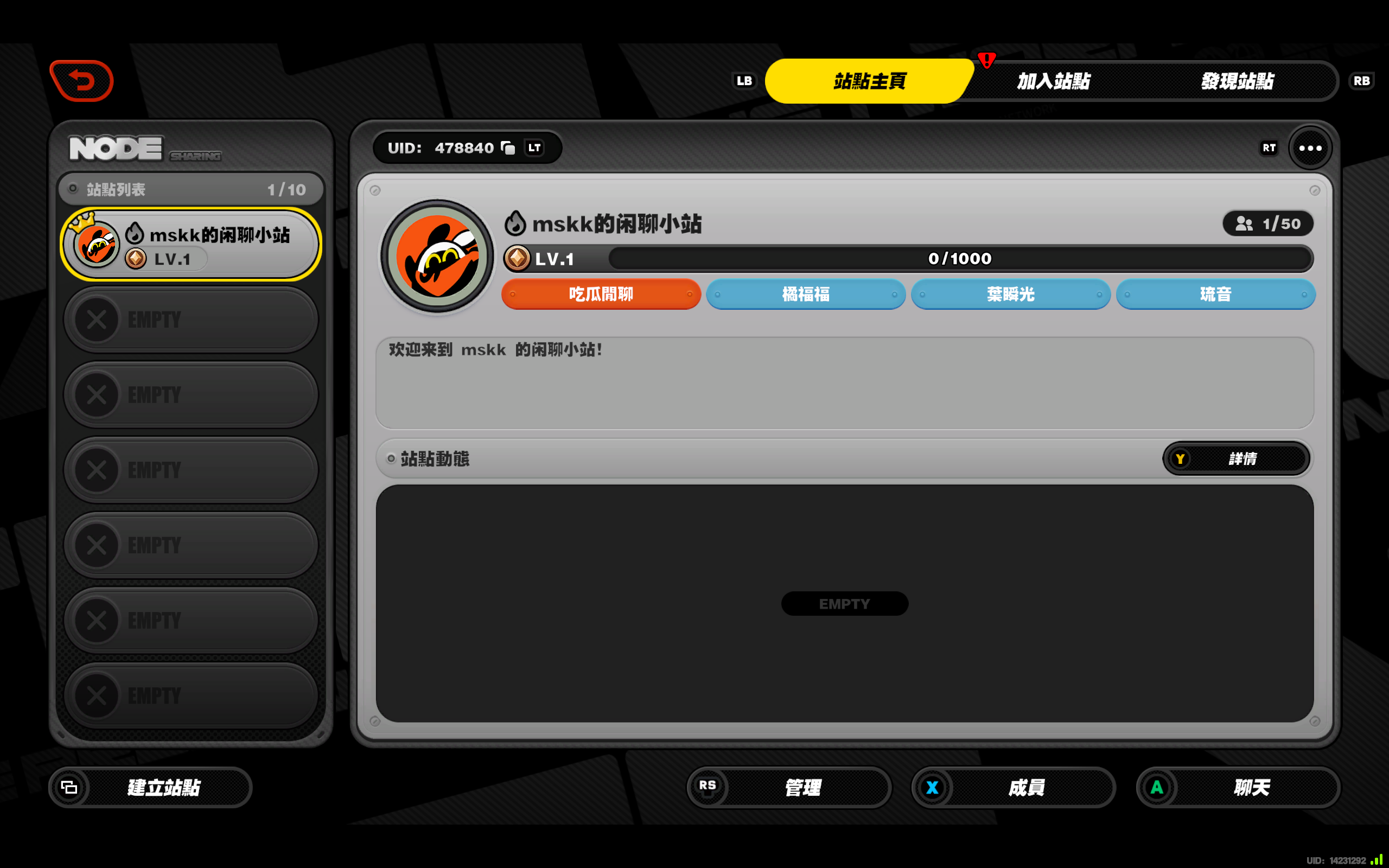
      <![CDATA[<p>欢迎大家加入我的官服绝区零站点！</p><p>UID: 478840</p><p><img src="https://host.dorahonor.me/images/image_2025-12-30_14-12-43.png" alt="" /></p><hr /><p>最近，《绝区零》新版上线了站点功能，许多玩家都在玩这个功能。</p><p>我也决定建立站点，便于大家来玩。</p>]]>
    </content>
    <id>https://blog.dorahonor.me/posts/822048942/</id>
    <link href="https://blog.dorahonor.me/posts/822048942/"/>
    <published>2025-12-30T06:13:36.000Z</published>
    <summary>
      <![CDATA[<p>欢迎大家加入我的官服绝区零站点！</p>
<p>UID: 478840</p>
<p><img src="https://host.dorahonor.me/images/image_2025-12-30_14-12-43.png" alt="" /></p>
<hr />]]>
    </summary>
    <title>欢迎大家加入我的官服绝区零站点！</title>
    <updated>2026-05-07T14:55:59.402Z</updated>
  </entry>
  <entry>
    <author>
      <name>Dora Honor</name>
    </author>
    <category term="教程" scheme="https://blog.dorahonor.me/categories/%E6%95%99%E7%A8%8B/"/>
    <category term="美化" scheme="https://blog.dorahonor.me/categories/%E6%95%99%E7%A8%8B/%E7%BE%8E%E5%8C%96/"/>
    <category term="折腾" scheme="https://blog.dorahonor.me/tags/%E6%8A%98%E8%85%BE/"/>
    <category term="Live2D" scheme="https://blog.dorahonor.me/tags/Live2D/"/>
    <category term="经验总结" scheme="https://blog.dorahonor.me/tags/%E7%BB%8F%E9%AA%8C%E6%80%BB%E7%BB%93/"/>
    <category term="看板娘" scheme="https://blog.dorahonor.me/tags/%E7%9C%8B%E6%9D%BF%E5%A8%98/"/>
    <category term="个性化" scheme="https://blog.dorahonor.me/tags/%E4%B8%AA%E6%80%A7%E5%8C%96/"/>
    <content>
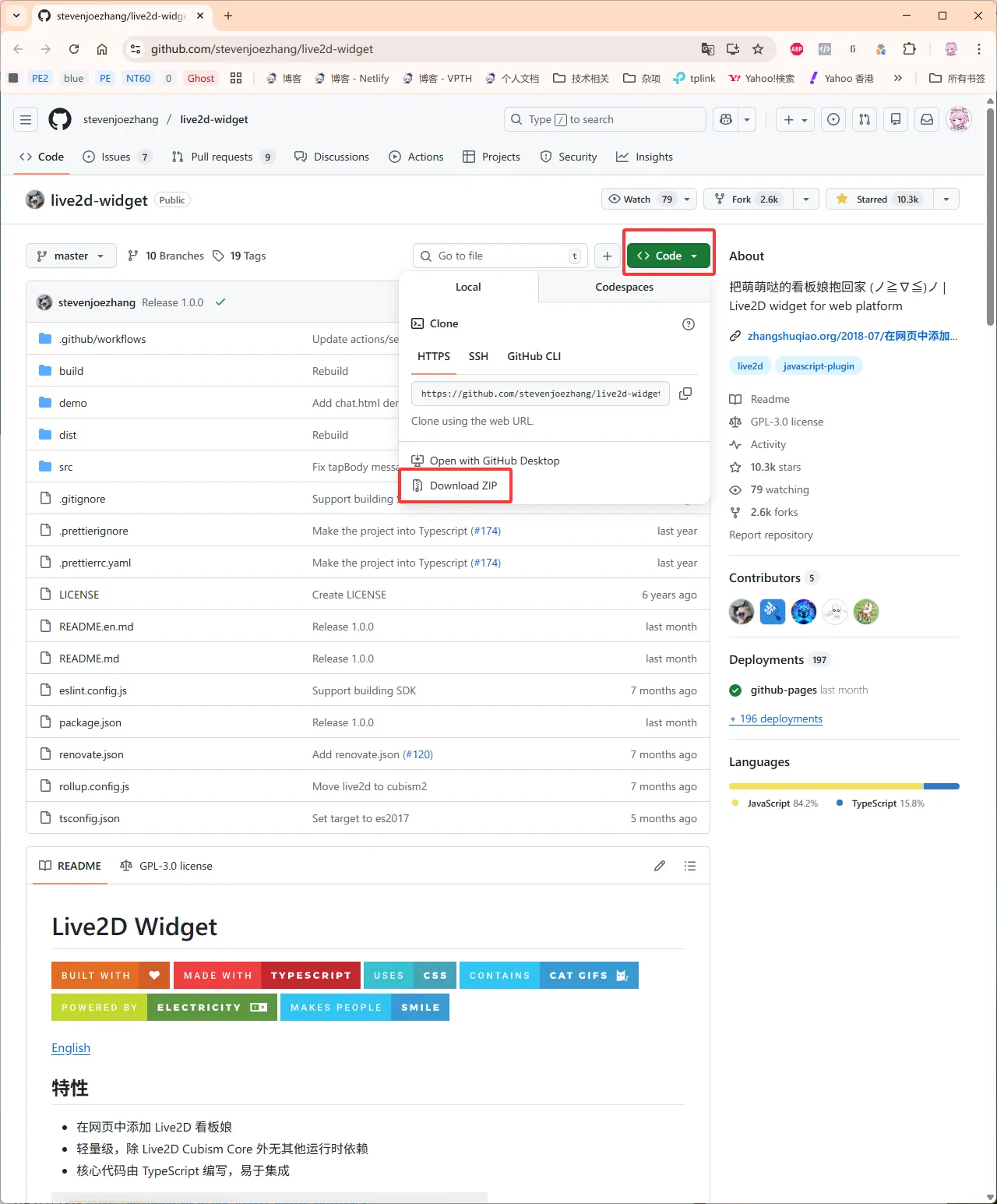
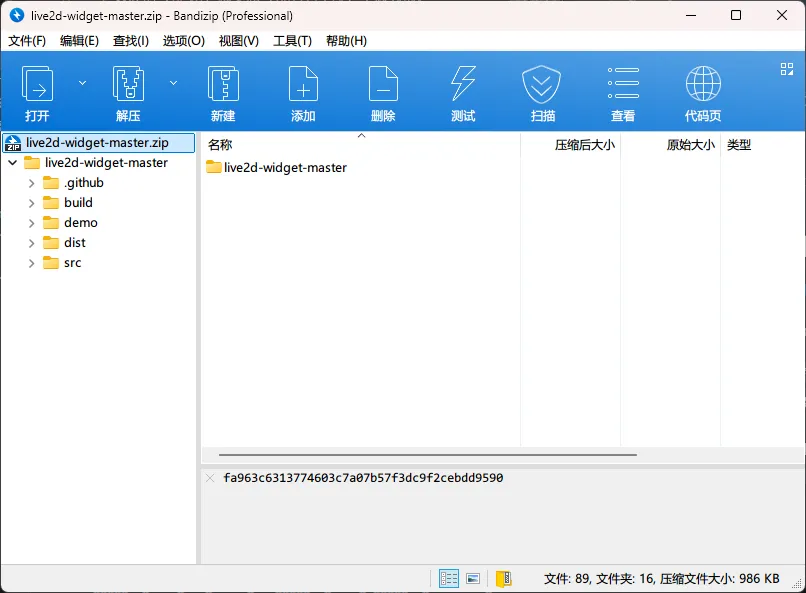
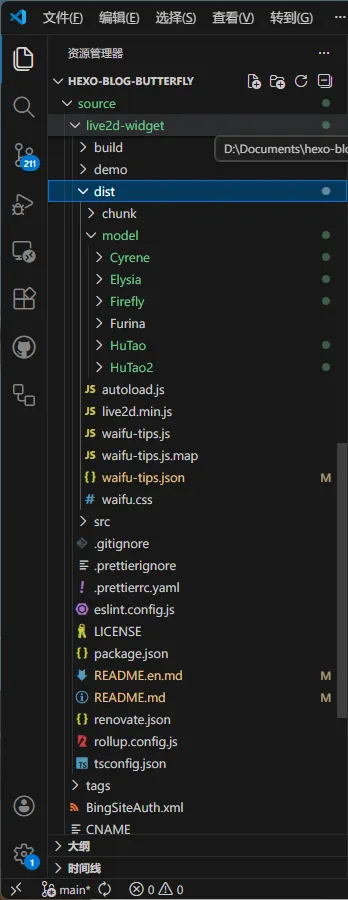
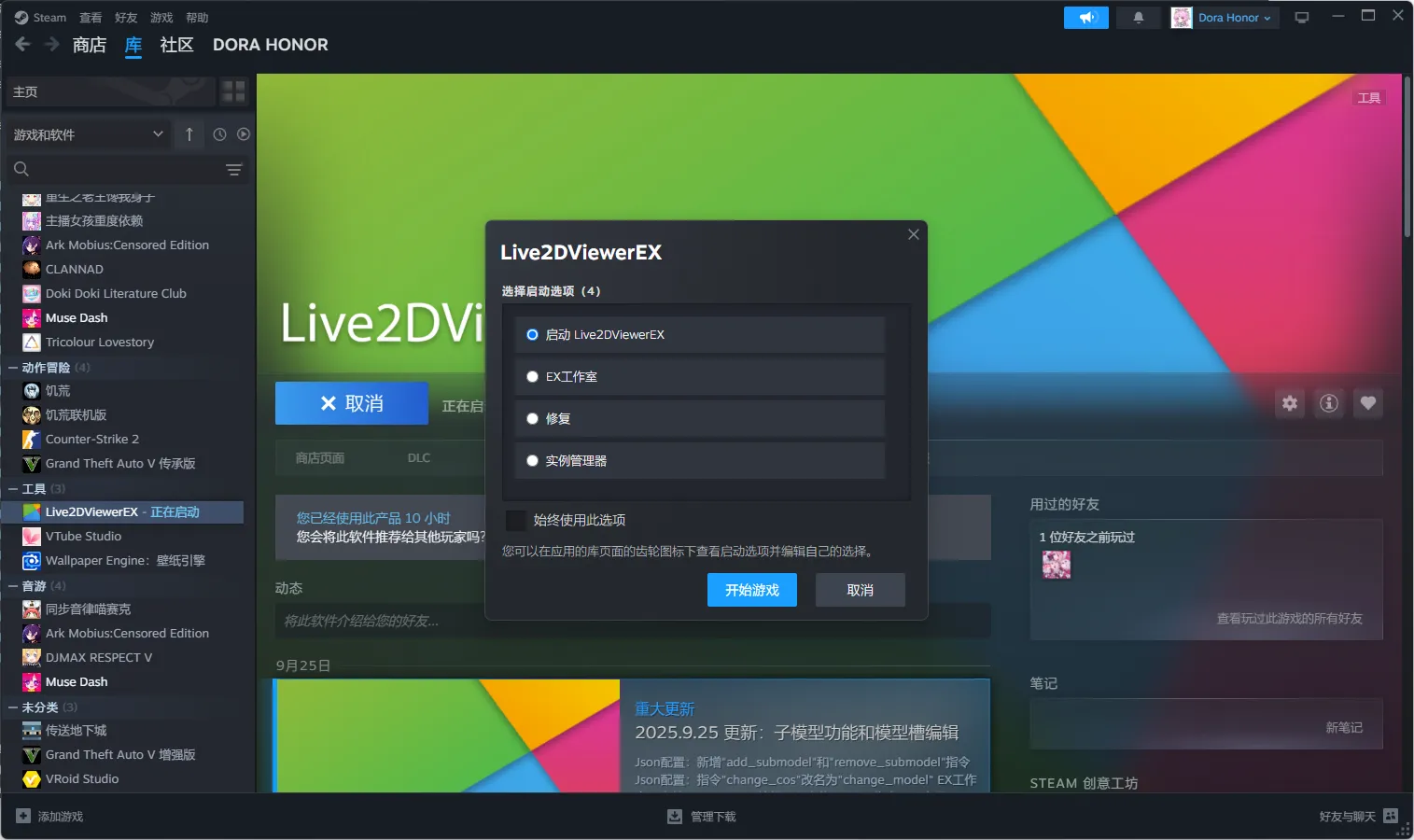
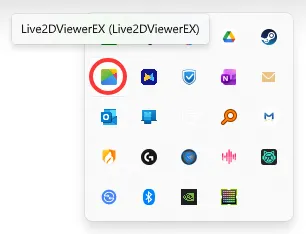
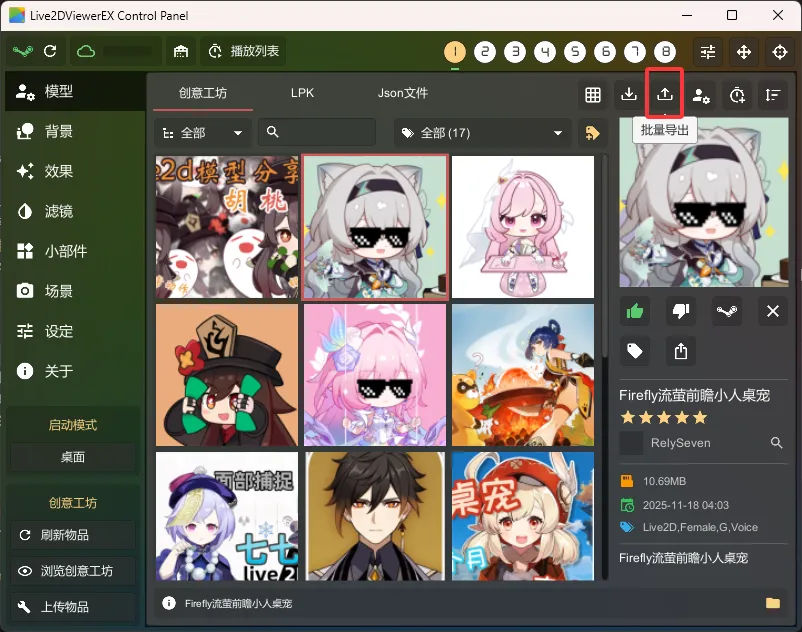
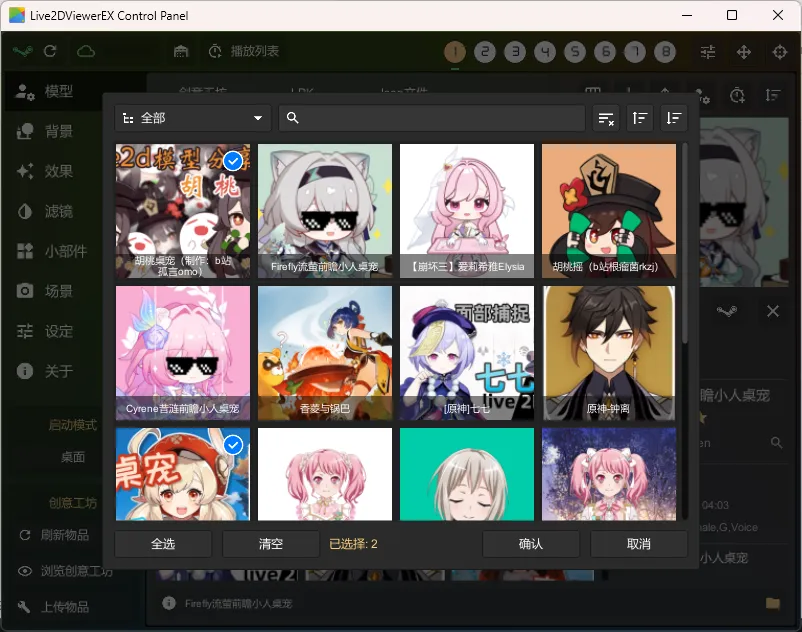
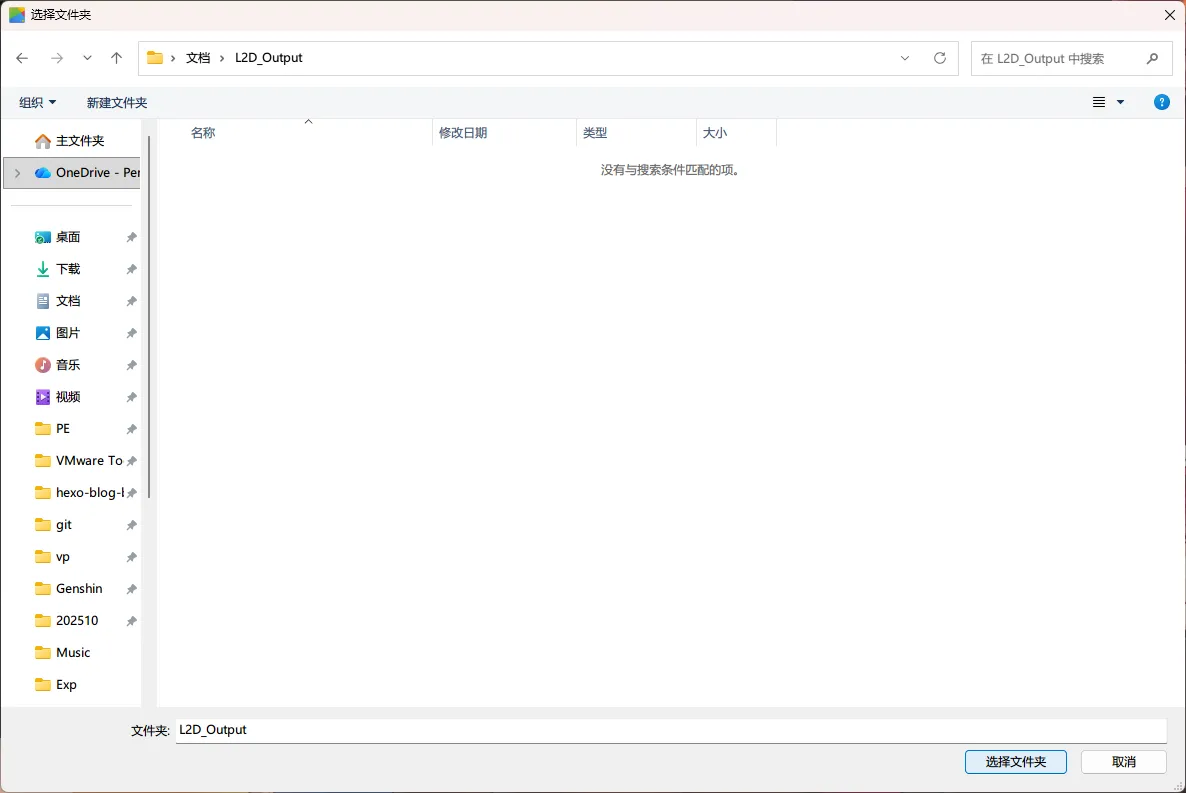
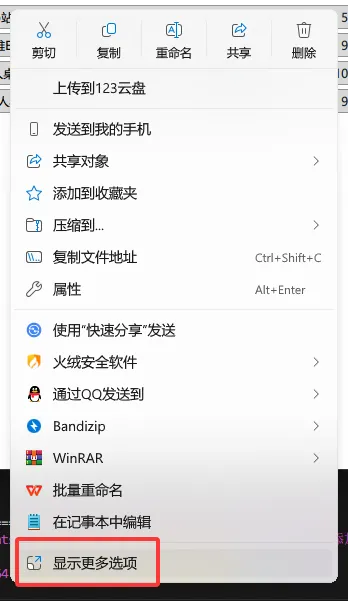
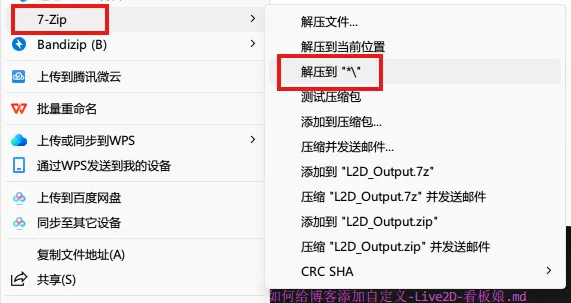
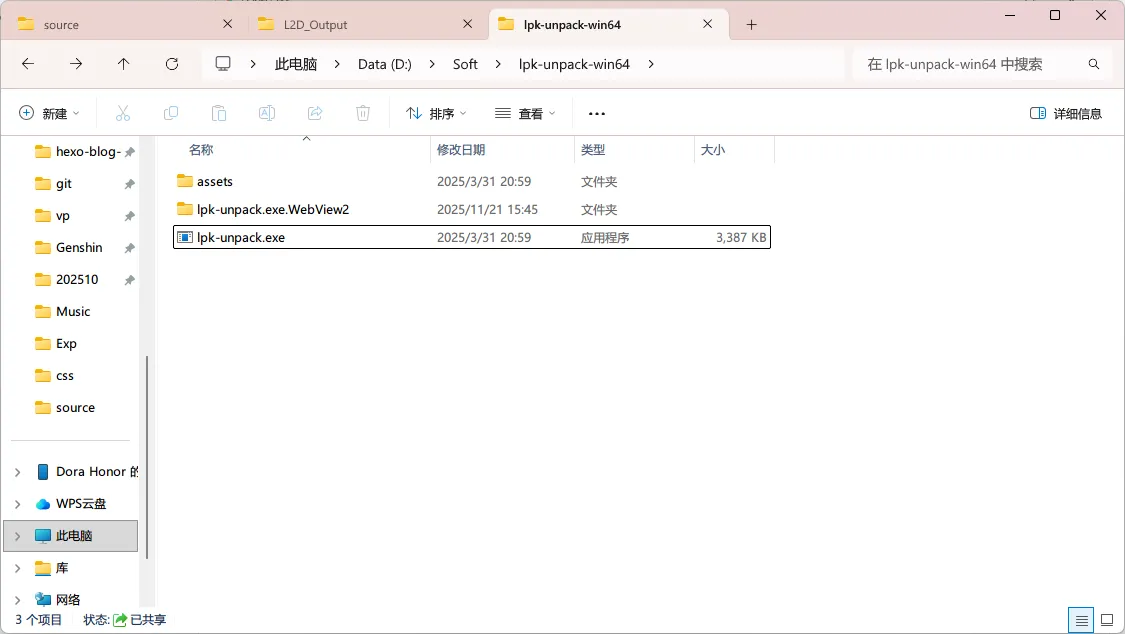
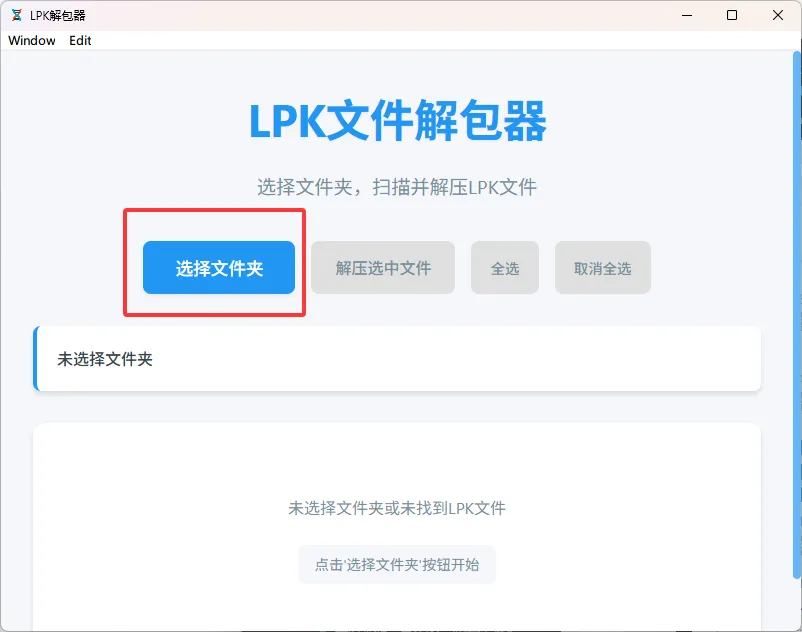
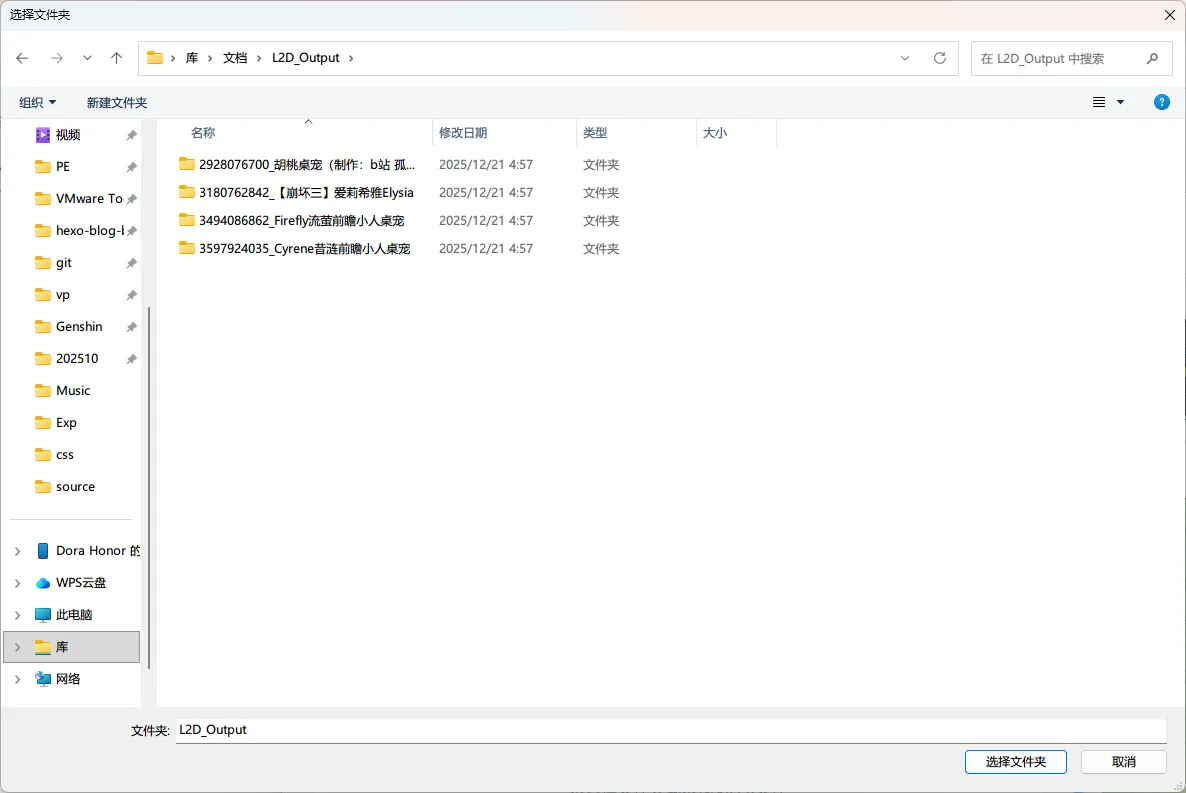
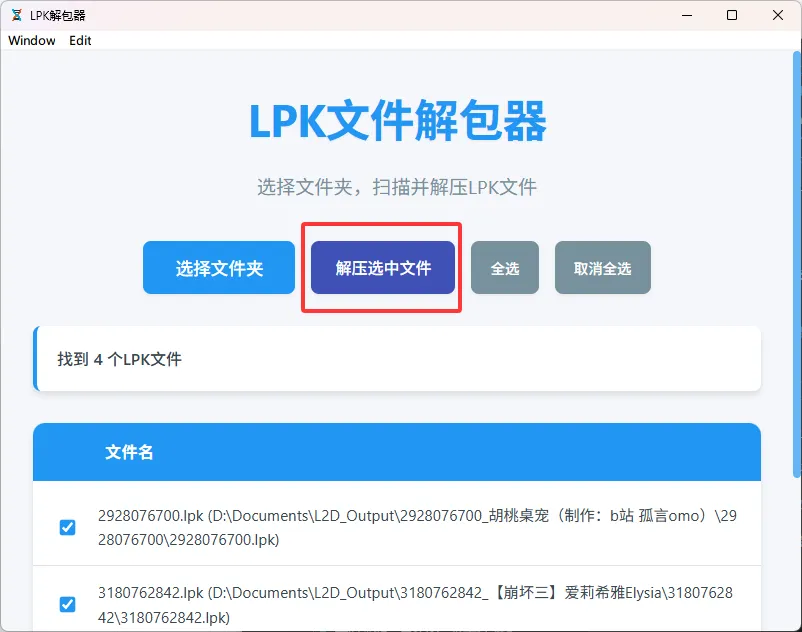
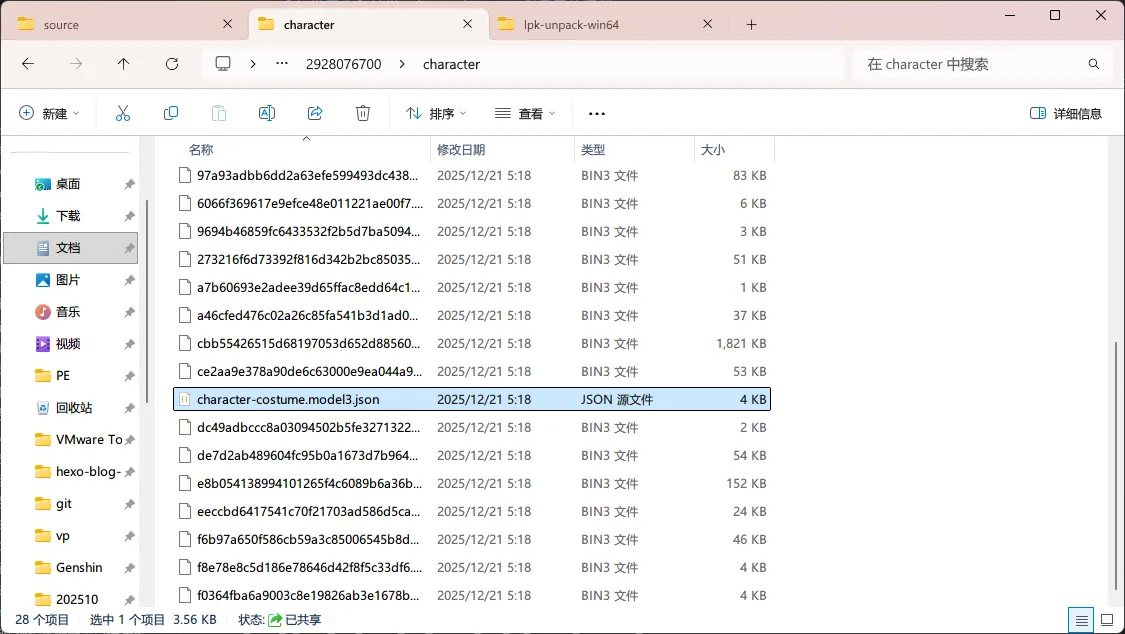
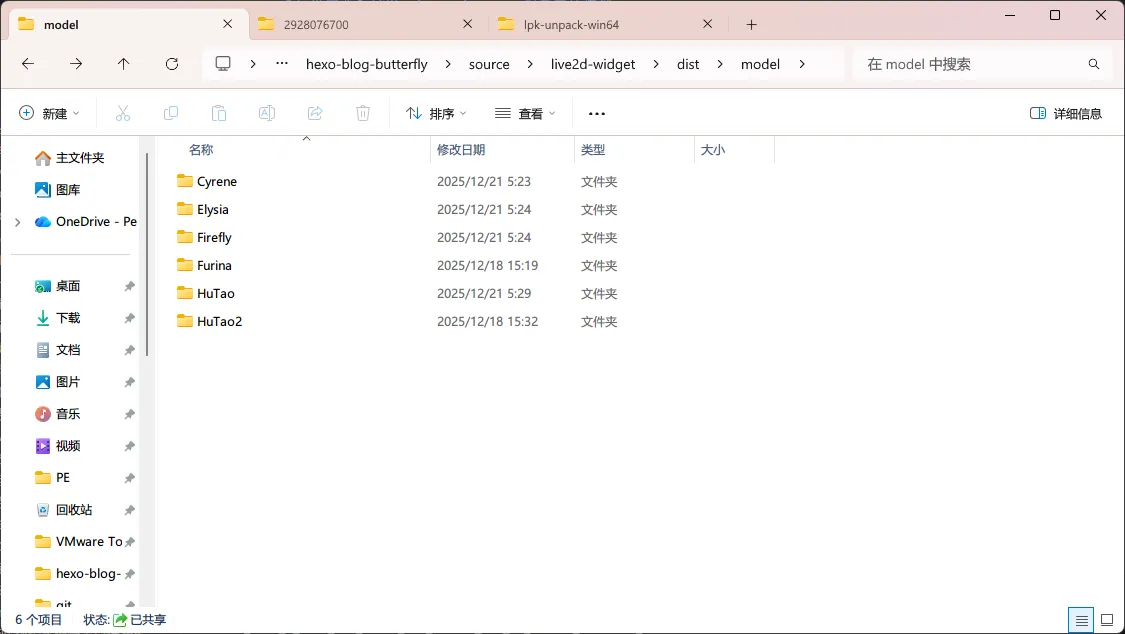
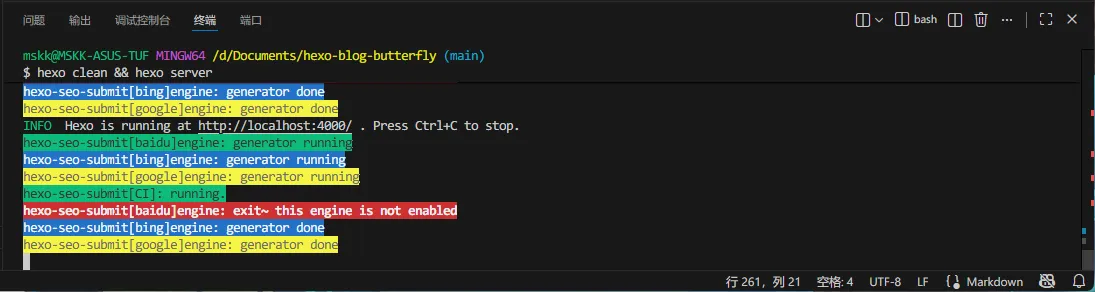
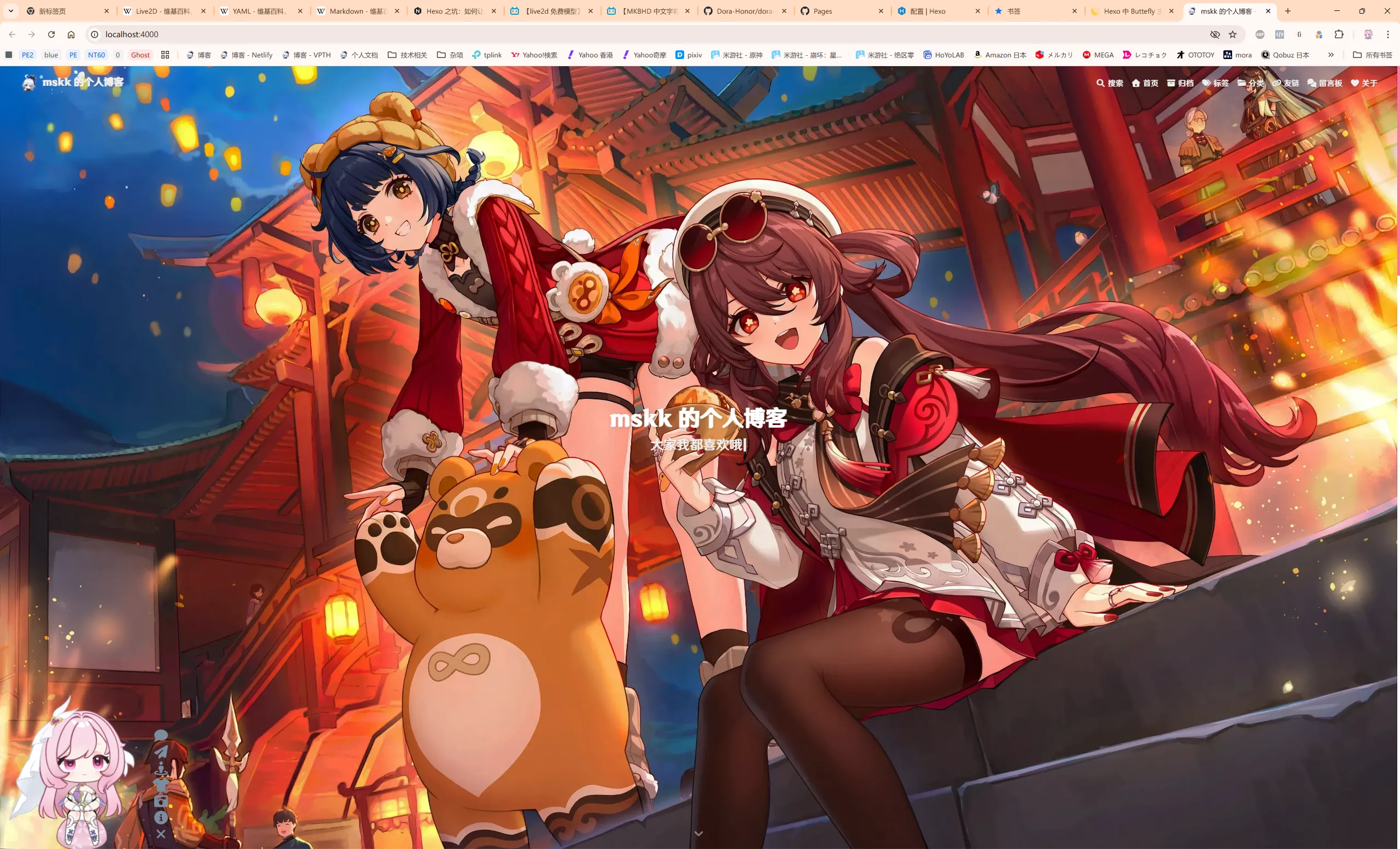
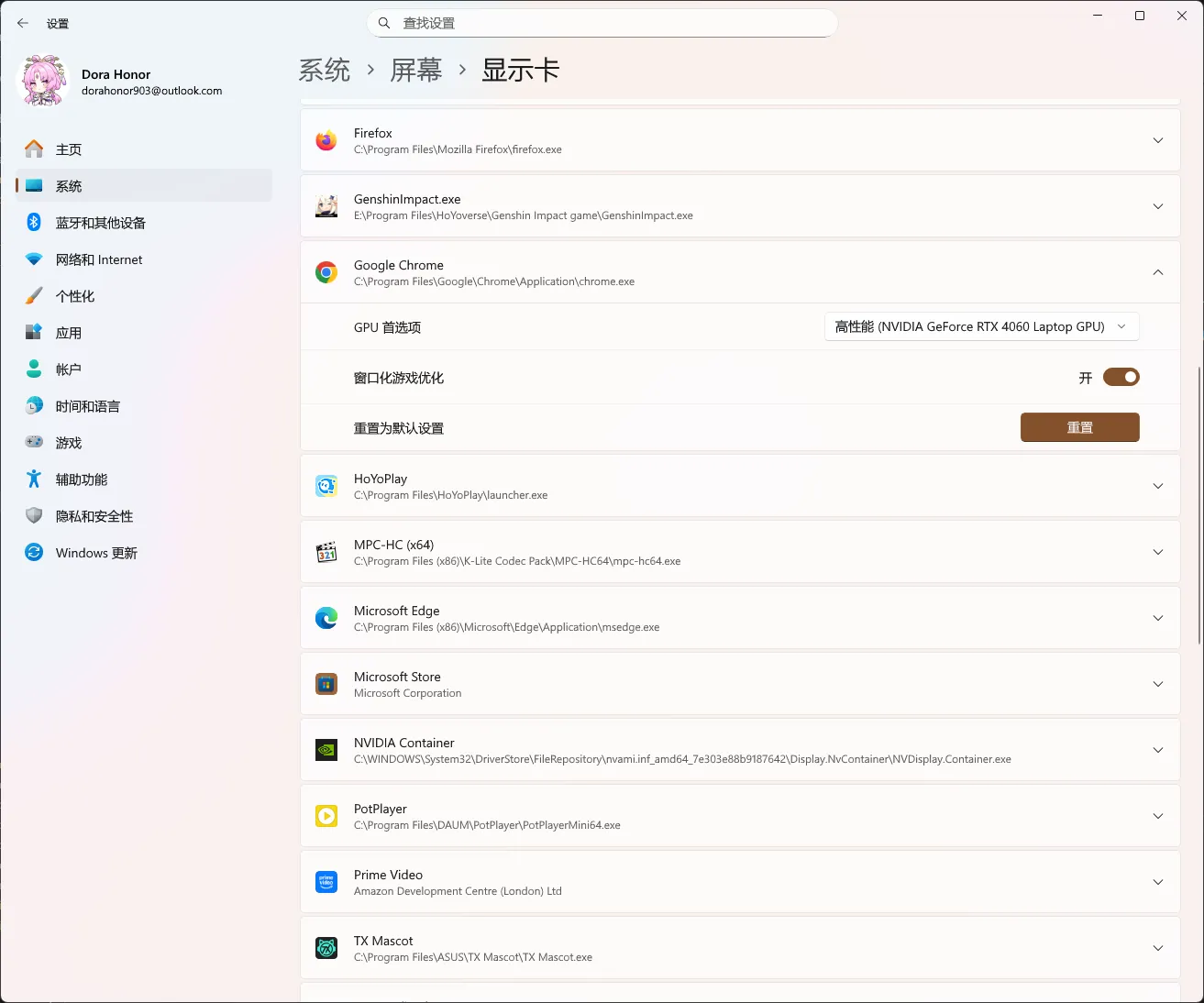
      <![CDATA[<h2 id="前言"><a class="markdownIt-Anchor" href="#前言"></a> 前言</h2><p>平时在浏览许多前辈们的博客时，总能看到有不少前辈们的站点角落有引人注目的看板娘。我就在想，「如果自己的博客也能有自己喜欢的角色来彰显个性就好了」。</p><p>相信许多朋友们都和我一样，也想给自己的博客加上喜欢的角色作为看板娘吧？</p><p>众所周知，许多带看板娘的博客，其看板娘基本都用的是 <strong>Live2D</strong> 模型和引擎。Live2D 引擎使用 2.5D 设计和建模，其最大的特色是只要对角色各部位进行设计和建模，导出模型在查看器或 Live2D 引擎就能让角色动起来，<strong>无需花费大量时间画每一帧</strong><sup class="footnote-ref"><a href="#fn1" id="fnref1">[1]</a></sup>。</p><p>为此，我们需要下载所需的 Live2D 引擎组件，进行添加 Live2D 看板娘，以及添加自定义 Live2D 看板娘角色（可选）。</p><h2 id="所需条件"><a class="markdownIt-Anchor" href="#所需条件"></a> 所需条件</h2><ul><li>你的博客项目已建立好（修改前<strong>建议备份</strong>）</li><li>熟悉 Node.js、NPM、Yarn、PNPM、Git、VS Code 等运行时、包管理器、软件的使用，且已安装</li><li>丰富的认知和思考能力</li><li>足够的电脑性能</li></ul><h2 id="准备工作"><a class="markdownIt-Anchor" href="#准备工作"></a> 准备工作</h2><div class="callout" data-callout="note"><div class="callout-title"><div class="callout-title-icon"><svg xmlns="http://www.w3.org/2000/svg" width="24" height="24" viewBox="0 0 24 24" fill="none" stroke="currentColor" stroke-width="2" stroke-linecap="round" stroke-linejoin="round" class="lucide lucide-pencil"><path d="M17 3a2.85 2.83 0 1 1 4 4L7.5 20.5 2 22l1.5-5.5Z"/><path d="m15 5 4 4"/></svg></div><div class="callout-title-inner">Note</div></div><div class="callout-content"><p>以我的 <a href="https://hexo.io">Hexo</a> 框架和 <a href="https://butterfly.js.org">Butterfly</a> 主题为例。</p></div></div><div class="callout" data-callout="caution"><div class="callout-title"><div class="callout-title-icon"><svg xmlns="http://www.w3.org/2000/svg" width="24" height="24" viewBox="0 0 24 24" fill="none" stroke="currentColor" stroke-width="2" stroke-linecap="round" stroke-linejoin="round" class="lucide lucide-alert-triangle"><path d="m21.73 18-8-14a2 2 0 0 0-3.48 0l-8 14A2 2 0 0 0 4 21h16a2 2 0 0 0 1.73-3Z"/><path d="M12 9v4"/><path d="M12 17h.01"/></svg></div><div class="callout-title-inner">Caution</div></div><div class="callout-content"><p>其他主题或框架的部分方法可能有不同，具体请参考对应的文档说明。</p></div></div><h2 id="下载和引入所需组件"><a class="markdownIt-Anchor" href="#下载和引入所需组件"></a> 下载和引入所需组件</h2><h3 id="下载-live2d-依赖组件"><a class="markdownIt-Anchor" href="#下载-live2d-依赖组件"></a> 下载 Live2D 依赖组件</h3><p>进入 <a href="https://github.com/stevenjoezhang/live2d-widget">这个 Live2D 依赖组件的 GitHub 仓库</a> 找到该依赖。</p><p>在页面选择【Code】—【Download ZIP】进行下载。</p><p><img src="https://host.dorahonor.me/images/251221/01.webp" alt="" /></p><p>将依赖解压到 <code>你的工作目录\source\live2d-widget</code> 目录，如果 <code>source</code> 下没有 <code>live2d-widget</code> 目录，解压时会自动创建。</p><p><img src="https://host.dorahonor.me/images/251221/02.webp" alt="" /><br /><img src="https://host.dorahonor.me/images/251221/03.webp" alt="" /></p><div class="callout" data-callout="tip"><div class="callout-title"><div class="callout-title-icon"><svg xmlns="http://www.w3.org/2000/svg" width="24" height="24" viewBox="0 0 24 24" fill="none" stroke="currentColor" stroke-width="2" stroke-linecap="round" stroke-linejoin="round" class="lucide lucide-flame"><path d="M8.5 14.5A2.5 2.5 0 0 0 11 12c0-1.38-.5-2-1-3-1.072-2.143-.224-4.054 2-6 .5 2.5 2 4.9 4 6.5 2 1.6 3 3.5 3 5.5a7 7 0 1 1-14 0c0-1.153.433-2.294 1-3a2.5 2.5 0 0 0 2.5 2.5z"/></svg></div><div class="callout-title-inner">Tip</div></div><div class="callout-content"><p>你也可以在 Git Bash 或其他终端使用 <code>git clone</code> 命令来下载到本地。</p></div></div><figure class="highlight bash"><table><tr><td class="code"><pre><span class="line">git <span class="built_in">clone</span> https://github.com/stevenjoezhang/live2d-widget</span><br><span class="line"><span class="comment"># 你也可以在链接后指定克隆的目录。</span></span><br><span class="line"><span class="comment"># git clone https://github.com/stevenjoezhang/live2d-widget folder/live2d-widget</span></span><br></pre></td></tr></table></figure><h3 id="引入-live2d-依赖组件"><a class="markdownIt-Anchor" href="#引入-live2d-依赖组件"></a> 引入 Live2D 依赖组件</h3><p>在你的工作目录的根目录找到 <code>_config.butterfly.yml</code> 配置文件并打开。</p><div class="callout" data-callout="tip"><div class="callout-title"><div class="callout-title-icon"><svg xmlns="http://www.w3.org/2000/svg" width="24" height="24" viewBox="0 0 24 24" fill="none" stroke="currentColor" stroke-width="2" stroke-linecap="round" stroke-linejoin="round" class="lucide lucide-flame"><path d="M8.5 14.5A2.5 2.5 0 0 0 11 12c0-1.38-.5-2-1-3-1.072-2.143-.224-4.054 2-6 .5 2.5 2 4.9 4 6.5 2 1.6 3 3.5 3 5.5a7 7 0 1 1-14 0c0-1.153.433-2.294 1-3a2.5 2.5 0 0 0 2.5 2.5z"/></svg></div><div class="callout-title-inner">Tip</div></div><div class="callout-content"><p>推荐用 VS Code 打开你的工作目录，在左侧资源管理器中操作代码文件，使用更方便。</p></div></div><div class="callout" data-callout="note"><div class="callout-title"><div class="callout-title-icon"><svg xmlns="http://www.w3.org/2000/svg" width="24" height="24" viewBox="0 0 24 24" fill="none" stroke="currentColor" stroke-width="2" stroke-linecap="round" stroke-linejoin="round" class="lucide lucide-pencil"><path d="M17 3a2.85 2.83 0 1 1 4 4L7.5 20.5 2 22l1.5-5.5Z"/><path d="m15 5 4 4"/></svg></div><div class="callout-title-inner">Note</div></div><div class="callout-content"><p>对于同为 <a href="https://hexo.io">Hexo</a> 框架的其他主题，主题配置文件一样为 <code>_config.theme.yml</code> 格式。例如，NexT 主题为 <code>_config.next.yml</code>。</p></div></div><p>找到 <code>inject</code> 下的 <code>bottom</code> 字段，按照注释中的格式填入 <code>autoload.js</code> 所在路径。</p><figure class="highlight yaml"><table><tr><td class="code"><pre><span class="line"><span class="comment"># Inject</span></span><br><span class="line"><span class="comment"># Insert the code to head (before &#x27;&lt;/head&gt;&#x27; tag) and the bottom (before &#x27;&lt;/body&gt;&#x27; tag)</span></span><br><span class="line"><span class="attr">inject:</span></span><br><span class="line">  <span class="attr">head:</span></span><br><span class="line">    <span class="comment"># - &lt;link rel=&quot;stylesheet&quot; href=&quot;/xxx.css&quot;&gt;</span></span><br><span class="line">  <span class="attr">bottom:</span></span><br><span class="line">    <span class="comment"># - &lt;script src=&quot;xxxx&quot;&gt;&lt;/script&gt;</span></span><br><span class="line">    <span class="bullet">-</span> <span class="string">&lt;script</span> <span class="string">src=&quot;/live2d-widget/dist/autoload.js&quot;&gt;&lt;/script&gt;</span></span><br></pre></td></tr></table></figure><p>打开 <code>source</code> 里的 <code>live2d-widget\autoload.js</code>，修改 <code>const live2d_path</code> 字段参数为 <code>/live2d-widget/dist/</code> 并保存。</p><figure class="highlight javascript"><table><tr><td class="code"><pre><span class="line"><span class="comment">// Recommended to use absolute path for live2d_path parameter</span></span><br><span class="line"><span class="comment">// live2d_path 参数建议使用绝对路径</span></span><br><span class="line"><span class="keyword">const</span> live2d_path = <span class="string">&#x27;/live2d-widget/dist/&#x27;</span>;</span><br><span class="line"><span class="comment">// const live2d_path = &#x27;/dist/&#x27;;</span></span><br></pre></td></tr></table></figure><h3 id="可选优化模型显示效果"><a class="markdownIt-Anchor" href="#可选优化模型显示效果"></a> 【可选】优化模型显示效果</h3><p>打开 <code>source</code> 里的 <code>live2d-widget\autoload.js</code>。</p><p>由于手机屏幕尺寸有限，个人建议禁用手机端加载。将 <code>if (screen.width &lt; 768) return;</code> 字段取消注释。</p><figure class="highlight javascript"><table><tr><td class="code"><pre><span class="line"><span class="comment">// If you are concerned about display issues on mobile devices, you can use screen.width to determine whether to load</span></span><br><span class="line"><span class="comment">// 如果担心手机上显示效果不佳，可以根据屏幕宽度来判断是否加载</span></span><br><span class="line"><span class="keyword">if</span> (screen.<span class="property">width</span> &lt; <span class="number">768</span>) <span class="keyword">return</span>;</span><br></pre></td></tr></table></figure><p>更多说明，请参考 <a href="https://github.com/stevenjoezhang/live2d-widget">仓库</a> 的 <code>README.md</code> 自述文件。</p><h2 id="可选下载-解包-引入-live2d-模型"><a class="markdownIt-Anchor" href="#可选下载-解包-引入-live2d-模型"></a> 【可选】下载、解包、引入 Live2D 模型</h2><div class="callout" data-callout="warning"><div class="callout-title"><div class="callout-title-icon"><svg xmlns="http://www.w3.org/2000/svg" width="24" height="24" viewBox="0 0 24 24" fill="none" stroke="currentColor" stroke-width="2" stroke-linecap="round" stroke-linejoin="round" class="lucide lucide-alert-triangle"><path d="m21.73 18-8-14a2 2 0 0 0-3.48 0l-8 14A2 2 0 0 0 4 21h16a2 2 0 0 0 1.73-3Z"/><path d="M12 9v4"/><path d="M12 17h.01"/></svg></div><div class="callout-title-inner">Warning</div></div><div class="callout-content"><p>使用模型前，请<strong>仔细阅读</strong>并<strong>务必遵守</strong>相应的注意事项。对于因不当使用而产生的纠纷，本人概不负责。</p></div></div><div class="callout" data-callout="caution"><div class="callout-title"><div class="callout-title-icon"><svg xmlns="http://www.w3.org/2000/svg" width="24" height="24" viewBox="0 0 24 24" fill="none" stroke="currentColor" stroke-width="2" stroke-linecap="round" stroke-linejoin="round" class="lucide lucide-alert-triangle"><path d="m21.73 18-8-14a2 2 0 0 0-3.48 0l-8 14A2 2 0 0 0 4 21h16a2 2 0 0 0 1.73-3Z"/><path d="M12 9v4"/><path d="M12 17h.01"/></svg></div><div class="callout-title-inner">Caution</div></div><div class="callout-content"><p>并非所有模型都能 100% 兼容。</p></div></div><h3 id="下载-live2d-模型"><a class="markdownIt-Anchor" href="#下载-live2d-模型"></a> 下载 Live2D 模型</h3><p>在各类站点下载你想要的 Live2D 模型。推荐几个 GitHub 仓库：</p><ul><li><a href="https://github.com/Eikanya/Live2d-model"><code>Eikanya/Live2d-model</code></a></li><li><a href="https://github.com/xiazeyu/live2d-widget-models"><code>xiazeyu/live2d-widget-models</code></a></li></ul><h3 id="如果需要导出-live2dviewerex-创意工坊模型"><a class="markdownIt-Anchor" href="#如果需要导出-live2dviewerex-创意工坊模型"></a> 【如果需要】导出 Live2DViewerEX 创意工坊模型</h3><div class="callout" data-callout="caution"><div class="callout-title"><div class="callout-title-icon"><svg xmlns="http://www.w3.org/2000/svg" width="24" height="24" viewBox="0 0 24 24" fill="none" stroke="currentColor" stroke-width="2" stroke-linecap="round" stroke-linejoin="round" class="lucide lucide-alert-triangle"><path d="m21.73 18-8-14a2 2 0 0 0-3.48 0l-8 14A2 2 0 0 0 4 21h16a2 2 0 0 0 1.73-3Z"/><path d="M12 9v4"/><path d="M12 17h.01"/></svg></div><div class="callout-title-inner">Caution</div></div><div class="callout-content"><p>请确保 Steam 和 Live2DViewerEX 均已安装，并且 Steam 已经启动。</p></div></div><p>在 Steam 库找到 Live2DViewerEX，选择【启动】，在弹出的对话框中选择【启动 Live2DViewerEX】—【开始游戏】。</p><p><img src="https://host.dorahonor.me/images/251221/04.webp" alt="" /></p><p>在任务栏找到 Live2DViewerEX 图标，双击打开界面，找到并单击右侧的【批量导出】按钮。</p><p><img src="https://host.dorahonor.me/images/251221/05.webp" alt="" /><br /><img src="https://host.dorahonor.me/images/251221/06.webp" alt="" /></p><p>选择你所需导出的模型，完成后单击【确认】，找到所需导出的路径，单击【选择文件夹】。</p><p><img src="https://host.dorahonor.me/images/251221/07.webp" alt="" /><br /><img src="https://host.dorahonor.me/images/251221/08.webp" alt="" /></p><p>稍后会自动打开所在文件夹。</p><h4 id="解包"><a class="markdownIt-Anchor" href="#解包"></a> 解包</h4><div class="callout" data-callout="note"><div class="callout-title"><div class="callout-title-icon"><svg xmlns="http://www.w3.org/2000/svg" width="24" height="24" viewBox="0 0 24 24" fill="none" stroke="currentColor" stroke-width="2" stroke-linecap="round" stroke-linejoin="round" class="lucide lucide-pencil"><path d="M17 3a2.85 2.83 0 1 1 4 4L7.5 20.5 2 22l1.5-5.5Z"/><path d="m15 5 4 4"/></svg></div><div class="callout-title-inner">Note</div></div><div class="callout-content"><p>建议使用 <a href="https://7zip.org">7-Zip</a> 对在 Live2DViewerEX 导出的 <code>*.wpk</code> 包进行解压。</p></div></div><p>选中全部 <code>*.wpk</code> 包，右键单击选中的文件，在弹出的快捷菜单中选择【显示更多选项】—【7-Zip】——【解压到 “\*”】。</p><p><img src="https://host.dorahonor.me/images/251221/09.webp" alt="" /><br /><img src="https://host.dorahonor.me/images/251221/10.webp" alt="" /></p><div class="callout" data-callout="tip"><div class="callout-title"><div class="callout-title-icon"><svg xmlns="http://www.w3.org/2000/svg" width="24" height="24" viewBox="0 0 24 24" fill="none" stroke="currentColor" stroke-width="2" stroke-linecap="round" stroke-linejoin="round" class="lucide lucide-flame"><path d="M8.5 14.5A2.5 2.5 0 0 0 11 12c0-1.38-.5-2-1-3-1.072-2.143-.224-4.054 2-6 .5 2.5 2 4.9 4 6.5 2 1.6 3 3.5 3 5.5a7 7 0 1 1-14 0c0-1.153.433-2.294 1-3a2.5 2.5 0 0 0 2.5 2.5z"/></svg></div><div class="callout-title-inner">Tip</div></div><div class="callout-content"><p>对于 Windows 10 及以下版本，或将 Windows 11 右键菜单的「更多选项」设为默认显示状态下，则在快捷菜单中选择【7-Zip】——【解压到 “\*”】。</p></div></div><h4 id="解包从-7-zip-提取的-lpk-模型"><a class="markdownIt-Anchor" href="#解包从-7-zip-提取的-lpk-模型"></a> 解包从 7-Zip 提取的 LPK 模型</h4><div class="callout" data-callout="note"><div class="callout-title"><div class="callout-title-icon"><svg xmlns="http://www.w3.org/2000/svg" width="24" height="24" viewBox="0 0 24 24" fill="none" stroke="currentColor" stroke-width="2" stroke-linecap="round" stroke-linejoin="round" class="lucide lucide-pencil"><path d="M17 3a2.85 2.83 0 1 1 4 4L7.5 20.5 2 22l1.5-5.5Z"/><path d="m15 5 4 4"/></svg></div><div class="callout-title-inner">Note</div></div><div class="callout-content"><p>推荐使用工具：<a href="https://github.com/oovm/live2d-unpacker"><code>oovm/live2d-unpacker</code></a></p></div></div><p>在 <a href="https://github.com/oovm/live2d-unpacker/releases/tag/v0.0.0">Releases</a> 页找到对应平台版本，并解压到合适的目录。</p><p>进入工具解压的目录，运行根目录下的 <code>lpk-unpack.exe</code>。</p><p><img src="https://host.dorahonor.me/images/251221/11.webp" alt="" /></p><p>在程序界面单击【选择文件夹】，找到解压的各 LPK 模型共存的根目录，单击【选择文件夹】。</p><p><img src="https://host.dorahonor.me/images/251221/12.webp" alt="" /><br /><img src="https://host.dorahonor.me/images/251221/13.webp" alt="" /></p><p>程序会自动搜索 LPK 模型，全选并选择【解压选中文件】。</p><p><img src="https://host.dorahonor.me/images/251221/14.webp" alt="" /></p><p>如果解压成功，在各模型编号下找到 <code>character</code> 文件夹，内部会有 <code>character-costume.model3.json</code> 文件以打开 Live2D 模型。</p><p><img src="https://host.dorahonor.me/images/251221/15.webp" alt="" /></p><h3 id="将解压出的-live2d-模型放至项目文件夹"><a class="markdownIt-Anchor" href="#将解压出的-live2d-模型放至项目文件夹"></a> 将解压出的 Live2D 模型放至项目文件夹</h3><div class="callout" data-callout="tip"><div class="callout-title"><div class="callout-title-icon"><svg xmlns="http://www.w3.org/2000/svg" width="24" height="24" viewBox="0 0 24 24" fill="none" stroke="currentColor" stroke-width="2" stroke-linecap="round" stroke-linejoin="round" class="lucide lucide-flame"><path d="M8.5 14.5A2.5 2.5 0 0 0 11 12c0-1.38-.5-2-1-3-1.072-2.143-.224-4.054 2-6 .5 2.5 2 4.9 4 6.5 2 1.6 3 3.5 3 5.5a7 7 0 1 1-14 0c0-1.153.433-2.294 1-3a2.5 2.5 0 0 0 2.5 2.5z"/></svg></div><div class="callout-title-inner">Tip</div></div><div class="callout-content"><p>为了便于区分，强烈建议将其中解压出的 <code>character</code> 文件夹重命名为角色的英文名。角色英文名可查阅相应 wiki。</p></div></div><p>在 <code>你的工作目录\source\live2d-widget\dist</code> 中新建一个 <code>model</code> 文件夹，将重命名好的已被解包的模型文件夹复制进去。</p><p><img src="https://host.dorahonor.me/images/251221/16.webp" alt="" /></p><h3 id="在配置文件中引入-live2d-模型"><a class="markdownIt-Anchor" href="#在配置文件中引入-live2d-模型"></a> 在配置文件中引入 Live2D 模型</h3><p>在 <code>你的工作目录\source\live2d-widget\dist</code> 中找到 <code>waifu-tips.json</code> 文件并打开。</p><p>在 <code>models</code> 字段按标记语法填入模型信息。</p><figure class="highlight json"><table><tr><td class="code"><pre><span class="line"><span class="attr">&quot;models&quot;</span><span class="punctuation">:</span> <span class="punctuation">[</span><span class="punctuation">&#123;</span></span><br><span class="line">  <span class="attr">&quot;name&quot;</span><span class="punctuation">:</span> <span class="string">&quot;Furina&quot;</span><span class="punctuation">,</span></span><br><span class="line">  <span class="attr">&quot;paths&quot;</span><span class="punctuation">:</span> <span class="punctuation">[</span><span class="string">&quot;/live2d-widget/dist/model/Furina/Furina.model3.json&quot;</span><span class="punctuation">]</span><span class="punctuation">,</span></span><br><span class="line">  <span class="attr">&quot;message&quot;</span><span class="punctuation">:</span> <span class="string">&quot;站在你面前的，就是枫丹人人皆知的大明星——芙宁娜哦！&quot;</span></span><br><span class="line"><span class="punctuation">&#125;</span><span class="punctuation">,</span> <span class="punctuation">&#123;</span></span><br><span class="line">  <span class="attr">&quot;name&quot;</span><span class="punctuation">:</span> <span class="string">&quot;HuTao&quot;</span><span class="punctuation">,</span></span><br><span class="line">  <span class="attr">&quot;paths&quot;</span><span class="punctuation">:</span> <span class="punctuation">[</span><span class="string">&quot;/live2d-widget/dist/model/HuTao/character-costume.model3.json&quot;</span><span class="punctuation">]</span><span class="punctuation">,</span></span><br><span class="line">  <span class="attr">&quot;message&quot;</span><span class="punctuation">:</span> <span class="string">&quot;唷，找本堂主有何贵干呀？嗯？你不知道吗，往生堂第七十七代堂主就是我胡桃啦！&quot;</span></span><br><span class="line"><span class="punctuation">&#125;</span><span class="punctuation">,</span> <span class="punctuation">&#123;</span></span><br><span class="line">  <span class="attr">&quot;name&quot;</span><span class="punctuation">:</span> <span class="string">&quot;HuTao2&quot;</span><span class="punctuation">,</span></span><br><span class="line">  <span class="attr">&quot;paths&quot;</span><span class="punctuation">:</span> <span class="punctuation">[</span><span class="string">&quot;/live2d-widget/dist/model/HuTao2/character-costume.model3.json&quot;</span><span class="punctuation">]</span><span class="punctuation">,</span></span><br><span class="line">  <span class="attr">&quot;message&quot;</span><span class="punctuation">:</span> <span class="string">&quot;唷，找本堂主有何贵干呀？嗯？你不知道吗，往生堂第七十七代堂主就是我胡桃啦！&quot;</span> </span><br><span class="line"><span class="punctuation">&#125;</span><span class="punctuation">,</span> <span class="punctuation">&#123;</span></span><br><span class="line">  <span class="attr">&quot;name&quot;</span><span class="punctuation">:</span> <span class="string">&quot;Elysia&quot;</span><span class="punctuation">,</span></span><br><span class="line">  <span class="attr">&quot;paths&quot;</span><span class="punctuation">:</span> <span class="punctuation">[</span><span class="string">&quot;/live2d-widget/dist/model/Elysia/character-costume.model3.json&quot;</span><span class="punctuation">]</span><span class="punctuation">,</span></span><br><span class="line">  <span class="attr">&quot;message&quot;</span><span class="punctuation">:</span> <span class="string">&quot;你已知晓了我的过去，作为交换，我想见证你的「未来」。&quot;</span></span><br><span class="line"><span class="punctuation">&#125;</span><span class="punctuation">,</span> <span class="punctuation">&#123;</span></span><br><span class="line">  <span class="attr">&quot;name&quot;</span><span class="punctuation">:</span> <span class="string">&quot;Firefly&quot;</span><span class="punctuation">,</span></span><br><span class="line">  <span class="attr">&quot;paths&quot;</span><span class="punctuation">:</span> <span class="punctuation">[</span><span class="string">&quot;/live2d-widget/dist/model/Firefly/character-costume.model3.json&quot;</span><span class="punctuation">]</span><span class="punctuation">,</span></span><br><span class="line">  <span class="attr">&quot;message&quot;</span><span class="punctuation">:</span> <span class="string">&quot;嗨，又见面啦……我的意思，很高兴见到你。和往常一样，叫我「流萤」吧。&quot;</span></span><br><span class="line"><span class="punctuation">&#125;</span><span class="punctuation">,</span> <span class="punctuation">&#123;</span></span><br><span class="line">  <span class="attr">&quot;name&quot;</span><span class="punctuation">:</span> <span class="string">&quot;Cyrene&quot;</span><span class="punctuation">,</span></span><br><span class="line">  <span class="attr">&quot;paths&quot;</span><span class="punctuation">:</span> <span class="punctuation">[</span><span class="string">&quot;/live2d-widget/dist/model/Cyrene/character-costume.model3.json&quot;</span><span class="punctuation">]</span><span class="punctuation">,</span></span><br><span class="line">  <span class="attr">&quot;message&quot;</span><span class="punctuation">:</span> <span class="string">&quot;这是命运的邂逅吗，还是……久别重逢呢？真让人心跳加速呀，那……就像初遇时那样，再一次呼唤我「昔涟」，好吗？&quot;</span></span><br><span class="line"><span class="punctuation">&#125;</span><span class="punctuation">,</span> <span class="punctuation">&#123;</span></span><br><span class="line">  <span class="attr">&quot;name&quot;</span><span class="punctuation">:</span> <span class="string">&quot;Potion-Maker/Pio&quot;</span><span class="punctuation">,</span></span><br><span class="line">  <span class="attr">&quot;paths&quot;</span><span class="punctuation">:</span> <span class="punctuation">[</span><span class="string">&quot;https://fastly.jsdelivr.net/gh/fghrsh/live2d_api/model/Potion-Maker/Pio/index.json&quot;</span><span class="punctuation">]</span><span class="punctuation">,</span></span><br><span class="line">  <span class="attr">&quot;message&quot;</span><span class="punctuation">:</span> <span class="string">&quot;来自 Potion Maker 的 Pio 酱 ~&quot;</span></span><br><span class="line"><span class="punctuation">&#125;</span><span class="punctuation">,</span> <span class="punctuation">&#123;</span></span><br><span class="line">  <span class="attr">&quot;name&quot;</span><span class="punctuation">:</span> <span class="string">&quot;Potion-Maker/Tia&quot;</span><span class="punctuation">,</span></span><br><span class="line">  <span class="attr">&quot;paths&quot;</span><span class="punctuation">:</span> <span class="punctuation">[</span><span class="string">&quot;https://fastly.jsdelivr.net/gh/fghrsh/live2d_api/model/Potion-Maker/Tia/index.json&quot;</span><span class="punctuation">]</span><span class="punctuation">,</span></span><br><span class="line">  <span class="attr">&quot;message&quot;</span><span class="punctuation">:</span> <span class="string">&quot;来自 Potion Maker 的 Tia 酱 ~&quot;</span></span><br><span class="line"><span class="punctuation">&#125;</span><span class="punctuation">,</span> <span class="punctuation">&#123;</span></span><br><span class="line">  <span class="attr">&quot;name&quot;</span><span class="punctuation">:</span> <span class="string">&quot;HyperdimensionNeptunia&quot;</span><span class="punctuation">,</span></span><br><span class="line">  <span class="attr">&quot;paths&quot;</span><span class="punctuation">:</span> <span class="punctuation">[</span></span><br><span class="line">    <span class="string">&quot;https://fastly.jsdelivr.net/gh/fghrsh/live2d_api/model/HyperdimensionNeptunia/neptune_classic/index.json&quot;</span><span class="punctuation">,</span></span><br><span class="line">    <span class="string">&quot;https://fastly.jsdelivr.net/gh/fghrsh/live2d_api/model/HyperdimensionNeptunia/nepnep/index.json&quot;</span><span class="punctuation">,</span></span><br><span class="line">    <span class="string">&quot;https://fastly.jsdelivr.net/gh/fghrsh/live2d_api/model/HyperdimensionNeptunia/neptune_santa/index.json&quot;</span><span class="punctuation">,</span></span><br><span class="line">    <span class="string">&quot;https://fastly.jsdelivr.net/gh/fghrsh/live2d_api/model/HyperdimensionNeptunia/nepmaid/index.json&quot;</span><span class="punctuation">,</span></span><br><span class="line">    <span class="string">&quot;https://fastly.jsdelivr.net/gh/fghrsh/live2d_api/model/HyperdimensionNeptunia/nepswim/index.json&quot;</span><span class="punctuation">,</span></span><br><span class="line">    <span class="string">&quot;https://fastly.jsdelivr.net/gh/fghrsh/live2d_api/model/HyperdimensionNeptunia/noir_classic/index.json&quot;</span><span class="punctuation">,</span></span><br><span class="line">    <span class="string">&quot;https://fastly.jsdelivr.net/gh/fghrsh/live2d_api/model/HyperdimensionNeptunia/noir/index.json&quot;</span><span class="punctuation">,</span></span><br><span class="line">    <span class="string">&quot;https://fastly.jsdelivr.net/gh/fghrsh/live2d_api/model/HyperdimensionNeptunia/noir_santa/index.json&quot;</span><span class="punctuation">,</span></span><br><span class="line">    <span class="string">&quot;https://fastly.jsdelivr.net/gh/fghrsh/live2d_api/model/HyperdimensionNeptunia/noireswim/index.json&quot;</span><span class="punctuation">,</span></span><br><span class="line">    <span class="string">&quot;https://fastly.jsdelivr.net/gh/fghrsh/live2d_api/model/HyperdimensionNeptunia/blanc_classic/index.json&quot;</span><span class="punctuation">,</span></span><br><span class="line">    <span class="string">&quot;https://fastly.jsdelivr.net/gh/fghrsh/live2d_api/model/HyperdimensionNeptunia/blanc_normal/index.json&quot;</span><span class="punctuation">,</span></span><br><span class="line">    <span class="string">&quot;https://fastly.jsdelivr.net/gh/fghrsh/live2d_api/model/HyperdimensionNeptunia/blanc_swimwear/index.json&quot;</span><span class="punctuation">,</span></span><br><span class="line">    <span class="string">&quot;https://fastly.jsdelivr.net/gh/fghrsh/live2d_api/model/HyperdimensionNeptunia/vert_classic/index.json&quot;</span><span class="punctuation">,</span></span><br><span class="line">    <span class="string">&quot;https://fastly.jsdelivr.net/gh/fghrsh/live2d_api/model/HyperdimensionNeptunia/vert_normal/index.json&quot;</span><span class="punctuation">,</span></span><br><span class="line">    <span class="string">&quot;https://fastly.jsdelivr.net/gh/fghrsh/live2d_api/model/HyperdimensionNeptunia/vert_swimwear/index.json&quot;</span><span class="punctuation">,</span></span><br><span class="line">    <span class="string">&quot;https://fastly.jsdelivr.net/gh/fghrsh/live2d_api/model/HyperdimensionNeptunia/nepgear/index.json&quot;</span><span class="punctuation">,</span></span><br><span class="line">    <span class="string">&quot;https://fastly.jsdelivr.net/gh/fghrsh/live2d_api/model/HyperdimensionNeptunia/nepgear_extra/index.json&quot;</span><span class="punctuation">,</span></span><br><span class="line">    <span class="string">&quot;https://fastly.jsdelivr.net/gh/fghrsh/live2d_api/model/HyperdimensionNeptunia/nepgearswim/index.json&quot;</span><span class="punctuation">,</span></span><br><span class="line">    <span class="string">&quot;https://fastly.jsdelivr.net/gh/fghrsh/live2d_api/model/HyperdimensionNeptunia/histoire/index.json&quot;</span><span class="punctuation">,</span></span><br><span class="line">    <span class="string">&quot;https://fastly.jsdelivr.net/gh/fghrsh/live2d_api/model/HyperdimensionNeptunia/histoirenohover&quot;</span></span><br><span class="line">  <span class="punctuation">]</span><span class="punctuation">,</span></span><br><span class="line">  <span class="attr">&quot;message&quot;</span><span class="punctuation">:</span> <span class="string">&quot;Nep! Nep! 超次元游戏：海王星 系列&quot;</span></span><br><span class="line"><span class="punctuation">&#125;</span><span class="punctuation">,</span> <span class="punctuation">&#123;</span></span><br><span class="line">  <span class="attr">&quot;name&quot;</span><span class="punctuation">:</span> <span class="string">&quot;Hiyori&quot;</span><span class="punctuation">,</span></span><br><span class="line">  <span class="attr">&quot;paths&quot;</span><span class="punctuation">:</span> <span class="punctuation">[</span><span class="string">&quot;https://fastly.jsdelivr.net/gh/Live2D/CubismWebSamples/Samples/Resources/Hiyori/Hiyori.model3.json&quot;</span><span class="punctuation">]</span><span class="punctuation">,</span></span><br><span class="line">  <span class="attr">&quot;message&quot;</span><span class="punctuation">:</span> <span class="string">&quot;是 Hiyori 哦 ~&quot;</span></span><br><span class="line"><span class="punctuation">&#125;</span><span class="punctuation">]</span></span><br></pre></td></tr></table></figure><p>字段解释：</p><table><thead><tr><th>字段名称</th><th>字段说明</th><th>参数值规范</th></tr></thead><tbody><tr><td><code>&quot;name&quot;</code></td><td>角色名，用英文描述</td><td><code>&quot;character&quot;,</code>，使用英文半角逗号分隔</td></tr><tr><td><code>&quot;paths&quot;</code></td><td><code>*.json</code> 模型配置文件路径</td><td>使用中括号包围，如有多个则使用英文半角逗号分隔。对于网络路径，直接填写链接；对于本地路径，填写所在绝对路径，例如 <code>/live2d-widget/dist/model/characters/config.model3.json</code></td></tr><tr><td><code>&quot;message&quot;</code></td><td>切换角色时的消息</td><td><code>&quot;角色的台词&quot;</code>，根据自己喜好或对应 wiki 填入即可，如有多个则使用英文半角逗号进行分隔</td></tr></tbody></table><div class="callout" data-callout="note"><div class="callout-title"><div class="callout-title-icon"><svg xmlns="http://www.w3.org/2000/svg" width="24" height="24" viewBox="0 0 24 24" fill="none" stroke="currentColor" stroke-width="2" stroke-linecap="round" stroke-linejoin="round" class="lucide lucide-pencil"><path d="M17 3a2.85 2.83 0 1 1 4 4L7.5 20.5 2 22l1.5-5.5Z"/><path d="m15 5 4 4"/></svg></div><div class="callout-title-inner">Note</div></div><div class="callout-content"><p>最后四个为原本自带的网络 Live2D 模型。<br />加载顺序和 <code>waifu-tips.json</code> 中的顺序一致。</p></div></div><p>填写完成后，保存 <code>waifu-tips.json</code> 文件。</p><h2 id="测试效果"><a class="markdownIt-Anchor" href="#测试效果"></a> 测试效果</h2><p>开启 VS Code 的终端，执行命令开启预览。</p><figure class="highlight bash"><table><tr><td class="code"><pre><span class="line">hexo clean &amp;&amp; hexo server</span><br><span class="line"><span class="comment"># 或者直接使用 hexo server</span></span><br></pre></td></tr></table></figure><p><img src="https://host.dorahonor.me/images/251221/17.webp" alt="" /></p><p>待终端出现 <code>localhost</code> 地址后，按住 <code>Ctrl</code> 并单击打开链接查看预览。</p><p><img src="https://host.dorahonor.me/images/251221/18.webp" alt="" /></p><p>如果没有问题，关闭页面，回到 VS Code 的终端，按 <code>Ctrl-C</code> 停止预览服务器。</p><h2 id="在服务器上部署例如-github-pages-netlify-vercel"><a class="markdownIt-Anchor" href="#在服务器上部署例如-github-pages-netlify-vercel"></a> 在服务器上部署（例如 GitHub Pages、Netlify、Vercel）</h2><p>此步略。</p><h2 id="题外话"><a class="markdownIt-Anchor" href="#题外话"></a> 题外话</h2><ul><li>展示 Live2D 模型需要一定的性能，尽量使用高性能独显。如果你的笔记本电脑有独显，建议你在设置中将浏览器使用显卡设置为「高性能」，避免集显性能不足导致的卡顿。</li><li>最好控制模型体积，尽量不选特效太丰富的模型。</li></ul><p><img src="https://host.dorahonor.me/images/251221/19.webp" alt="" /></p><h2 id="参考资料和注释"><a class="markdownIt-Anchor" href="#参考资料和注释"></a> 参考资料和注释</h2><ul><li>stevenjoezhang/live2d-widget: 把萌萌哒的看板娘抱回家 (ノ≧∇≦)ノ | Live2D widget for web platform. <a href="https://github.com/stevenjoezhang/live2d-widget">https://github.com/stevenjoezhang/live2d-widget</a></li><li>oovm/live2d-unpacker: 批量解包 Live2dViewerEx 加密的 LPK 文件. <a href="https://github.com/oovm/live2d-unpacker">https://github.com/oovm/live2d-unpacker</a></li><li>创意工坊上传器 - Live2DViewerEX 文档. 导出物品. <a href="https://live2d.pavostudio.com/doc/zh-cn/exstudio/workshop-uploader/#_3">https://live2d.pavostudio.com/doc/zh-cn/exstudio/workshop-uploader/#_3</a></li></ul><hr class="footnotes-sep" /><section class="footnotes"><ol class="footnotes-list"><li id="fn1" class="footnote-item"><p>Live2D - 维基百科，自由的百科全书. <a href="https://zh.wikipedia.org/wiki/Live2D">https://zh.wikipedia.org/wiki/Live2D</a> <a href="#fnref1" class="footnote-backref">↩︎</a></p></li></ol></section>]]>
    </content>
    <id>https://blog.dorahonor.me/posts/1185598977/</id>
    <link href="https://blog.dorahonor.me/posts/1185598977/"/>
    <published>2025-12-20T18:33:14.000Z</published>
    <summary>
      <![CDATA[<h2 id="前言"><a class="markdownIt-Anchor" href="#前言"></a> 前言</h2>
<p>平时在浏览许多前辈们的博客时，总能看到有不少前辈们的站点角落有引人注目的看板娘。我就在想，「如果自己的博客也能有自己喜欢的角色来彰显个性就好了」]]>
    </summary>
    <title>如何给博客添加自定义 Live2D 看板娘</title>
    <updated>2026-05-07T14:55:59.402Z</updated>
  </entry>
  <entry>
    <author>
      <name>Dora Honor</name>
    </author>
    <category term="经验总结" scheme="https://blog.dorahonor.me/categories/%E7%BB%8F%E9%AA%8C%E6%80%BB%E7%BB%93/"/>
    <category term="经验" scheme="https://blog.dorahonor.me/tags/%E7%BB%8F%E9%AA%8C/"/>
    <content>
      <![CDATA[<div class="callout" data-callout="tip"><div class="callout-title"><div class="callout-title-icon"><svg xmlns="http://www.w3.org/2000/svg" width="24" height="24" viewBox="0 0 24 24" fill="none" stroke="currentColor" stroke-width="2" stroke-linecap="round" stroke-linejoin="round" class="lucide lucide-flame"><path d="M8.5 14.5A2.5 2.5 0 0 0 11 12c0-1.38-.5-2-1-3-1.072-2.143-.224-4.054 2-6 .5 2.5 2 4.9 4 6.5 2 1.6 3 3.5 3 5.5a7 7 0 1 1-14 0c0-1.153.433-2.294 1-3a2.5 2.5 0 0 0 2.5 2.5z"/></svg></div><div class="callout-title-inner">Tip</div></div><div class="callout-content"><p>理论上其他华硕机型也适用本方法。</p></div></div><p>今天又遇到了在今年 5 月份遇到的 <a href="/posts/743418456">相同问题</a>，只不过上次更新核显驱动的解决方案已不奏效。</p><p>进入【ARMOURY CRATE】，在侧边栏选择【设备】找到【你的机型】。</p><p><img src="https://host.dorahonor.me/images/251217/01.png" alt="" /><br /><img src="https://host.dorahonor.me/images/251217/02.png" alt="" /></p><p>进入系统设置，确保显示模式为非独显模式，并断开电源。</p><p>关闭【上佳屏幕亮度】。此时接上电源也不受影响。</p><p><img src="https://host.dorahonor.me/images/251217/03.png" alt="" /></p>]]>
    </content>
    <id>https://blog.dorahonor.me/posts/2563639847/</id>
    <link href="https://blog.dorahonor.me/posts/2563639847/"/>
    <published>2025-12-16T21:27:05.000Z</published>
    <summary>
      <![CDATA[<div class="callout" data-callout="tip">
<div class="callout-title">
<div class="callout-title-icon">
<svg xmlns="http://www.w3.org/2000/sv]]>
    </summary>
    <title>如何解决华硕天选 5 Pro 屏幕亮度、对比度忽高忽低问题</title>
    <updated>2026-05-07T14:55:59.402Z</updated>
  </entry>
  <entry>
    <author>
      <name>Dora Honor</name>
    </author>
    <category term="教程" scheme="https://blog.dorahonor.me/categories/%E6%95%99%E7%A8%8B/"/>
    <category term="排版" scheme="https://blog.dorahonor.me/tags/%E6%8E%92%E7%89%88/"/>
    <category term="教程" scheme="https://blog.dorahonor.me/tags/%E6%95%99%E7%A8%8B/"/>
    <content>
      <![CDATA[<p>统一中文文案、排版的相关用法，降低团队成员之间的沟通成本，增强网站气质。</p><hr /><h2 id="空格"><a class="markdownIt-Anchor" href="#空格"></a> 空格</h2><blockquote><p>「有研究显示，打字的时候不喜欢在中文和英文之间加空格的人，感情路都走得很辛苦，有七成的比例会在 34 岁的时候跟自己不爱的人结婚，而其余三成的人最后只能把遗产留给自己的猫。毕竟爱情跟书写都需要适时地留白。</p><p>与大家共勉之。」——<a href="https://github.com/vinta/pangu.js">vinta/paranoid-auto-spacing</a></p></blockquote><h3 id="中英文之间需要增加空格"><a class="markdownIt-Anchor" href="#中英文之间需要增加空格"></a> 中英文之间需要增加空格</h3><p>正确：</p><blockquote><p>在 LeanCloud 上，数据存储是围绕 <code>AVObject</code> 进行的。</p></blockquote><p>错误：</p><blockquote><p>在LeanCloud上，数据存储是围绕<code>AVObject</code>进行的。</p><p>在 LeanCloud上，数据存储是围绕<code>AVObject</code> 进行的。</p></blockquote><p>完整的正确用法：</p><blockquote><p>在 LeanCloud 上，数据存储是围绕 <code>AVObject</code> 进行的。每个 <code>AVObject</code> 都包含了与 JSON 兼容的 key-value 对应的数据。数据是 schema-free 的，你不需要在每个 <code>AVObject</code> 上提前指定存在哪些键，只要直接设定对应的 key-value 即可。</p></blockquote><p>例外：「豆瓣FM」等产品名词，按照官方所定义的格式书写。</p><h3 id="中文与数字之间需要增加空格"><a class="markdownIt-Anchor" href="#中文与数字之间需要增加空格"></a> 中文与数字之间需要增加空格</h3><p>正确：</p><blockquote><p>今天出去买菜花了 5000 元。</p></blockquote><p>错误：</p><blockquote><p>今天出去买菜花了 5000元。</p><p>今天出去买菜花了5000元。</p></blockquote><h3 id="数字与单位之间需要增加空格"><a class="markdownIt-Anchor" href="#数字与单位之间需要增加空格"></a> 数字与单位之间需要增加空格</h3><p>正确：</p><blockquote><p>我家的光纤入屋宽带有 10 Gbps，SSD 一共有 20 TB</p></blockquote><p>错误：</p><blockquote><p>我家的光纤入屋宽带有 10Gbps，SSD 一共有 20TB</p></blockquote><p>例外：度数／百分比与数字之间不需要增加空格：</p><p>正确：</p><blockquote><p>角度为 90° 的角，就是直角。</p><p>新 MacBook Pro 有 15% 的 CPU 性能提升。</p></blockquote><p>错误：</p><blockquote><p>角度为 90 ° 的角，就是直角。</p><p>新 MacBook Pro 有 15 % 的 CPU 性能提升。</p></blockquote><h3 id="全角标点与其他字符之间不加空格"><a class="markdownIt-Anchor" href="#全角标点与其他字符之间不加空格"></a> 全角标点与其他字符之间不加空格</h3><p>正确：</p><blockquote><p>刚刚买了一部 iPhone，好开心！</p></blockquote><p>错误：</p><blockquote><p>刚刚买了一部 iPhone ，好开心！</p><p>刚刚买了一部 iPhone， 好开心！</p></blockquote><h3 id="用-text-spacing-来挽救"><a class="markdownIt-Anchor" href="#用-text-spacing-来挽救"></a> 用 <code>text-spacing</code> 来挽救？</h3><p>CSS Text Module Level 4 的 <a href="https://www.w3.org/TR/css-text-4/#text-spacing-property"><code>text-spacing</code></a> 和 Microsoft 的 <a href="https://msdn.microsoft.com/library/ms531164(v=vs.85).aspx"><code>-ms-text-autospace</code></a> 可以实现自动为中英文之间增加空白。不过目前并未普及，另外在其他应用场景，例如 macOS、iOS、Windows 等用户界面目前并不存在这个特性，所以请继续保持随手加空格的习惯。</p><h2 id="标点符号"><a class="markdownIt-Anchor" href="#标点符号"></a> 标点符号</h2><h3 id="不重复使用标点符号"><a class="markdownIt-Anchor" href="#不重复使用标点符号"></a> 不重复使用标点符号</h3><p>虽然中国大陆的标点符号用法允许重复使用标点符号，但是这么做会破坏句子的美观性。</p><p>正确：</p><blockquote><p>德国队竟然战胜了巴西队！</p><p>她竟然对你说「喵」？！</p></blockquote><p>错误：</p><blockquote><p>德国队竟然战胜了巴西队！！</p><p>德国队竟然战胜了巴西队！！！！！！！！</p><p>她竟然对你说「喵」？？！！</p><p>她竟然对你说「喵」？！？！？？！！</p></blockquote><h2 id="全角和半角"><a class="markdownIt-Anchor" href="#全角和半角"></a> 全角和半角</h2><p>不明白什么是全角（全形）与半角（半形）符号？请查看维基百科条目『<a href="https://zh.wikipedia.org/wiki/%E5%85%A8%E5%BD%A2%E5%92%8C%E5%8D%8A%E5%BD%A2">全角和半角</a>』。</p><h3 id="使用全角中文标点"><a class="markdownIt-Anchor" href="#使用全角中文标点"></a> 使用全角中文标点</h3><p>正确：</p><blockquote><p>嗨！你知道嘛？今天前台的小妹跟我说「喵」了哎！</p><p>核磁共振成像（NMRI）是什么原理都不知道？JFGI！</p></blockquote><p>错误：</p><blockquote><p>嗨! 你知道嘛? 今天前台的小妹跟我说 “喵” 了哎！</p><p>嗨!你知道嘛?今天前台的小妹跟我说&quot;喵&quot;了哎！</p><p>核磁共振成像 (NMRI) 是什么原理都不知道? JFGI!</p><p>核磁共振成像(NMRI)是什么原理都不知道?JFGI!</p></blockquote><p>例外：中文句子内夹有英文书籍名、报刊名时，不应借用中文书名号，应以英文斜体表示。</p><h3 id="数字使用半角字符"><a class="markdownIt-Anchor" href="#数字使用半角字符"></a> 数字使用半角字符</h3><p>正确：</p><blockquote><p>这个蛋糕只卖 1000 元。</p></blockquote><p>错误：</p><blockquote><p>这个蛋糕只卖 １０００ 元。</p></blockquote><p>例外：在设计稿、宣传海报中如出现极少量数字的情形时，为方便文字对齐，是可以使用全角数字的。</p><h3 id="遇到完整的英文整句-特殊名词其内容使用半角标点"><a class="markdownIt-Anchor" href="#遇到完整的英文整句-特殊名词其内容使用半角标点"></a> 遇到完整的英文整句、特殊名词，其内容使用半角标点</h3><p>正确：</p><blockquote><p>乔布斯那句话是怎么说的？「Stay hungry, stay foolish.」</p><p>推荐你阅读 <em>Hackers &amp; Painters: Big Ideas from the Computer Age</em>，非常地有趣。</p></blockquote><p>错误：</p><blockquote><p>乔布斯那句话是怎么说的？「Stay hungry，stay foolish。」</p><p>推荐你阅读《Hackers＆Painters：Big Ideas from the Computer Age》，非常的有趣。</p></blockquote><h2 id="名词"><a class="markdownIt-Anchor" href="#名词"></a> 名词</h2><h3 id="专有名词使用正确的大小写"><a class="markdownIt-Anchor" href="#专有名词使用正确的大小写"></a> 专有名词使用正确的大小写</h3><p>大小写相关用法原属于英文书写范畴，不属于本 wiki 讨论内容，在这里只对部分易错用法进行简述。</p><p>正确：</p><blockquote><p>使用 GitHub 登录</p><p>我们的客户有 GitHub、Foursquare、Microsoft Corporation、Google、Facebook, Inc.。</p></blockquote><p>错误：</p><blockquote><p>使用 github 登录</p><p>使用 GITHUB 登录</p><p>使用 Github 登录</p><p>使用 gitHub 登录</p><p>使用 gｲんĤЦ8 登录</p><p>我们的客户有 github、foursquare、microsoft corporation、google、facebook, inc.。</p><p>我们的客户有 GITHUB、FOURSQUARE、MICROSOFT CORPORATION、GOOGLE、FACEBOOK, INC.。</p><p>我们的客户有 Github、FourSquare、MicroSoft Corporation、Google、FaceBook, Inc.。</p><p>我们的客户有 gitHub、fourSquare、microSoft Corporation、google、faceBook, Inc.。</p><p>我们的客户有 gｲんĤЦ8、ｷouЯƧquﾑгє、๓เςг๏ร๏Ŧt ς๏гק๏гคtเ๏ภn、900913、ƒ4ᄃëв๏๏к, IПᄃ.。</p></blockquote><p>注意：当网页中需要配合整体视觉风格而出现全部大写／小写的情形，HTML 中请使用标淮的大小写规范进行书写；并通过 <code>text-transform: uppercase;</code>／<code>text-transform: lowercase;</code> 对表现形式进行定义。</p><h3 id="不要使用不地道的缩写"><a class="markdownIt-Anchor" href="#不要使用不地道的缩写"></a> 不要使用不地道的缩写</h3><p>正确：</p><blockquote><p>我们需要一位熟悉 TypeScript、HTML5，至少理解一种框架（如 React、Next.js）的前端开发者。</p></blockquote><p>错误：</p><blockquote><p>我们需要一位熟悉 Ts、h5，至少理解一种框架（如 RJS、nextjs）的 FED。</p></blockquote><h2 id="争议"><a class="markdownIt-Anchor" href="#争议"></a> 争议</h2><p>以下用法略带有个人色彩，即：无论是否遵循下述规则，从语法的角度来讲都是<strong>正确</strong>的。</p><h3 id="链接之间增加空格"><a class="markdownIt-Anchor" href="#链接之间增加空格"></a> 链接之间增加空格</h3><p>用法：</p><blockquote><p>请 <a href="#">提交一个 issue</a> 并分配给相关同事。</p><p>访问我们网站的最新动态，请 <a href="#">点击这里</a> 进行订阅！</p></blockquote><p>对比用法：</p><blockquote><p>请<a href="#">提交一个 issue</a>并分配给相关同事。</p><p>访问我们网站的最新动态，请<a href="#">点击这里</a>进行订阅！</p></blockquote><h3 id="简体中文使用直角引号"><a class="markdownIt-Anchor" href="#简体中文使用直角引号"></a> 简体中文使用直角引号</h3><p>用法：</p><blockquote><p>「老师，『有条不紊』的『紊』是什么意思？」</p></blockquote><p>对比用法：</p><blockquote><p>“老师，‘有条不紊’的‘紊’是什么意思？”</p></blockquote><h2 id="工具"><a class="markdownIt-Anchor" href="#工具"></a> 工具</h2><table><thead><tr><th>仓库</th><th>系列</th><th>语言</th></tr></thead><tbody><tr><td><a href="https://github.com/vinta/pangu.js">pangu.js</a></td><td>pangu</td><td>JavaScript</td></tr><tr><td><a href="https://github.com/vinta/pangu">pangu-go</a></td><td>pangu</td><td>Go</td></tr><tr><td><a href="https://github.com/vinta/pangu.java">pangu.java</a></td><td>pangu</td><td>Java</td></tr><tr><td><a href="https://github.com/vinta/pangu.py">pangu.py</a></td><td>pangu</td><td>Python</td></tr><tr><td><a href="https://github.com/dlackty/pangu.rb">pangu.rb</a></td><td>pangu</td><td>Ruby</td></tr><tr><td><a href="https://github.com/cchlorine/pangu.php">pangu.php</a></td><td>pangu</td><td>PHP</td></tr><tr><td><a href="https://github.com/hotoo/pangu.vim">pangu.vim</a></td><td>pangu</td><td>Vim</td></tr><tr><td><a href="https://github.com/serkodev/vue-pangu">vue-pangu</a></td><td>pangu</td><td>Vue.js (Web Converter)</td></tr><tr><td><a href="https://plugins.jetbrains.com/plugin/19665-pangu">intellij-pangu</a></td><td>pangu</td><td>Intellij Platform Plugin</td></tr><tr><td><a href="https://github.com/huacnlee/autocorrect">autocorrect</a></td><td>autocorrect</td><td>Rust, WASM, CLI tool</td></tr><tr><td><a href="https://github.com/huacnlee/autocorrect/tree/main/autocorrect-node">autocorrect-node</a></td><td>autocorrect</td><td>Node.js</td></tr><tr><td><a href="https://github.com/huacnlee/autocorrect/tree/main/autocorrect-py">autocorrect-py</a></td><td>autocorrect</td><td>Python</td></tr><tr><td><a href="https://github.com/huacnlee/autocorrect/tree/main/autocorrect-rb">autocorrect-rb</a></td><td>autocorrect</td><td>Ruby</td></tr><tr><td><a href="https://github.com/huacnlee/autocorrect/tree/main/autocorrect-java">autocorrect-java</a></td><td>autocorrect</td><td>Java</td></tr><tr><td><a href="https://github.com/longbridgeapp/autocorrect">autocorrect-go</a></td><td>autocorrect</td><td>Go</td></tr><tr><td><a href="https://github.com/NauxLiu/auto-correct">autocorrect-php</a></td><td>autocorrect</td><td>PHP</td></tr><tr><td><a href="https://marketplace.visualstudio.com/items?itemName=huacnlee.autocorrect">autocorrect-vscode</a></td><td>autocorrect</td><td>VS Code Extension</td></tr><tr><td><a href="https://plugins.jetbrains.com/plugin/20244-autocorrect">autocorrect-idea-plugin</a></td><td>autocorrect</td><td>Intellij Platform Plugin</td></tr><tr><td><a href="https://github.com/jxlwqq/chinese-typesetting">jxlwqq/chinese-typesetting</a></td><td>other</td><td>PHP</td></tr><tr><td><a href="https://github.com/sparanoid/space-lover">sparanoid/space-lover</a></td><td>other</td><td>PHP (WordPress)</td></tr><tr><td><a href="https://github.com/sparanoid/grunt-auto-spacing">sparanoid/grunt-auto-spacing</a></td><td>other</td><td>Node.js (Grunt)</td></tr><tr><td><a href="https://github.com/hjiang/scripts/blob/master/add-space-between-latin-and-cjk">hjiang/scripts/add-space-between-latin-and-cjk</a></td><td>other</td><td>Python</td></tr><tr><td><a href="https://github.com/hustcc/hint">hustcc/hint</a></td><td>other</td><td>Python</td></tr><tr><td><a href="https://github.com/n0vad3v/Tekorrect">n0vad3v/Tekorrect</a></td><td>other</td><td>Python</td></tr></tbody></table><h2 id="谁在这样做"><a class="markdownIt-Anchor" href="#谁在这样做"></a> 谁在这样做？</h2><table><thead><tr><th>网站</th><th>文案</th><th>UGC</th></tr></thead><tbody><tr><td><a href="https://www.apple.com/cn/">Apple 中国</a></td><td>是</td><td>N/A</td></tr><tr><td><a href="https://www.apple.com/hk/">Apple 香港</a></td><td>是</td><td>N/A</td></tr><tr><td><a href="https://www.apple.com/tw/">Apple 台湾</a></td><td>是</td><td>N/A</td></tr><tr><td><a href="https://www.microsoft.com/zh-cn/">Microsoft 中国</a></td><td>是</td><td>N/A</td></tr><tr><td><a href="https://www.microsoft.com/zh-hk/">Microsoft 香港</a></td><td>是</td><td>N/A</td></tr><tr><td><a href="https://www.microsoft.com/zh-tw/">Microsoft 台湾</a></td><td>是</td><td>N/A</td></tr><tr><td><a href="https://leancloud.cn/">LeanCloud</a></td><td>是</td><td>N/A</td></tr><tr><td><a href="https://www.v2ex.com/">V2EX</a></td><td>是</td><td>是</td></tr><tr><td><a href="https://apple4us.com/">Apple4us</a></td><td>是</td><td>N/A</td></tr><tr><td><a href="https://ruby-china.org/">Ruby China</a></td><td>是</td><td>是</td></tr><tr><td><a href="https://sspai.com/">少数派</a></td><td>是</td><td>N/A</td></tr></tbody></table><h2 id="参考文献"><a class="markdownIt-Anchor" href="#参考文献"></a> 参考文献</h2><ul><li><a href="https://www.thoughtco.com/guidelines-for-using-capital-letters-1691724">Guidelines for Using Capital Letters - ThoughtCo.</a></li><li><a href="https://en.wikipedia.org/wiki/Letter_case">Letter case - Wikipedia</a></li><li><a href="https://en.oxforddictionaries.com/grammar/punctuation">Punctuation - Oxford Dictionaries</a></li><li><a href="https://owl.english.purdue.edu/owl/section/1/6/">Punctuation - The Purdue OWL</a></li><li><a href="https://www.wikihow.com/Use-English-Punctuation-Correctly">How to Use English Punctuation Correctly - wikiHow</a></li><li><a href="https://zh.opensuse.org/index.php?title=Help:%E6%A0%BC%E5%BC%8F">格式 - openSUSE</a></li><li><a href="https://zh.wikipedia.org/wiki/%E5%85%A8%E5%BD%A2%E5%92%8C%E5%8D%8A%E5%BD%A2">全形和半形 - 维基百科</a></li><li><a href="https://zh.wikipedia.org/wiki/%E5%BC%95%E8%99%9F">引号 - 维基百科</a></li><li><a href="https://zh.wikipedia.org/wiki/%E7%96%91%E5%95%8F%E9%A9%9A%E5%98%86%E8%99%9F">疑问惊叹号 - 维基百科</a></li></ul><h2 id="forks"><a class="markdownIt-Anchor" href="#forks"></a> Forks</h2><p>衍生项目的用法可能与本项目存在差异。</p><ul><li><a href="https://github.com/mzlogin/chinese-copywriting-guidelines">mzlogin/chinese-copywriting-guidelines</a></li></ul>]]>
    </content>
    <id>https://blog.dorahonor.me/posts/2376324285/</id>
    <link href="https://blog.dorahonor.me/posts/2376324285/"/>
    <published>2025-12-03T02:01:56.000Z</published>
    <summary>
      <![CDATA[<p>统一中文文案、排版的相关用法，降低团队成员之间的沟通成本，增强网站气质。</p>
<hr />
<h2 id="空格"><a class="markdownIt-Anchor" href="#空格"></a> 空格</h2>
<blockquote>
<p>「有研究显示，打]]>
    </summary>
    <title>中文文案排版指北</title>
    <updated>2026-05-07T14:55:59.402Z</updated>
  </entry>
  <entry>
    <author>
      <name>Dora Honor</name>
    </author>
    <category term="经验总结" scheme="https://blog.dorahonor.me/categories/%E7%BB%8F%E9%AA%8C%E6%80%BB%E7%BB%93/"/>
    <category term="GitHub Pages" scheme="https://blog.dorahonor.me/tags/GitHub-Pages/"/>
    <category term="经验" scheme="https://blog.dorahonor.me/tags/%E7%BB%8F%E9%AA%8C/"/>
    <category term="折腾" scheme="https://blog.dorahonor.me/tags/%E6%8A%98%E8%85%BE/"/>
    <content>
      <![CDATA[<h2 id="前言"><a class="markdownIt-Anchor" href="#前言"></a> 前言</h2><p>博客从今年 6 月份建立至今，已经有 5 个多月了。在给博客折腾，优化得更好、更有个性的这段时间，我发现我有了不少收获。</p><p>不只是熟悉了注册 <a href="https://github.com/">GitHub</a> 在上面发布自己的项目，还熟悉了非常好用的 <a href="https://github.com/microsoft/vscode">VS Code</a><sup class="footnote-ref"><a href="#fn1" id="fnref1">[1]</a></sup> 代码编辑器，以及如何用 <a href="https://git-scm.com/">Git</a> 远程管理 <a href="https://github.com/">GitHub</a> 项目仓库、Markdown 扩展语法、部分 HTML/CSS 语法。</p><h2 id="为什么要建立自己的博客"><a class="markdownIt-Anchor" href="#为什么要建立自己的博客"></a> 为什么要建立自己的博客？</h2><p>平常在用 <a href="https://www.google.com/">Google</a>、<a href="https://www.bing.com/">Bing</a> 搜索引擎查资料、解决问题的方法时，总能发现不少博主有自己的博客网页，他们的网页都做得很华丽，而且在 <a href="https://github.com/">GitHub</a> 托管项目和在 GitHub Pages 部署静态网页很方便。我就在想「<strong>如果我也能有自己的博客就好了</strong>」，于是就有了自己折腾博客的想法。</p><p><strong>自己有自己的博客感觉很酷</strong>。能自己写博文和管理博客，再加上能折腾变得更有个性，想想就很开心！</p><p>在生活和实践中，免不了遇上一些困难，我不仅会利用 <a href="https://www.google.com/">Google</a>、<a href="https://www.bing.com/">Bing</a> 等搜索引擎和 <a href="https://chat.deepseek.com/">DeepSeek</a>、<a href="https://chat.openai.com/">ChatGPT</a> 等生成 AI 查找，还会结合自己的经验和想法去解决问题。<strong>如果能有自己的博客，将我自己的经验记录下来，或许能帮上遇上同问题的朋友们。</strong></p><p>不只是写自己的经验，还有自己想说的话也会写。</p><p>虽然如今互联网早已普及，SNS 平台也是一片红海，但我还是觉得个人博客网站依然不能少。</p><h3 id="建立博客有什么好处"><a class="markdownIt-Anchor" href="#建立博客有什么好处"></a> 建立博客有什么好处？</h3><ul><li>自己写想写的博文，在自己搭建的博客里管理更方便，<s>基本没有大多数 SNS 平台被卡审核之类的问题</s>。</li><li>自由度高，可玩性强。加上评论系统互动显得更有活力。</li><li>在折腾的过程中能有不少收获，<strong>增长见识和经验</strong>，获得情绪价值。</li></ul><h2 id="具体有什么收获"><a class="markdownIt-Anchor" href="#具体有什么收获"></a> 具体有什么收获？</h2><h3 id="依赖组件和标记语言"><a class="markdownIt-Anchor" href="#依赖组件和标记语言"></a> 依赖组件和标记语言</h3><ul><li><strong>Node.js 和 NPM、PNPM、Yarn 等包管理器</strong>：<a href="https://hexo.io/zh-cn/">Hexo</a> 博客的搭建、测试、页面生成离不开这些依赖组件。简单了解了如何通过对应命令安装、更新、卸载组件。</li><li><strong><a href="https://git-scm.com/">Git</a></strong>：管理 <a href="https://github.com/">GitHub</a> 仓库<strong>必不可少</strong>的依赖。有了这个组件，对于管理在 <a href="https://github.com/">GitHub</a> 上托管的项目很方便，结合 <a href="https://github.com/microsoft/vscode">VS Code</a><sup class="footnote-ref"><a href="#fn1" id="fnref1:1">[1:1]</a></sup> 的图形界面则更加方便。同时，<a href="https://git-scm.com/">Git</a> 还自带了 Bash 终端，对我来说比 CMD 更舒服。</li><li><strong><a href="https://github.com/microsoft/vscode">VS Code</a><sup class="footnote-ref"><a href="#fn1" id="fnref1:2">[1:2]</a></sup></strong>：非常好用的代码编辑器，不止支持 Markdown、YAML、HTML、CSS、JavaScript 等常见语法，还带了 Git 和终端功能，且可以更改默认终端（我就改成了 Git Bash）和打开文件夹，用起来更方便，不用频繁切窗口。</li><li><strong>Markdown</strong>：上手速度极快的标记语法。只要几分钟就能轻松上手，且易读性好。</li><li><strong>HTML</strong>：在之前部署 <a href="https://docsify.js.org/">docsify</a><sup class="footnote-ref"><a href="#fn2" id="fnref2">[2]</a></sup> 加入组件的时候，我又学到了一些 HTML 语法，以及 HTML 存在许多起始和结束标签，和引入 CSS、JavaScript 样式。</li><li><strong>CSS/JavaScript</strong>：在 <a href="https://hexo.io/zh-cn/">Hexo</a> 的 <a href="https://butterfly.js.org/">Butterfly</a> 主题和 <a href="https://docsify.js.org/">docsify</a> 修改字体和自定义样式、插件的时候，这俩必不可少。</li><li><strong>YAML</strong>：<a href="https://hexo.io/zh-cn/">Hexo</a>、<a href="https://butterfly.js.org/">Butterfly</a>、GitHub Actions 都在用的配置文件类型，易读性好。</li></ul><h3 id="定制界面和各种组件"><a class="markdownIt-Anchor" href="#定制界面和各种组件"></a> 定制界面和各种组件</h3><ul><li><strong><a href="https://hexo.io/zh-cn/">Hexo</a></strong>：框架强大，生态（主题、插件、用户量）丰富，可玩性强。但自带的 <code>hexo-marked</code> 渲染器支持的扩展语法不多，换成 <code>hexo-renderer-markdown-it-plus</code> 加上用 NPM 安装好的所需插件就好。</li><li><strong><a href="https://butterfly.js.org/">Butterfly</a> 主题</strong>：自带组件丰富，整体风格美观，适合许多不同喜好的人群；可玩性强，不仅自带了 <a href="https://fontawesome.com/icons">font-awesome v6</a> 图标，引入自定义字体样式、阿里 <a href="https://www.iconfont.cn/">iconfont</a> 自定义图标也很方便。</li><li><strong><a href="https://waline.js.org/">Waline</a> 评论系统</strong>：支持不登录评论、Markdown 语法，以及在不同平台部署服务端和数据库端，支持各种通知方式。目前在用这个评论系统。</li><li><strong><a href="https://github.com/gitalk/gitalk">Gitalk</a></strong>：基于 GitHub Issues，界面美观，<strong>但要求权限比较高，且博主未打开文章界面创建 Issues 时，其他人均无法评论</strong>。</li><li><strong><a href="https://giscus.app/zh-CN">Giscus</a></strong>：基于 GitHub Discussions，不需要博主打开文章创建话题，但<strong>界面没那么美观</strong>。</li><li><s><strong><a href="https://leancloud.app/">LeanCloud</a></strong>：用于存放 Waline 各种信息的数据库。但将于明年 1 月 12 日停服。</s></li><li><strong><a href="https://tidbcloud.com/">TiDB Cloud</a></strong>：用于存放 Waline 各种信息的数据库。</li><li><strong><a href="https://vercel.com/">Vercel</a></strong>：部署静态网页的服务，可从 GitHub 导入。目前有自定义域名而使用该服务部署 Waline。</li><li><strong><a href="https://netlify.com/">Netlify</a></strong>：部署静态网页的服务，可从 GitHub 导入。其最大特点是<strong>可以不自定义域名直连</strong>。</li></ul><h2 id="感想"><a class="markdownIt-Anchor" href="#感想"></a> 感想</h2><p>自己折腾好博客，在 GitHub Pages 上部署好了之后，只要有链接和互联网，何时何地都能打开。这给了我很大的成就感。</p><p><s>可以在家人、朋友、同学面前炫耀，让他们小小羡慕一下</s>，收获一点情绪价值。</p><p>今后还会不定期更新博文，不会停下。不白浪费这份成就。</p><hr class="footnotes-sep" /><section class="footnotes"><ol class="footnotes-list"><li id="fn1" class="footnote-item"><p>全称 Visual Studio Code，和 Visual Studio 并非一类软件。 <a href="#fnref1" class="footnote-backref">↩︎</a> <a href="#fnref1:1" class="footnote-backref">↩︎</a> <a href="#fnref1:2" class="footnote-backref">↩︎</a></p></li><li id="fn2" class="footnote-item"><p>另一个文档生成器，其最大特点是只需要一个 <code>index.html</code> 就可以瞬间生成 Markdown 文档网页。 <a href="#fnref2" class="footnote-backref">↩︎</a></p></li></ol></section>]]>
    </content>
    <id>https://blog.dorahonor.me/posts/3342541928/</id>
    <link href="https://blog.dorahonor.me/posts/3342541928/"/>
    <published>2025-11-25T15:25:39.000Z</published>
    <summary>
      <![CDATA[<h2 id="前言"><a class="markdownIt-Anchor" href="#前言"></a> 前言</h2>
<p>博客从今年 6 月份建立至今，已经有 5 个多月了。在给博客折腾，优化得更好、更有个性的这段时间，我发现我有了不少收获。</p>
<p>不只是熟]]>
    </summary>
    <title>这段时间在 GitHub Pages 折腾博客的一些感想</title>
    <updated>2026-05-07T14:55:59.406Z</updated>
  </entry>
  <entry>
    <author>
      <name>Dora Honor</name>
    </author>
    <category term="踩坑记录" scheme="https://blog.dorahonor.me/categories/%E8%B8%A9%E5%9D%91%E8%AE%B0%E5%BD%95/"/>
    <category term="经验总结" scheme="https://blog.dorahonor.me/categories/%E8%B8%A9%E5%9D%91%E8%AE%B0%E5%BD%95/%E7%BB%8F%E9%AA%8C%E6%80%BB%E7%BB%93/"/>
    <category term="GitHub Pages" scheme="https://blog.dorahonor.me/tags/GitHub-Pages/"/>
    <category term="踩坑记录" scheme="https://blog.dorahonor.me/tags/%E8%B8%A9%E5%9D%91%E8%AE%B0%E5%BD%95/"/>
    <content>
      <![CDATA[<h2 id="前言"><a class="markdownIt-Anchor" href="#前言"></a> 前言</h2><p>最近在研究一件事——就是把下载好的字体文件放入 <code>/source/fonts/</code> 文件夹中，如何通过撰写 CSS 样式文件来引入？</p><p>相信不少人都像我一样，想让自己的博客页面更有自己的个性，于是选择了生态丰富的 Hexo 框架和相对好看的 Butterfly 主题。但是，在构建过程中，难免会遇到一些麻烦。</p><h2 id="准备工作"><a class="markdownIt-Anchor" href="#准备工作"></a> 准备工作</h2><p>以我下载好的多字重 MiSans 字体和 Google Fonts 的 Noto Sans<sup class="footnote-ref"><a href="#fn1" id="fnref1">[1]</a></sup>/Serif<sup class="footnote-ref"><a href="#fn2" id="fnref2">[2]</a></sup> SC/TC/HK/JP/KR、Roboto、Roboto Slab、Roboto Mono 在线字体为例。</p><h3 id="下载-misans-字体"><a class="markdownIt-Anchor" href="#下载-misans-字体"></a> <a href="https://hyperos.mi.com/font/download">下载 MiSans 字体</a></h3><p>先在 <code>/source/</code> 里创建 <code>fonts</code> 文件夹，把所需 <code>*.woff</code>、<code>*.woff2</code> 格式字体复制进去。</p><p><img src="https://host.dorahonor.me/251111/01.png" alt="MiSans" /></p><h3 id="导入-google-fonts"><a class="markdownIt-Anchor" href="#导入-google-fonts"></a> 导入 Google Fonts</h3><p>进入 <a href="https://fonts.google.com/">Google Fonts 官网</a>。</p><p><img src="https://host.dorahonor.me/251111/gf1.webp" alt="" /></p><p>搜索上述字体，对所有字体都选择右上角的【Get font】加入购物车。</p><p><img src="https://host.dorahonor.me/251111/gf2.webp" alt="" /></p><p>单击页面右上角的购物车按钮，选择右侧的【Get embed code】。</p><p><img src="https://host.dorahonor.me/251111/gf3.webp" alt="" /></p><p>在 Web 栏中选择 <code>@import</code> 单选框，在第一个代码框中将 <code>&lt;style&gt;</code> 和 <code>&lt;/style&gt;</code> 内的链接复制出来。</p><p><img src="https://host.dorahonor.me/251111/gf4.webp" alt="" /></p><figure class="highlight css"><table><tr><td class="code"><pre><span class="line"><span class="keyword">@import</span> url(<span class="string">&quot;https://fonts.googleapis.com/css2?family=Noto+Sans+HK:wght@100..900&amp;family=Noto+Sans+JP:wght@100..900&amp;family=Noto+Sans+KR:wght@100..900&amp;family=Noto+Sans+SC:wght@100..900&amp;family=Noto+Sans+TC:wght@100..900&amp;family=Noto+Serif+HK:wght@200..900&amp;family=Noto+Serif+JP:wght@200..900&amp;family=Noto+Serif+KR:wght@200..900&amp;family=Noto+Serif+SC:wght@200..900&amp;family=Noto+Serif+TC:wght@200..900&amp;family=Roboto+Mono:ital,wght@0,100..700;1,100..700&amp;family=Roboto+Slab:wght@100..900&amp;family=Roboto:ital,wght@0,100..900;1,100..900&amp;display=swap&quot;</span>)</span><br></pre></td></tr></table></figure><h2 id="正式开始"><a class="markdownIt-Anchor" href="#正式开始"></a> 正式开始</h2><h3 id="创建-css-样式文件"><a class="markdownIt-Anchor" href="#创建-css-样式文件"></a> 创建 CSS 样式文件</h3><p>用 VS Code 创建一个 CSS 样式文件，保存在 <code>/source/css/</code> 下。 下面以 <code>fonts.css</code> 文件名为例。</p><figure class="highlight css"><table><tr><td class="code"><pre><span class="line"><span class="keyword">@import</span> url(<span class="string">&quot;https://fonts.googleapis.com/css2?family=Noto+Sans+HK:wght@100..900&amp;family=Noto+Sans+JP:wght@100..900&amp;family=Noto+Sans+KR:wght@100..900&amp;family=Noto+Sans+SC:wght@100..900&amp;family=Noto+Sans+TC:wght@100..900&amp;family=Noto+Serif+HK:wght@200..900&amp;family=Noto+Serif+JP:wght@200..900&amp;family=Noto+Serif+KR:wght@200..900&amp;family=Noto+Serif+SC:wght@200..900&amp;family=Noto+Serif+TC:wght@200..900&amp;family=Roboto+Mono:ital,wght@0,100..700;1,100..700&amp;family=Roboto+Slab:wght@100..900&amp;family=Roboto:ital,wght@0,100..900;1,100..900&amp;display=swap&quot;</span>);</span><br><span class="line"></span><br><span class="line"><span class="keyword">@font-face</span> &#123;</span><br><span class="line">    <span class="attribute">font-family</span>: <span class="string">&quot;MiSans&quot;</span>;</span><br><span class="line">    <span class="attribute">font-display</span>: swap;</span><br><span class="line">    <span class="attribute">font-weight</span>: <span class="number">100</span>;</span><br><span class="line">    <span class="attribute">font-style</span>: normal;</span><br><span class="line">    <span class="attribute">src</span>: <span class="built_in">local</span>(<span class="string">&quot;MiSans-Thin&quot;</span>),</span><br><span class="line">         <span class="built_in">url</span>(<span class="string">&quot;../fonts/MiSans-Thin.woff2&quot;</span>) <span class="built_in">format</span>(<span class="string">&quot;woff2&quot;</span>),</span><br><span class="line">         <span class="built_in">url</span>(<span class="string">&quot;../fonts/MiSans-Thin.woff&quot;</span>) <span class="built_in">format</span>(<span class="string">&quot;woff&quot;</span>);</span><br><span class="line">&#125;</span><br><span class="line"></span><br><span class="line"><span class="keyword">@font-face</span> &#123;</span><br><span class="line">    <span class="attribute">font-family</span>: <span class="string">&quot;MiSans&quot;</span>;</span><br><span class="line">    <span class="attribute">font-display</span>: swap;</span><br><span class="line">    <span class="attribute">font-weight</span>: <span class="number">200</span>;</span><br><span class="line">    <span class="attribute">font-style</span>: normal;</span><br><span class="line">    <span class="attribute">src</span>: <span class="built_in">local</span>(<span class="string">&quot;MiSans-ExtraLight&quot;</span>),</span><br><span class="line">         <span class="built_in">url</span>(<span class="string">&quot;../fonts/MiSans-ExtraLight.woff2&quot;</span>) <span class="built_in">format</span>(<span class="string">&quot;woff2&quot;</span>),</span><br><span class="line">         <span class="built_in">url</span>(<span class="string">&quot;../fonts/MiSans-ExtraLight.woff&quot;</span>) <span class="built_in">format</span>(<span class="string">&quot;woff&quot;</span>);</span><br><span class="line">&#125;</span><br><span class="line"></span><br><span class="line"><span class="keyword">@font-face</span> &#123;</span><br><span class="line">    <span class="attribute">font-family</span>: <span class="string">&quot;MiSans&quot;</span>;</span><br><span class="line">    <span class="attribute">font-display</span>: swap;</span><br><span class="line">    <span class="attribute">font-weight</span>: <span class="number">300</span>;</span><br><span class="line">    <span class="attribute">font-style</span>: normal;</span><br><span class="line">    <span class="attribute">src</span>: <span class="built_in">local</span>(<span class="string">&quot;MiSans-Light&quot;</span>),</span><br><span class="line">         <span class="built_in">url</span>(<span class="string">&quot;../fonts/MiSans-Light.woff2&quot;</span>) <span class="built_in">format</span>(<span class="string">&quot;woff2&quot;</span>),</span><br><span class="line">         <span class="built_in">url</span>(<span class="string">&quot;../fonts/MiSans-Light.woff&quot;</span>) <span class="built_in">format</span>(<span class="string">&quot;woff&quot;</span>);</span><br><span class="line">&#125;</span><br><span class="line"></span><br><span class="line"><span class="keyword">@font-face</span> &#123;</span><br><span class="line">    <span class="attribute">font-family</span>: <span class="string">&quot;MiSans&quot;</span>;</span><br><span class="line">    <span class="attribute">font-display</span>: swap;</span><br><span class="line">    <span class="attribute">font-weight</span>: <span class="number">400</span>;</span><br><span class="line">    <span class="attribute">font-style</span>: normal;</span><br><span class="line">    <span class="attribute">src</span>: <span class="built_in">local</span>(<span class="string">&quot;MiSans-Normal&quot;</span>), <span class="built_in">local</span>(<span class="string">&quot;MiSans&quot;</span>),</span><br><span class="line">         <span class="built_in">url</span>(<span class="string">&quot;../fonts/MiSans-Normal.woff2&quot;</span>) <span class="built_in">format</span>(<span class="string">&quot;woff2&quot;</span>),</span><br><span class="line">         <span class="built_in">url</span>(<span class="string">&quot;../fonts/MiSans-Normal.woff&quot;</span>) <span class="built_in">format</span>(<span class="string">&quot;woff&quot;</span>);</span><br><span class="line">&#125;</span><br><span class="line"></span><br><span class="line"><span class="keyword">@font-face</span> &#123;</span><br><span class="line">    <span class="attribute">font-family</span>: <span class="string">&quot;MiSans&quot;</span>;</span><br><span class="line">    <span class="attribute">font-display</span>: swap;</span><br><span class="line">    <span class="attribute">font-weight</span>: <span class="number">500</span>;</span><br><span class="line">    <span class="attribute">font-style</span>: normal;</span><br><span class="line">    <span class="attribute">src</span>: <span class="built_in">local</span>(<span class="string">&quot;MiSans-Medium&quot;</span>),</span><br><span class="line">         <span class="built_in">url</span>(<span class="string">&quot;../fonts/MiSans-Medium.woff2&quot;</span>) <span class="built_in">format</span>(<span class="string">&quot;woff2&quot;</span>),</span><br><span class="line">         <span class="built_in">url</span>(<span class="string">&quot;../fonts/MiSans-Medium.woff&quot;</span>) <span class="built_in">format</span>(<span class="string">&quot;woff&quot;</span>);</span><br><span class="line">&#125;</span><br><span class="line"></span><br><span class="line"><span class="keyword">@font-face</span> &#123;</span><br><span class="line">    <span class="attribute">font-family</span>: <span class="string">&quot;MiSans&quot;</span>;</span><br><span class="line">    <span class="attribute">font-display</span>: swap;</span><br><span class="line">    <span class="attribute">font-weight</span>: <span class="number">600</span>;</span><br><span class="line">    <span class="attribute">font-style</span>: normal;</span><br><span class="line">    <span class="attribute">src</span>: <span class="built_in">local</span>(<span class="string">&quot;MiSans-SemiBold&quot;</span>),</span><br><span class="line">         <span class="built_in">url</span>(<span class="string">&quot;../fonts/MiSans-SemiBold.woff2&quot;</span>) <span class="built_in">format</span>(<span class="string">&quot;woff2&quot;</span>),</span><br><span class="line">         <span class="built_in">url</span>(<span class="string">&quot;../fonts/MiSans-SemiBold.woff&quot;</span>) <span class="built_in">format</span>(<span class="string">&quot;woff&quot;</span>);</span><br><span class="line">&#125;</span><br><span class="line"></span><br><span class="line"><span class="keyword">@font-face</span> &#123;</span><br><span class="line">    <span class="attribute">font-family</span>: <span class="string">&quot;MiSans&quot;</span>;</span><br><span class="line">    <span class="attribute">font-display</span>: swap;</span><br><span class="line">    <span class="attribute">font-weight</span>: <span class="number">700</span>;</span><br><span class="line">    <span class="attribute">font-style</span>: normal;</span><br><span class="line">    <span class="attribute">src</span>: <span class="built_in">local</span>(<span class="string">&quot;MiSans-Bold&quot;</span>),</span><br><span class="line">         <span class="built_in">url</span>(<span class="string">&quot;../fonts/MiSans-Bold.woff2&quot;</span>) <span class="built_in">format</span>(<span class="string">&quot;woff2&quot;</span>),</span><br><span class="line">         <span class="built_in">url</span>(<span class="string">&quot;../fonts/MiSans-Bold.woff&quot;</span>) <span class="built_in">format</span>(<span class="string">&quot;woff&quot;</span>);</span><br><span class="line">&#125;</span><br><span class="line"></span><br><span class="line"><span class="keyword">@font-face</span> &#123;</span><br><span class="line">    <span class="attribute">font-family</span>: <span class="string">&quot;MiSans&quot;</span>;</span><br><span class="line">    <span class="attribute">font-display</span>: swap;</span><br><span class="line">    <span class="attribute">font-weight</span>: <span class="number">800</span>;</span><br><span class="line">    <span class="attribute">font-style</span>: normal;</span><br><span class="line">    <span class="attribute">src</span>: <span class="built_in">local</span>(<span class="string">&quot;MiSans-Heavy&quot;</span>),</span><br><span class="line">         <span class="built_in">url</span>(<span class="string">&quot;../fonts/MiSans-Heavy.woff2&quot;</span>) <span class="built_in">format</span>(<span class="string">&quot;woff2&quot;</span>),</span><br><span class="line">         <span class="built_in">url</span>(<span class="string">&quot;../fonts/MiSans-Heavy.woff&quot;</span>) <span class="built_in">format</span>(<span class="string">&quot;woff&quot;</span>);</span><br><span class="line">&#125;</span><br><span class="line"></span><br><span class="line"><span class="keyword">@font-face</span> &#123;</span><br><span class="line">    <span class="attribute">font-family</span>: <span class="string">&quot;MiSans&quot;</span>;</span><br><span class="line">    <span class="attribute">font-display</span>: swap;</span><br><span class="line">    <span class="attribute">font-weight</span>: <span class="number">900</span>;</span><br><span class="line">    <span class="attribute">font-style</span>: normal;</span><br><span class="line">    <span class="attribute">src</span>: <span class="built_in">local</span>(<span class="string">&quot;MiSans-Demibold&quot;</span>),</span><br><span class="line">         <span class="built_in">url</span>(<span class="string">&quot;../fonts/MiSans-Demibold.woff2&quot;</span>) <span class="built_in">format</span>(<span class="string">&quot;woff2&quot;</span>),</span><br><span class="line">         <span class="built_in">url</span>(<span class="string">&quot;../fonts/MiSans-Demibold.woff&quot;</span>) <span class="built_in">format</span>(<span class="string">&quot;woff&quot;</span>);</span><br><span class="line">&#125;</span><br></pre></td></tr></table></figure><h3 id="引入-css-样式文件"><a class="markdownIt-Anchor" href="#引入-css-样式文件"></a> 引入 CSS 样式文件</h3><p>在项目根目录找到 <code>_config.butterfly.yml</code> 文件并打开，找到 <code>inject</code> 注释开头的那行，如下所示。</p><figure class="highlight yaml"><table><tr><td class="code"><pre><span class="line"><span class="comment"># Inject</span></span><br><span class="line"><span class="comment"># Insert the code to head (before &#x27;&lt;/head&gt;&#x27; tag) and the bottom (before &#x27;&lt;/body&gt;&#x27; tag)</span></span><br><span class="line"><span class="attr">inject:</span></span><br><span class="line">  <span class="attr">head:</span></span><br><span class="line">    <span class="comment"># - &lt;link rel=&quot;stylesheet&quot; href=&quot;/xxx.css&quot;&gt;</span></span><br><span class="line">  <span class="attr">bottom:</span></span><br><span class="line">    <span class="comment"># - &lt;script src=&quot;xxxx&quot;&gt;&lt;/script&gt;</span></span><br></pre></td></tr></table></figure><p>在 <code>head</code> 处输入 <code>&lt;link rel=&quot;stylesheet&quot; href=&quot;/css/fonts.css&gt;</code>。</p><figure class="highlight yaml"><table><tr><td class="code"><pre><span class="line"><span class="comment"># Inject</span></span><br><span class="line"><span class="comment"># Insert the code to head (before &#x27;&lt;/head&gt;&#x27; tag) and the bottom (before &#x27;&lt;/body&gt;&#x27; tag)</span></span><br><span class="line"><span class="attr">inject:</span></span><br><span class="line">  <span class="attr">head:</span></span><br><span class="line">    <span class="comment"># - &lt;link rel=&quot;stylesheet&quot; href=&quot;/xxx.css&quot;&gt;</span></span><br><span class="line">    <span class="bullet">-</span> <span class="string">&lt;link</span> <span class="string">rel=&quot;stylesheet&quot;</span> <span class="string">href=&quot;/css/fonts.css&gt;</span></span><br><span class="line">  <span class="attr">bottom:</span></span><br><span class="line">    <span class="comment"># - &lt;script src=&quot;xxxx&quot;&gt;&lt;/script&gt;</span></span><br></pre></td></tr></table></figure><h3 id="修改字体样式"><a class="markdownIt-Anchor" href="#修改字体样式"></a> 修改字体样式</h3><p>在项目根目录找到 <code>_config.butterfly.yml</code> 文件并打开，找到 <code>Global font settings</code> 注释开头的那行，如下所示。</p><figure class="highlight yaml"><table><tr><td class="code"><pre><span class="line"><span class="comment"># Global font settings</span></span><br><span class="line"><span class="comment"># Don&#x27;t modify the following settings unless you know how they work</span></span><br><span class="line"><span class="attr">font:</span></span><br><span class="line">  <span class="attr">global_font_size:</span></span><br><span class="line">  <span class="attr">code_font_size:</span></span><br><span class="line">  <span class="attr">font_family:</span></span><br><span class="line">  <span class="attr">code_font_family:</span></span><br><span class="line"></span><br><span class="line"><span class="comment"># Font settings for the site title and site subtitle</span></span><br><span class="line"><span class="attr">blog_title_font:</span></span><br><span class="line">  <span class="attr">font_link:</span></span><br><span class="line">  <span class="attr">font_family:</span></span><br></pre></td></tr></table></figure><p>将参数设为如下值。</p><figure class="highlight yaml"><table><tr><td class="code"><pre><span class="line"><span class="comment"># Global font settings</span></span><br><span class="line"><span class="comment"># Don&#x27;t modify the following settings unless you know how they work</span></span><br><span class="line"><span class="attr">font:</span></span><br><span class="line">  <span class="attr">global_font_size:</span> <span class="string">16px</span></span><br><span class="line">  <span class="attr">code_font_size:</span> <span class="string">12px</span></span><br><span class="line">  <span class="attr">font_family:</span> <span class="string">MiSans,</span> <span class="string">Roboto,</span> <span class="string">&quot;Noto Sans SC&quot;</span><span class="string">,</span> <span class="string">&quot;PingFang SC&quot;</span><span class="string">,</span> <span class="string">-apple-system,</span> <span class="string">&quot;Microsoft Yahei&quot;</span><span class="string">,</span> <span class="string">&quot;WenQuanYi Micro Hei&quot;</span><span class="string">,</span> <span class="string">&quot;ST Heiti&quot;</span><span class="string">,</span> <span class="string">&quot;Noto Sans TC&quot;</span><span class="string">,</span> <span class="string">&quot;PingFang TC&quot;</span><span class="string">,</span> <span class="string">&quot;Microsoft Jhenghei&quot;</span><span class="string">,</span> <span class="string">&quot;Noto Sans HK&quot;</span><span class="string">,</span> <span class="string">&quot;Noto Sans JP&quot;</span><span class="string">,</span> <span class="string">Hiragino,</span> <span class="string">Osaka,</span> <span class="string">&quot;Yu Gothic&quot;</span><span class="string">,</span> <span class="string">Meiryo,</span> <span class="string">&quot;MS Mincho&quot;</span><span class="string">,</span> <span class="string">&quot;Noto Sans KR&quot;</span><span class="string">,</span> <span class="string">&quot;Apple Gothic&quot;</span><span class="string">,</span> <span class="string">Seoul,</span> <span class="string">&quot;Malgun Gothic&quot;</span><span class="string">,</span> <span class="string">Dotum,</span> <span class="string">sans-serif,</span> <span class="string">&quot;Roboto Slab&quot;</span><span class="string">,</span> <span class="string">&quot;Noto Serif SC&quot;</span><span class="string">,</span> <span class="string">SimSun,</span> <span class="string">&quot;Noto Serif TC&quot;</span><span class="string">,</span> <span class="string">MingLiu,</span> <span class="string">&quot;Noto Serif HK&quot;</span><span class="string">,</span> <span class="string">&quot;Noto Serif JP&quot;</span><span class="string">,</span> <span class="string">&quot;Yu Mincho&quot;</span><span class="string">,</span> <span class="string">&quot;MS Mincho&quot;</span><span class="string">,</span> <span class="string">&quot;Noto Serif KR&quot;</span><span class="string">,</span> <span class="string">&quot;PC Myungjo&quot;</span><span class="string">,</span> <span class="string">&quot;Shin Myungjo Neue&quot;</span><span class="string">,</span> <span class="string">Batang,</span> <span class="string">serif,</span> <span class="string">&quot;Inter&quot;</span><span class="string">,</span> <span class="string">&#x27;Quicksand&#x27;</span><span class="string">,</span> <span class="string">&#x27;Nimbus Roman No9 L&#x27;</span><span class="string">,</span> <span class="string">ui-sans-serif,</span> <span class="string">system-ui,</span> <span class="string">sans-serif,</span> <span class="string">&quot;Noto Color Emoji&quot;</span><span class="string">,</span> <span class="string">&quot;Apple Color Emoji&quot;</span><span class="string">,</span> <span class="string">&quot;Segoe UI Emoji&quot;</span><span class="string">,</span> <span class="string">&quot;Segoe UI Symbol&quot;</span></span><br><span class="line">  <span class="attr">code_font_family:</span> <span class="string">Consolas,</span> <span class="string">&quot;Roboto Mono&quot;</span><span class="string">,</span> <span class="string">&quot;Monaco&quot;</span><span class="string">,</span> <span class="string">&quot;Andale Mono&quot;</span><span class="string">,</span> <span class="string">&quot;Ubuntu Mono&quot;</span><span class="string">,</span> <span class="string">monospace</span></span><br><span class="line"></span><br><span class="line"><span class="comment"># Font settings for the site title and site subtitle</span></span><br><span class="line"><span class="attr">blog_title_font:</span></span><br><span class="line">  <span class="attr">font_link:</span></span><br><span class="line">  <span class="attr">font_family:</span> <span class="string">MiSans,</span> <span class="string">Roboto,</span> <span class="string">&quot;Noto Sans SC&quot;</span><span class="string">,</span> <span class="string">&quot;PingFang SC&quot;</span><span class="string">,</span> <span class="string">-apple-system,</span> <span class="string">&quot;Microsoft Yahei&quot;</span><span class="string">,</span> <span class="string">&quot;WenQuanYi Micro Hei&quot;</span><span class="string">,</span> <span class="string">&quot;ST Heiti&quot;</span><span class="string">,</span> <span class="string">&quot;Noto Sans TC&quot;</span><span class="string">,</span> <span class="string">&quot;PingFang TC&quot;</span><span class="string">,</span> <span class="string">&quot;Microsoft Jhenghei&quot;</span><span class="string">,</span> <span class="string">&quot;Noto Sans HK&quot;</span><span class="string">,</span> <span class="string">&quot;Noto Sans JP&quot;</span><span class="string">,</span> <span class="string">Hiragino,</span> <span class="string">Osaka,</span> <span class="string">&quot;Yu Gothic&quot;</span><span class="string">,</span> <span class="string">Meiryo,</span> <span class="string">&quot;MS Mincho&quot;</span><span class="string">,</span> <span class="string">&quot;Noto Sans KR&quot;</span><span class="string">,</span> <span class="string">&quot;Apple Gothic&quot;</span><span class="string">,</span> <span class="string">Seoul,</span> <span class="string">&quot;Malgun Gothic&quot;</span><span class="string">,</span> <span class="string">Dotum,</span> <span class="string">sans-serif,</span> <span class="string">&quot;Roboto Slab&quot;</span><span class="string">,</span> <span class="string">&quot;Noto Serif SC&quot;</span><span class="string">,</span> <span class="string">SimSun,</span> <span class="string">&quot;Noto Serif TC&quot;</span><span class="string">,</span> <span class="string">MingLiu,</span> <span class="string">&quot;Noto Serif HK&quot;</span><span class="string">,</span> <span class="string">&quot;Noto Serif JP&quot;</span><span class="string">,</span> <span class="string">&quot;Yu Mincho&quot;</span><span class="string">,</span> <span class="string">&quot;MS Mincho&quot;</span><span class="string">,</span> <span class="string">&quot;Noto Serif KR&quot;</span><span class="string">,</span> <span class="string">&quot;PC Myungjo&quot;</span><span class="string">,</span> <span class="string">&quot;Shin Myungjo Neue&quot;</span><span class="string">,</span> <span class="string">Batang,</span> <span class="string">serif,</span> <span class="string">&quot;Inter&quot;</span><span class="string">,</span> <span class="string">&#x27;Quicksand&#x27;</span><span class="string">,</span> <span class="string">&#x27;Nimbus Roman No9 L&#x27;</span><span class="string">,</span> <span class="string">ui-sans-serif,</span> <span class="string">system-ui,</span> <span class="string">sans-serif,</span> <span class="string">&quot;Noto Color Emoji&quot;</span><span class="string">,</span> <span class="string">&quot;Apple Color Emoji&quot;</span><span class="string">,</span> <span class="string">&quot;Segoe UI Emoji&quot;</span><span class="string">,</span> <span class="string">&quot;Segoe UI Symbol&quot;</span><span class="string">;</span></span><br></pre></td></tr></table></figure><div class="callout" data-callout="note"><div class="callout-title"><div class="callout-title-icon"><svg xmlns="http://www.w3.org/2000/svg" width="24" height="24" viewBox="0 0 24 24" fill="none" stroke="currentColor" stroke-width="2" stroke-linecap="round" stroke-linejoin="round" class="lucide lucide-pencil"><path d="M17 3a2.85 2.83 0 1 1 4 4L7.5 20.5 2 22l1.5-5.5Z"/><path d="m15 5 4 4"/></svg></div><div class="callout-title-inner">Note</div></div><div class="callout-content"><p>备用字体根据自行需求填写。</p></div></div><div class="callout" data-callout="tip"><div class="callout-title"><div class="callout-title-icon"><svg xmlns="http://www.w3.org/2000/svg" width="24" height="24" viewBox="0 0 24 24" fill="none" stroke="currentColor" stroke-width="2" stroke-linecap="round" stroke-linejoin="round" class="lucide lucide-flame"><path d="M8.5 14.5A2.5 2.5 0 0 0 11 12c0-1.38-.5-2-1-3-1.072-2.143-.224-4.054 2-6 .5 2.5 2 4.9 4 6.5 2 1.6 3 3.5 3 5.5a7 7 0 1 1-14 0c0-1.153.433-2.294 1-3a2.5 2.5 0 0 0 2.5 2.5z"/></svg></div><div class="callout-title-inner">Tip</div></div><div class="callout-content"><p>建议多填备用字体，以避免部分字符显示不出的问题。</p></div></div><p>保存配置文件。</p><h2 id="测试样式是否生效"><a class="markdownIt-Anchor" href="#测试样式是否生效"></a> 测试样式是否生效</h2><p>在项目根目录的终端中输入 <code>hexo server</code> 命令并执行，待出现 <code>localhost:4000</code> 时，进浏览器开启链接，查看样式是否生效。</p><p>如生效，则可关闭该标签页，在终端中按 <code>Ctrl-C</code> 终止执行。</p><h2 id="在服务器部署"><a class="markdownIt-Anchor" href="#在服务器部署"></a> 在服务器部署</h2><p>此步略。</p><h2 id="注意事项"><a class="markdownIt-Anchor" href="#注意事项"></a> 注意事项</h2><ul><li>不要在字体样式的 CSS 文件中加入 <code>body</code> 项，否则 <code>_config.butterfly.yml</code> 配置文件的字体样式会失效，且会<strong>牵连主题原本自带的 font-awesome v6 图标</strong>导致不显示！</li></ul><h2 id="题外话"><a class="markdownIt-Anchor" href="#题外话"></a> 题外话</h2><h3 id="如何一次性引用多个自定义-css-样式"><a class="markdownIt-Anchor" href="#如何一次性引用多个自定义-css-样式"></a> 如何一次性引用多个自定义 CSS 样式？</h3><p>我个人建议将多个 CSS 样式配置只写进一个文件里，这样不容易出现奇怪的问题。</p><p>例如将透明样式引入 CSS，只需在行末加入以下内容。</p><figure class="highlight css"><table><tr><td class="code"><pre><span class="line"><span class="selector-class">.layout_post</span>&gt;<span class="selector-id">#post</span> &#123;</span><br><span class="line">    <span class="attribute">background</span>: <span class="built_in">rgba</span>(<span class="number">255</span>,<span class="number">255</span>,<span class="number">255</span>,.<span class="number">75</span>);</span><br><span class="line">&#125;</span><br><span class="line"></span><br><span class="line"><span class="selector-id">#aside_content</span> <span class="selector-class">.card-widget</span>, <span class="selector-id">#recent-posts</span>&gt;<span class="selector-class">.recent-post-item</span>, <span class="selector-class">.layout_page</span>&gt;<span class="selector-tag">div</span><span class="selector-pseudo">:first-child</span><span class="selector-pseudo">:not</span>(<span class="selector-class">.recent-posts</span>), <span class="selector-class">.layout_post</span>&gt;<span class="selector-id">#page</span>, <span class="selector-class">.layout_post</span>&gt;<span class="selector-id">#post</span>, <span class="selector-class">.read-mode</span> <span class="selector-class">.layout_post</span>&gt;<span class="selector-id">#post</span>&#123;</span><br><span class="line">    <span class="attribute">background</span>: <span class="built_in">rgba</span>(<span class="number">255</span>,<span class="number">255</span>,<span class="number">255</span>,.<span class="number">75</span>);</span><br><span class="line">&#125;</span><br><span class="line"></span><br><span class="line"><span class="selector-pseudo">:root</span> &#123;</span><br><span class="line">  <span class="attr">--card-bg</span>: <span class="built_in">rgba</span>(<span class="number">255</span>, <span class="number">255</span>, <span class="number">255</span>, .<span class="number">75</span>);</span><br><span class="line">&#125;</span><br><span class="line"></span><br><span class="line"><span class="selector-id">#footer</span> &#123;</span><br><span class="line"><span class="attribute">background</span>: <span class="built_in">rgba</span>(<span class="number">255</span>,<span class="number">255</span>,<span class="number">255</span>, .<span class="number">0</span>);</span><br><span class="line">&#125;</span><br></pre></td></tr></table></figure><div class="callout" data-callout="caution"><div class="callout-title"><div class="callout-title-icon"><svg xmlns="http://www.w3.org/2000/svg" width="24" height="24" viewBox="0 0 24 24" fill="none" stroke="currentColor" stroke-width="2" stroke-linecap="round" stroke-linejoin="round" class="lucide lucide-alert-triangle"><path d="m21.73 18-8-14a2 2 0 0 0-3.48 0l-8 14A2 2 0 0 0 4 21h16a2 2 0 0 0 1.73-3Z"/><path d="M12 9v4"/><path d="M12 17h.01"/></svg></div><div class="callout-title-inner">Caution</div></div><div class="callout-content"><p>注意要和原本的样式间隔一行。</p></div></div><h2 id="参考资料"><a class="markdownIt-Anchor" href="#参考资料"></a> 参考资料</h2><ul><li>如何修改Hexo主题：Butterfly网站字体. Allen. <a href="https://www.luxiyue.com/server/%E5%A6%82%E4%BD%95%E4%BF%AE%E6%94%B9hexo%E4%B8%BB%E9%A2%98%EF%BC%9Abutterfly%E7%BD%91%E7%AB%99%E5%AD%97%E4%BD%93/">https://www.luxiyue.com/server/如何修改hexo主题：butterfly网站字体/</a></li><li>Hexo中Buttefly主题美化进阶（八） | 偷掉月亮. 偷掉月亮的阿硕. <a href="https://moonshuo.cn/posts/1481.html">https://moonshuo.cn/posts/1481.html</a>. 2022-11-25</li><li>Butterfly 文檔(三) 主題配置 | Butterfly. Jerry. <a href="https://butterfly.js.org/posts/4aa8abbe/?highlight=css#%E5%85%A8%E5%B1%80%E5%AD%97%E9%AB%94">https://butterfly.js.org/posts/4aa8abbe/?highlight=css#全局字體</a>. 2020-05-28</li><li>Butterfly 文檔(六) 進階教程 | Butterfly. Jerry. <a href="https://butterfly.js.org/posts/4073eda/">https://butterfly.js.org/posts/4073eda/</a>. 2020-05-28</li></ul><hr class="footnotes-sep" /><section class="footnotes"><ol class="footnotes-list"><li id="fn1" class="footnote-item"><p>中文：思源黑体，日文：源ノ角ゴシック，韩文：본고딕(本고딕)，英文别名：Source Han Sans <a href="#fnref1" class="footnote-backref">↩︎</a></p></li><li id="fn2" class="footnote-item"><p>中文：思源宋体，日文：源ノ明朝，韩文：본명조(本明朝)，英文别名：Source Han Serif <a href="#fnref2" class="footnote-backref">↩︎</a></p></li></ol></section>]]>
    </content>
    <id>https://blog.dorahonor.me/posts/2427732307/</id>
    <link href="https://blog.dorahonor.me/posts/2427732307/"/>
    <published>2025-11-10T18:30:07.000Z</published>
    <summary>
      <![CDATA[<h2 id="前言"><a class="markdownIt-Anchor" href="#前言"></a> 前言</h2>
<p>最近在研究一件事——就是把下载好的字体文件放入 <code>/source/fonts/</code> 文件夹中，如何通过撰写 CSS 样式文件]]>
    </summary>
    <title>记录一次在 Hexo + Butterfly 中引入本地字体的经验</title>
    <updated>2026-05-07T14:55:59.402Z</updated>
  </entry>
  <entry>
    <author>
      <name>Dora Honor</name>
    </author>
    <category term="随笔" scheme="https://blog.dorahonor.me/categories/%E9%9A%8F%E7%AC%94/"/>
    <category term="米哈游" scheme="https://blog.dorahonor.me/tags/%E7%B1%B3%E5%93%88%E6%B8%B8/"/>
    <category term="米游" scheme="https://blog.dorahonor.me/tags/%E7%B1%B3%E6%B8%B8/"/>
    <category term="游戏" scheme="https://blog.dorahonor.me/tags/%E6%B8%B8%E6%88%8F/"/>
    <content>
      <![CDATA[<p>如下所示。</p><figure class="highlight yaml"><table><tr><td class="code"><pre><span class="line"><span class="attr">title:</span> <span class="string">My</span> <span class="string">Favorite</span> <span class="string">HoYo</span> <span class="string">Characters</span></span><br><span class="line"><span class="comment"># 我喜欢的米游角色</span></span><br><span class="line"></span><br><span class="line"><span class="attr">Honkai Impact 3rd:</span> <span class="comment"># 崩坏 3rd</span></span><br><span class="line">  <span class="bullet">-</span> <span class="string">Kiana</span> <span class="string">Kaslana</span> <span class="comment"># 琪亚娜·卡斯兰娜</span></span><br><span class="line">  <span class="bullet">-</span> <span class="string">Raiden</span> <span class="string">Mei</span> <span class="comment"># 雷电芽衣</span></span><br><span class="line">  <span class="bullet">-</span> <span class="string">Theresa</span> <span class="string">Apocalypse</span> <span class="comment"># 德丽莎·阿波卡利斯</span></span><br><span class="line">  <span class="bullet">-</span> <span class="string">Bronya</span> <span class="string">Zaychik</span> <span class="comment"># 布洛妮娅·扎伊切克</span></span><br><span class="line">  <span class="bullet">-</span> <span class="string">Elysia</span> <span class="comment"># 爱莉希雅</span></span><br><span class="line"></span><br><span class="line"><span class="attr">Genshin Impact:</span> <span class="comment"># 原神</span></span><br><span class="line">  <span class="attr">Mondstadt:</span> <span class="comment"># 蒙德</span></span><br><span class="line">    <span class="bullet">-</span> <span class="string">Klee</span> <span class="comment"># 可莉</span></span><br><span class="line">    <span class="bullet">-</span> <span class="string">Venti</span> <span class="comment"># 温迪</span></span><br><span class="line">  <span class="attr">Liyue:</span> <span class="comment"># 璃月</span></span><br><span class="line">    <span class="bullet">-</span> <span class="string">Hu</span> <span class="string">Tao</span> <span class="comment"># 胡桃</span></span><br><span class="line">    <span class="bullet">-</span> <span class="string">Ganyu</span> <span class="comment"># 甘雨</span></span><br><span class="line">    <span class="bullet">-</span> <span class="string">Shenhe</span> <span class="comment"># 申鹤</span></span><br><span class="line">    <span class="bullet">-</span> <span class="string">Zhongli</span> <span class="comment"># 钟离</span></span><br><span class="line">    <span class="bullet">-</span> <span class="string">Xianyun</span> <span class="comment"># 闲云</span></span><br><span class="line">    <span class="bullet">-</span> <span class="string">Xiangling</span> <span class="comment"># 香菱</span></span><br><span class="line">    <span class="bullet">-</span> <span class="string">Lan</span> <span class="string">Yan</span> <span class="comment"># 蓝砚</span></span><br><span class="line">    <span class="bullet">-</span> <span class="string">Yanfei</span> <span class="comment"># 烟绯</span></span><br><span class="line">    <span class="bullet">-</span> <span class="string">Chongyun</span> <span class="comment"># 重云</span></span><br><span class="line">    <span class="bullet">-</span> <span class="string">Yaoyao</span> <span class="comment"># 瑶瑶</span></span><br><span class="line">  <span class="attr">Inazuma:</span> <span class="comment"># 稻妻</span></span><br><span class="line">    <span class="bullet">-</span> <span class="string">Yoimiya</span> <span class="comment"># 宵宫</span></span><br><span class="line">    <span class="bullet">-</span> <span class="string">Raiden</span> <span class="string">Shogun</span> <span class="comment"># 雷电将军</span></span><br><span class="line">    <span class="bullet">-</span> <span class="string">Kamisato</span> <span class="string">Ayaka</span> <span class="comment"># 神里绫华</span></span><br><span class="line">    <span class="bullet">-</span> <span class="string">Sangonomiya</span> <span class="string">Kokomi</span> <span class="comment"># 珊瑚宫心海</span></span><br><span class="line">    <span class="bullet">-</span> <span class="string">Kaedehara</span> <span class="string">Kazuha</span> <span class="comment"># 枫原万叶</span></span><br><span class="line">    <span class="bullet">-</span> <span class="string">Arataki</span> <span class="string">Itto</span> <span class="comment"># 荒泷一斗</span></span><br><span class="line">    <span class="bullet">-</span> <span class="string">Kirara</span> <span class="comment"># 绮良良</span></span><br><span class="line">  <span class="attr">Sumeru:</span> <span class="comment"># 须弥</span></span><br><span class="line">    <span class="bullet">-</span> <span class="string">Nahida</span> <span class="comment"># 纳西妲</span></span><br><span class="line">    <span class="bullet">-</span> <span class="string">Nilou</span> <span class="comment"># 妮露</span></span><br><span class="line">  <span class="attr">Fontaine:</span> <span class="comment"># 枫丹</span></span><br><span class="line">    <span class="bullet">-</span> <span class="string">Furina</span> <span class="comment"># 芙宁娜</span></span><br><span class="line">    <span class="bullet">-</span> <span class="string">Navia</span> <span class="comment"># 娜维娅</span></span><br><span class="line">    <span class="bullet">-</span> <span class="string">Sigewinne</span> <span class="comment"># 希格雯</span></span><br><span class="line">    <span class="bullet">-</span> <span class="string">Escoffier</span> <span class="comment"># 爱可菲</span></span><br><span class="line">    <span class="bullet">-</span> <span class="string">Charlotte</span> <span class="comment"># 夏洛蒂</span></span><br><span class="line">  <span class="attr">Natlan:</span> <span class="comment"># 纳塔</span></span><br><span class="line">    <span class="bullet">-</span> <span class="string">Mualani</span> <span class="comment"># 玛拉妮</span></span><br><span class="line">    <span class="bullet">-</span> <span class="string">Mavuika</span> <span class="comment"># 玛薇卡</span></span><br><span class="line">    <span class="bullet">-</span> <span class="string">Xilonen</span> <span class="comment"># 希诺宁</span></span><br><span class="line">    <span class="bullet">-</span> <span class="string">Chasca</span> <span class="comment"># 恰斯卡</span></span><br><span class="line">    <span class="bullet">-</span> <span class="string">Citlali</span> <span class="comment"># 茜特菈莉</span></span><br><span class="line">    <span class="bullet">-</span> <span class="string">Varesa</span> <span class="comment"># 瓦雷莎</span></span><br><span class="line">    <span class="bullet">-</span> <span class="string">Kachina</span> <span class="comment"># 卡齐娜</span></span><br><span class="line">  <span class="attr">Nod-Krai:</span> <span class="comment"># 挪德卡莱</span></span><br><span class="line">    <span class="bullet">-</span> <span class="string">Lauma</span> <span class="comment"># 菈乌玛</span></span><br><span class="line">    <span class="bullet">-</span> <span class="string">Ineffa</span> <span class="comment"># 伊涅芙</span></span><br><span class="line">    <span class="bullet">-</span> <span class="string">Nefer</span> <span class="comment"># 奈芙尔</span></span><br><span class="line"></span><br><span class="line"><span class="attr">&quot;Honkai: Star Rail&quot;:</span> <span class="comment"># 崩坏：星穹铁道</span></span><br><span class="line">  <span class="attr">Astral:</span> <span class="comment"># 星穹列车</span></span><br><span class="line">    <span class="bullet">-</span> <span class="string">March</span> <span class="string">7th</span> <span class="comment"># 三月七</span></span><br><span class="line">  <span class="attr">Stellaron Hunters:</span> <span class="comment"># 星核猎手</span></span><br><span class="line">    <span class="bullet">-</span> <span class="string">Silver</span> <span class="string">Wolf</span> <span class="comment"># 银狼</span></span><br><span class="line">    <span class="bullet">-</span> <span class="string">Kafka</span> <span class="comment"># 卡芙卡</span></span><br><span class="line">    <span class="bullet">-</span> <span class="string">Firefly</span> <span class="comment"># 流萤</span></span><br><span class="line">  <span class="attr">Galaxy Rangers:</span> <span class="comment"># 巡海游侠</span></span><br><span class="line">    <span class="bullet">-</span> <span class="string">Acheron</span> <span class="comment"># 黄泉</span></span><br><span class="line">    <span class="bullet">-</span> <span class="string">Boothill</span> <span class="comment"># 波提欧</span></span><br><span class="line">    <span class="bullet">-</span> <span class="string">Rappa</span> <span class="comment"># 乱破</span></span><br><span class="line">  <span class="attr">Herta Space Station:</span> <span class="comment"># 「黑塔」空间站</span></span><br><span class="line">    <span class="bullet">-</span> <span class="string">The</span> <span class="string">Herta</span> <span class="comment"># 大黑塔</span></span><br><span class="line">    <span class="bullet">-</span> <span class="string">Ruan</span> <span class="string">Mei</span> <span class="comment"># 阮·梅</span></span><br><span class="line">  <span class="attr">Jarilo-VI/Belobog:</span> <span class="comment"># 雅利洛-VI／贝洛伯格</span></span><br><span class="line">    <span class="bullet">-</span> <span class="string">Seele</span> <span class="comment"># 希儿</span></span><br><span class="line">    <span class="bullet">-</span> <span class="string">Hook</span> <span class="comment"># 虎克</span></span><br><span class="line">    <span class="bullet">-</span> <span class="string">Clara</span> <span class="comment"># 克拉拉</span></span><br><span class="line">  <span class="attr">The Xianzhou Luofu:</span> <span class="comment"># 「仙舟」罗浮</span></span><br><span class="line">    <span class="bullet">-</span> <span class="string">Fu</span> <span class="string">Xuan</span> <span class="comment"># 符玄</span></span><br><span class="line">    <span class="bullet">-</span> <span class="string">Jing</span> <span class="string">Yuan</span> <span class="comment"># 景元</span></span><br><span class="line">    <span class="bullet">-</span> <span class="string">Huohuo</span> <span class="comment"># 藿藿</span></span><br><span class="line">    <span class="bullet">-</span> <span class="string">Yunli</span> <span class="comment"># 云璃</span></span><br><span class="line">    <span class="bullet">-</span> <span class="string">Bailu</span> <span class="comment"># 白露</span></span><br><span class="line">  <span class="attr">Penacony:</span> <span class="comment"># 匹诺康尼</span></span><br><span class="line">    <span class="bullet">-</span> <span class="string">Robin</span> <span class="comment"># 知更鸟</span></span><br><span class="line">    <span class="bullet">-</span> <span class="string">Sparkle</span> <span class="comment"># 花火</span></span><br><span class="line">  <span class="attr">Amphoreus:</span> <span class="comment"># 翁法罗斯</span></span><br><span class="line">    <span class="bullet">-</span> <span class="string">Castorice</span> <span class="comment"># 遐蝶</span></span><br><span class="line">    <span class="bullet">-</span> <span class="string">Tribble</span> <span class="comment"># 缇宝</span></span><br><span class="line">    <span class="bullet">-</span> <span class="string">Aglaea</span> <span class="comment"># 阿格莱雅</span></span><br><span class="line">    <span class="bullet">-</span> <span class="string">Hyacine</span> <span class="comment"># 风堇</span></span><br><span class="line">    <span class="bullet">-</span> <span class="string">Cipher</span> <span class="comment"># 赛飞儿</span></span><br><span class="line">    <span class="bullet">-</span> <span class="string">Cerydra</span> <span class="comment"># 克律德菈</span></span><br><span class="line">    <span class="bullet">-</span> <span class="string">Evernight</span> <span class="comment"># 长夜月</span></span><br><span class="line">    <span class="bullet">-</span> <span class="string">Cyrene</span> <span class="comment"># 昔涟</span></span><br><span class="line"></span><br><span class="line"><span class="attr">Zenless Zone Zero:</span> <span class="comment"># 绝区零</span></span><br><span class="line">  <span class="attr">Cunning Hares:</span> <span class="comment"># 狡兔屋</span></span><br><span class="line">    <span class="bullet">-</span> <span class="string">Nekomiya</span> <span class="string">Mana</span> <span class="comment"># 猫宫又奈／猫又</span></span><br><span class="line">    <span class="bullet">-</span> <span class="string">Anby</span> <span class="string">Demara</span> <span class="comment"># 安比·德玛拉</span></span><br><span class="line">  <span class="attr">Belobog Heavy Industries:</span> <span class="comment"># 白祇重工</span></span><br><span class="line">    <span class="bullet">-</span> <span class="string">Grace</span> <span class="string">Howard</span> <span class="comment"># 格莉斯·霍华德</span></span><br><span class="line">    <span class="bullet">-</span> <span class="string">Koleda</span> <span class="string">Belobog</span> <span class="comment"># 珂蕾妲·贝洛伯格</span></span><br><span class="line">    <span class="bullet">-</span> <span class="string">Anton</span> <span class="string">Ivanov</span> <span class="comment"># 安东·伊万诺夫</span></span><br><span class="line">  <span class="attr">Victoria Housekeeping Co.:</span> <span class="comment"># 维多利亚家政</span></span><br><span class="line">    <span class="bullet">-</span> <span class="string">Ellen</span> <span class="string">Joe</span> <span class="comment"># 艾莲·乔</span></span><br><span class="line">  <span class="attr">Obol Squad:</span> <span class="comment"># 防卫军·奥波勒斯小队</span></span><br><span class="line">    <span class="bullet">-</span> <span class="string">Seed</span> <span class="comment"># 席德</span></span><br><span class="line">  <span class="attr">Criminal Investigation Special Response Team:</span> <span class="comment"># 刑侦特勤组</span></span><br><span class="line">    <span class="bullet">-</span> <span class="string">Zhu</span> <span class="string">Yuan</span> <span class="comment"># 朱鸢</span></span><br><span class="line">    <span class="bullet">-</span> <span class="string">Qingyi</span> <span class="comment"># 青衣</span></span><br><span class="line">  <span class="attr">Sons of Calydon:</span> <span class="comment"># 卡吕冬之子</span></span><br><span class="line">    <span class="bullet">-</span> <span class="string">Caesar</span> <span class="string">King</span> <span class="comment"># 凯撒·金</span></span><br><span class="line">    <span class="bullet">-</span> <span class="string">Burnice</span> <span class="string">White</span> <span class="comment"># 柏妮思·怀特</span></span><br><span class="line">  <span class="attr">Hollow Special Operations Section:</span> <span class="comment"># 对空六课</span></span><br><span class="line">    <span class="bullet">-</span> <span class="string">Hoshimi</span> <span class="string">Miyabi</span> <span class="comment"># 星见雅</span></span><br><span class="line">    <span class="bullet">-</span> <span class="string">Tsukishiro</span> <span class="string">Yanagi</span> <span class="comment"># 月城柳</span></span><br><span class="line">    <span class="bullet">-</span> <span class="string">Asaba</span> <span class="string">Harumasa</span> <span class="comment"># 浅羽悠真</span></span><br><span class="line">  <span class="attr">Stars of Lyra:</span> <span class="comment"># 天琴座</span></span><br><span class="line">    <span class="bullet">-</span> <span class="string">Astra</span> <span class="string">Yao</span> <span class="comment"># 耀佳音</span></span><br><span class="line">  <span class="attr">Defense Force - Silver Squad:</span> <span class="comment"># 防卫军·白银小队</span></span><br><span class="line">    <span class="bullet">-</span> <span class="string">Soldier</span> <span class="number">0</span> <span class="bullet">-</span> <span class="string">Anby</span> <span class="comment"># 零号·安比</span></span><br><span class="line">  <span class="attr">Mockingbird:</span> <span class="comment"># 反舌鸟</span></span><br><span class="line">    <span class="bullet">-</span> <span class="string">Vivian</span> <span class="string">Banshee</span> <span class="comment"># 薇薇安·班希</span></span><br><span class="line">  <span class="attr">Yunkui Summit:</span> <span class="comment"># 云岿山</span></span><br><span class="line">    <span class="bullet">-</span> <span class="string">Yixuan</span> <span class="comment"># 仪玄</span></span><br><span class="line">    <span class="bullet">-</span> <span class="string">Ju</span> <span class="string">Fufu</span> <span class="comment"># 橘福福</span></span><br><span class="line">  <span class="attr">Spook Shack:</span> <span class="comment"># 怪啖屋</span></span><br><span class="line">    <span class="bullet">-</span> <span class="string">Ukinami</span> <span class="string">Yuzuha</span> <span class="comment"># 浮波柚叶</span></span><br><span class="line">    <span class="bullet">-</span> <span class="string">Alice</span> <span class="string">Thymefield</span> <span class="comment"># 爱丽丝·泰姆菲尔德</span></span><br><span class="line">    <span class="bullet">-</span> <span class="string">Lucia</span> <span class="string">Elowen</span> <span class="comment"># 卢西娅·艾洛温</span></span><br><span class="line"></span><br><span class="line"><span class="comment"># &quot;Honkai: Nexus Anima&quot;: # 崩坏：因缘精灵</span></span><br></pre></td></tr></table></figure>]]>
    </content>
    <id>https://blog.dorahonor.me/posts/1986294578/</id>
    <link href="https://blog.dorahonor.me/posts/1986294578/"/>
    <published>2025-10-19T02:58:19.000Z</published>
    <summary>
      <![CDATA[<p>如下所示。</p>
<figure class="highlight yaml"><table><tr><td class="code"><pre><span class="line"><span class="attr">title:</span> <span class]]>
    </summary>
    <title>用 YAML 形式列出我喜欢的米游角色</title>
    <updated>2026-05-07T14:55:59.402Z</updated>
  </entry>
  <entry>
    <author>
      <name>Dora Honor</name>
    </author>
    <category term="教程" scheme="https://blog.dorahonor.me/categories/%E6%95%99%E7%A8%8B/"/>
    <category term="Windows" scheme="https://blog.dorahonor.me/tags/Windows/"/>
    <content>
      <![CDATA[<div class="callout" data-callout="caution"><div class="callout-title"><div class="callout-title-icon"><svg xmlns="http://www.w3.org/2000/svg" width="24" height="24" viewBox="0 0 24 24" fill="none" stroke="currentColor" stroke-width="2" stroke-linecap="round" stroke-linejoin="round" class="lucide lucide-alert-triangle"><path d="m21.73 18-8-14a2 2 0 0 0-3.48 0l-8 14A2 2 0 0 0 4 21h16a2 2 0 0 0 1.73-3Z"/><path d="M12 9v4"/><path d="M12 17h.01"/></svg></div><div class="callout-title-inner">Caution</div></div><div class="callout-content"><p>本文针对的是 Windows 8 (NT 6.2, build 9200)，并非 Windows 8.1 (NT 6.3, build 9600)！</p></div></div><h2 id="前言"><a class="markdownIt-Anchor" href="#前言"></a> 前言</h2><p>众所周知，微软官方并不像现在的 Windows 10/11 那样提供带更新的镜像（LTSB/LTSC 除外）。而我们直接安装目标系统，在目标系统里安装更新补丁很费时且麻烦，还有失败的可能。</p><p>微软早在 2016 年 1 月 12 日就已停止对 Windows 8 的支持，而同为 NT 6.2 内核的 Windows Embedded 8 直到 2023 年 7 月 11 日才停止 ESU 支持，Windows Server 2012 则是在 2026 年 10 月停止 ESU 支持。但同为 NT 6.2 内核的 Windows Server 2012 只有 64 位而没 32 位，因此 32 位的 Windows 8 和 Windows Embedded 8 的更新补丁只能安装到 2023 年 7 月 11 日，而 64 位 Windows 8、Windows Embedded 8 和 Windows Server 2012 则可以在 2026 年 10 月之内继续安装更新。</p><p>为此，我们就要挂载镜像，为 Windows 8 离线安装更新补丁和 BypassESU。</p><hr /><h2 id="所需内容"><a class="markdownIt-Anchor" href="#所需内容"></a> 所需内容</h2><ul><li><a href="https://files.rg-adguard.net/language/4eba0b22-2762-b54c-e07b-9853fe39a726">Windows 8 原版镜像</a></li><li><a href="https://www.7-zip.org/">7-Zip</a> 或其他解压缩软件</li><li><a href="https://www.423down.com/1397.html">UltraISO</a></li><li><a href="https://github.com/Chuyu-Team/Dism-Multi-Language">Dism++</a></li><li><a href="https://www.ntlite.com/">NTLite</a></li><li><a href="https://gitlab.com/stdout12/adns/uploads/ef7c376b2a039ff69ce94ee5fd8c445d/BypassESU-Blue-v2.7z">BypassESU-Blue-v2</a></li><li><a href="https://github.com/Dora-Honor/wsus-offline-legacy/releases/download/1032/wsusoffline1032.7z">WSUS Offline Update</a> (<a href="https://gitee.com/Dora-Honor/wsus-offline-legacy/releases/download/1032/wsusoffline1032.7z">Gitee</a>)</li><li><a href="https://gitlab.com/stdout12/adns/uploads/c7c9f583da309adfb5f7a621ff3cf218/W8_NetFx4_IE11_Prereqs.7z">Windows 8 安装 IE 11 和 .NET 4 先决更新补丁</a></li><li><a href="https://gitlab.com/stdout12/adns/uploads/f4f25dddf99ae700e0ae0007473171f3/dotNetFx48-W8.zip">.NET Framework 4 安装工具</a></li><li>由 WSUS Offline Update 下载的更新补丁</li><li><a href="https://www.catalog.update.microsoft.com/Search.aspx?q=kb4492872">用于 NT 6.2 的 IE 11 更新补丁和语言包</a></li><li><a href="https://www.catalog.update.microsoft.com/Search.aspx?q=kb4486081">用于 NT 6.2 的 .NET Framework 4.8 更新补丁</a> 和 <a href="https://www.catalog.update.microsoft.com/Search.aspx?q=kb4087513">语言包</a></li><li><a href="https://www.ghxi.com/vmware17.html">VMware Workstation Pro 虚拟机</a></li><li><strong>丰富的计算机知识</strong></li><li><strong>充分的理解能力</strong></li></ul><hr /><h2 id="正文"><a class="markdownIt-Anchor" href="#正文"></a> 正文</h2><h3 id="解压-iso"><a class="markdownIt-Anchor" href="#解压-iso"></a> 解压 ISO</h3><ul><li>使用 7-Zip 或者其他解压缩软件将 ISO 解压到合适的目录。</li><li><strong>最好选择【解压到 \*】选项。</strong></li></ul><h3 id="启用-net-framework-35-和安装-we8-sku-补丁"><a class="markdownIt-Anchor" href="#启用-net-framework-35-和安装-we8-sku-补丁"></a> 启用 .NET Framework 3.5 和安装 WE8 SKU 补丁</h3><ul><li>启动 Dism++，在主界面选择【文件】—【挂载映像】，填入 WIM 文件路径和挂载目录。</li></ul><div class="callout" data-callout="caution"><div class="callout-title"><div class="callout-title-icon"><svg xmlns="http://www.w3.org/2000/svg" width="24" height="24" viewBox="0 0 24 24" fill="none" stroke="currentColor" stroke-width="2" stroke-linecap="round" stroke-linejoin="round" class="lucide lucide-alert-triangle"><path d="m21.73 18-8-14a2 2 0 0 0-3.48 0l-8 14A2 2 0 0 0 4 21h16a2 2 0 0 0 1.73-3Z"/><path d="M12 9v4"/><path d="M12 17h.01"/></svg></div><div class="callout-title-inner">Caution</div></div><div class="callout-content"><p>注意挂载目录要先创建，<strong>不能是根目录、有文件的目录、非半角英文数字字符目录！</strong></p></div></div><p><img src="https://host.dorahonor.me/images/250730/01.png" alt="" /><br /><img src="https://host.dorahonor.me/images/250730/02.png" alt="" /></p><h4 id="启用-net-framework-35"><a class="markdownIt-Anchor" href="#启用-net-framework-35"></a> 启用 .NET Framework 3.5</h4><ol><li>打开会话，选择【程序和功能】—【Windows 功能】，查看是否有本地源。<br /><img src="https://host.dorahonor.me/images/250730/03.png" alt="" /></li><li>如有则双击【.NET Framework 3.5 (包括 .NET 2.0 和 3.0)】复选框，将其变成填充状态以启用 .NET Framework 3.5。</li><li>选择【应用】，等待一段时间后就启用了。<br /><img src="https://host.dorahonor.me/images/250730/04.png" alt="" /></li></ol><div class="callout" data-callout="note"><div class="callout-title"><div class="callout-title-icon"><svg xmlns="http://www.w3.org/2000/svg" width="24" height="24" viewBox="0 0 24 24" fill="none" stroke="currentColor" stroke-width="2" stroke-linecap="round" stroke-linejoin="round" class="lucide lucide-pencil"><path d="M17 3a2.85 2.83 0 1 1 4 4L7.5 20.5 2 22l1.5-5.5Z"/><path d="m15 5 4 4"/></svg></div><div class="callout-title-inner">Note</div></div><div class="callout-content"><p>保险起见，最好先保存映像，避免因后续失败而花大量时间重做。</p></div></div><h4 id="安装-we8-sku-ie-11-net-4-更新补丁"><a class="markdownIt-Anchor" href="#安装-we8-sku-ie-11-net-4-更新补丁"></a> 安装 WE8 SKU、IE 11、.NET 4 更新补丁</h4><div class="callout" data-callout="warning"><div class="callout-title"><div class="callout-title-icon"><svg xmlns="http://www.w3.org/2000/svg" width="24" height="24" viewBox="0 0 24 24" fill="none" stroke="currentColor" stroke-width="2" stroke-linecap="round" stroke-linejoin="round" class="lucide lucide-alert-triangle"><path d="m21.73 18-8-14a2 2 0 0 0-3.48 0l-8 14A2 2 0 0 0 4 21h16a2 2 0 0 0 1.73-3Z"/><path d="M12 9v4"/><path d="M12 17h.01"/></svg></div><div class="callout-title-inner">Warning</div></div><div class="callout-content"><p>注意一定要按照安装顺序进行，<strong>否则会出现「不适合」的现象而无法安装！</strong></p></div></div><ol><li>解压 <a href="https://gitlab.com/stdout12/adns/uploads/c7c9f583da309adfb5f7a621ff3cf218/W8_NetFx4_IE11_Prereqs.7z">Windows 8 安装 IE 11 和 .NET 4 先决更新补丁</a>，里面有 <code>x64</code> 和 <code>x86</code> 文件夹，分别代表 64 位和 32 位，根据镜像位宽选择即可。以下以 64 位为例。</li><li>在 Dism++ 选择【更新管理】—【Windows Update】—【添加】，找到先决更新补丁所在位置，进入 <code>x64</code> 文件夹，先选中以 <code>Microsoft-Windows-Embedded-SKU</code> 开头的全部 <code>MUM</code> 文件，然后单击【打开】安装 SKU 更新，等待一段时间。<br /><img src="https://host.dorahonor.me/images/250730/05.png" alt="" /><br /><img src="https://host.dorahonor.me/images/250730/06.png" alt="" /><br /><img src="https://host.dorahonor.me/images/250730/07.png" alt="" /></li><li>重复上一个步骤，选中 <code>Microsoft-Windows-Embedded-IE-Desktop-Package~31bf3856ad364e35~amd64~~6.2.9200.16384.mum</code>、<code>Microsoft-Windows-Embedded-NetFx4Extended-Package~31bf3856ad364e35~amd64~~6.2.9200.16384.mum</code> 和以 <code>Microsoft-Windows-Embedded-NetFx4</code> 开头的更新补丁，单击【打开】安装 SKU 更新，等待一段时间。<br /><img src="https://host.dorahonor.me/images/250730/08.png" alt="" /><br /><img src="https://host.dorahonor.me/images/250730/09.png" alt="" /></li></ol><div class="callout" data-callout="note"><div class="callout-title"><div class="callout-title-icon"><svg xmlns="http://www.w3.org/2000/svg" width="24" height="24" viewBox="0 0 24 24" fill="none" stroke="currentColor" stroke-width="2" stroke-linecap="round" stroke-linejoin="round" class="lucide lucide-pencil"><path d="M17 3a2.85 2.83 0 1 1 4 4L7.5 20.5 2 22l1.5-5.5Z"/><path d="m15 5 4 4"/></svg></div><div class="callout-title-inner">Note</div></div><div class="callout-content"><p>保险起见，最好先保存映像，避免因后续失败而花大量时间重做。</p></div></div><h3 id="安装-ie-11-和-net-48"><a class="markdownIt-Anchor" href="#安装-ie-11-和-net-48"></a> 安装 IE 11 和 .NET 4.8</h3><h4 id="安装-ie-11"><a class="markdownIt-Anchor" href="#安装-ie-11"></a> 安装 IE 11</h4><ol><li>重复上述安装步骤，找到 IE 11 及语言包更新补丁所在位置，先选择 <code>ie11-win6.2_8d823347334b5cb35a0d174a4267e03a8ae8ccc0.msu</code> 打开安装 IE 11，等待一段时间。<br /><img src="https://host.dorahonor.me/images/250730/10.png" alt="" /></li><li>然后选择 <code>ie11-windows6.2-languagepack-x64-*.msu</code> 语言包更新补丁，安装 IE 11 语言包，等待一段时间。<br /><img src="https://host.dorahonor.me/images/250730/11.png" alt="" /></li></ol><div class="callout" data-callout="note"><div class="callout-title"><div class="callout-title-icon"><svg xmlns="http://www.w3.org/2000/svg" width="24" height="24" viewBox="0 0 24 24" fill="none" stroke="currentColor" stroke-width="2" stroke-linecap="round" stroke-linejoin="round" class="lucide lucide-pencil"><path d="M17 3a2.85 2.83 0 1 1 4 4L7.5 20.5 2 22l1.5-5.5Z"/><path d="m15 5 4 4"/></svg></div><div class="callout-title-inner">Note</div></div><div class="callout-content"><p>保险起见，最好先保存映像，避免因后续失败而花大量时间重做。</p></div></div><h4 id="安装-net-framework-48"><a class="markdownIt-Anchor" href="#安装-net-framework-48"></a> 安装 .NET Framework 4.8</h4><ol><li>解压安装器，将 .NET Framework 4.8 及语言包更新补丁放在和 .NET Framework 4 安装器同一个目录。</li><li>右键单击 <code>NET48.cmd</code>，在弹出的快捷菜单中选择【以管理员身份运行】。<br /><img src="https://host.dorahonor.me/images/250730/12.png" alt="" /></li><li>输入所在的 WIM 挂载路径，按 Enter 执行安装。<br /><img src="https://host.dorahonor.me/images/250730/13.png" alt="" /></li><li>在 Dism++ 保存映像，然后卸载。</li></ol><div class="callout" data-callout="note"><div class="callout-title"><div class="callout-title-icon"><svg xmlns="http://www.w3.org/2000/svg" width="24" height="24" viewBox="0 0 24 24" fill="none" stroke="currentColor" stroke-width="2" stroke-linecap="round" stroke-linejoin="round" class="lucide lucide-pencil"><path d="M17 3a2.85 2.83 0 1 1 4 4L7.5 20.5 2 22l1.5-5.5Z"/><path d="m15 5 4 4"/></svg></div><div class="callout-title-inner">Note</div></div><div class="callout-content"><p>保险起见，最好先保存映像，避免因后续失败而花大量时间重做。</p></div></div><h3 id="使用-bypassesu-blue-v2-安装-esu-破解补丁"><a class="markdownIt-Anchor" href="#使用-bypassesu-blue-v2-安装-esu-破解补丁"></a> 使用 BypassESU-Blue-v2 安装 ESU 破解补丁</h3><ol><li>解压 <code>BypassESU-Blue-v2.7z</code> 压缩包，找到所在位置，右键单击 <code>Wim-Integration.cmd</code>，在弹出的快捷菜单中选择【以管理员身份运行】。<br /><img src="https://host.dorahonor.me/images/250730/14.png" alt="" /></li><li>输入 WIM 映像所在路径，按 Enter 进入下一步。<br /><img src="https://host.dorahonor.me/images/250730/15.png" alt="" /></li><li>等待检测，按 &lt;2&gt; 进行安装。<br /><img src="https://host.dorahonor.me/images/250730/16.png" alt="" /><br /><img src="https://host.dorahonor.me/images/250730/17.png" alt="" /></li></ol><h3 id="使用-wsus-offline-update-下载更新补丁"><a class="markdownIt-Anchor" href="#使用-wsus-offline-update-下载更新补丁"></a> 使用 WSUS Offline Update 下载更新补丁</h3><ol><li>解压 WSUS Offline 压缩包，右键单击 <code>UpdateGenerator.exe</code>，选择【以管理员身份运行】。</li><li>选择 [Legacy products]，在 [Windows 8 / Server 2012] 处勾选 [x64 Global]，Option 处按照截图勾选。<br /><img src="https://host.dorahonor.me/images/250730/18.png" alt="" /></li><li>单击 [Start] 开始下载更新补丁。等待一段时间。<br /><img src="https://host.dorahonor.me/images/250730/19.png" alt="" /></li></ol><div class="callout" data-callout="note"><div class="callout-title"><div class="callout-title-icon"><svg xmlns="http://www.w3.org/2000/svg" width="24" height="24" viewBox="0 0 24 24" fill="none" stroke="currentColor" stroke-width="2" stroke-linecap="round" stroke-linejoin="round" class="lucide lucide-pencil"><path d="M17 3a2.85 2.83 0 1 1 4 4L7.5 20.5 2 22l1.5-5.5Z"/><path d="m15 5 4 4"/></svg></div><div class="callout-title-inner">Note</div></div><div class="callout-content"><p>更新补丁下载在程序目录的 <code>cilent\w62-x64\glb</code> 处。</p></div></div><h3 id="使用-ntlite-安装更新补丁"><a class="markdownIt-Anchor" href="#使用-ntlite-安装更新补丁"></a> 使用 NTLite 安装更新补丁</h3><ol><li>打开 NTLite，将 WIM 拖进窗口，双击分卷挂载 WIM。<br /><img src="https://host.dorahonor.me/images/250730/20.png" alt="" /></li><li>找到补丁的下载位置，选中除 <code>ie11-*.cab</code> 和 <code>windows8-rt-kb2966827-x64_6d16009f8bdb735822cfb385d3ecf2c7b74a567a.cab</code> 外的所有更新补丁包，将其拖入 NTLite 的【更新整合】处，等待分析一段时间。<br /><img src="https://host.dorahonor.me/images/250730/21.png" alt="" /><br /><img src="https://host.dorahonor.me/images/250730/22.png" alt="" /></li><li>完成后，选择【结束】下的【应用】，再单击【工具栏】选项卡下的【开始】，确认应用更改。<br /><img src="https://host.dorahonor.me/images/250730/23.png" alt="" /></li></ol><div class="callout" data-callout="note"><div class="callout-title"><div class="callout-title-icon"><svg xmlns="http://www.w3.org/2000/svg" width="24" height="24" viewBox="0 0 24 24" fill="none" stroke="currentColor" stroke-width="2" stroke-linecap="round" stroke-linejoin="round" class="lucide lucide-pencil"><path d="M17 3a2.85 2.83 0 1 1 4 4L7.5 20.5 2 22l1.5-5.5Z"/><path d="m15 5 4 4"/></svg></div><div class="callout-title-inner">Note</div></div><div class="callout-content"><p>更新补丁安装需要等待一段时间。</p></div></div><div class="callout" data-callout="warning"><div class="callout-title"><div class="callout-title-icon"><svg xmlns="http://www.w3.org/2000/svg" width="24" height="24" viewBox="0 0 24 24" fill="none" stroke="currentColor" stroke-width="2" stroke-linecap="round" stroke-linejoin="round" class="lucide lucide-alert-triangle"><path d="m21.73 18-8-14a2 2 0 0 0-3.48 0l-8 14A2 2 0 0 0 4 21h16a2 2 0 0 0 1.73-3Z"/><path d="M12 9v4"/><path d="M12 17h.01"/></svg></div><div class="callout-title-inner">Warning</div></div><div class="callout-content"><p>一定不要安装 <code>KB2966827</code> 更新补丁，否则 <strong>.NET Framework 3.5 会被关闭，且无法再启用！</strong></p></div></div><hr /><h2 id="在虚拟机或实体机安装测试"><a class="markdownIt-Anchor" href="#在虚拟机或实体机安装测试"></a> 在虚拟机或实体机安装测试</h2><ul><li>此步略。</li></ul><p><img src="https://host.dorahonor.me/images/250730/24.png" alt="" /><br /><img src="https://host.dorahonor.me/images/250730/25.png" alt="" /><br /><img src="https://host.dorahonor.me/images/250730/26.png" alt="" /><br /><img src="https://host.dorahonor.me/images/250730/27.png" alt="" /></p><hr /><div class="callout" data-callout="caution"><div class="callout-title"><div class="callout-title-icon"><svg xmlns="http://www.w3.org/2000/svg" width="24" height="24" viewBox="0 0 24 24" fill="none" stroke="currentColor" stroke-width="2" stroke-linecap="round" stroke-linejoin="round" class="lucide lucide-alert-triangle"><path d="m21.73 18-8-14a2 2 0 0 0-3.48 0l-8 14A2 2 0 0 0 4 21h16a2 2 0 0 0 1.73-3Z"/><path d="M12 9v4"/><path d="M12 17h.01"/></svg></div><div class="callout-title-inner">Caution</div></div><div class="callout-content"><p></p><h2 id="微软对-windows-8-安装-ie-11-和-net-4-设置阻碍的说明"><a class="markdownIt-Anchor" href="#微软对-windows-8-安装-ie-11-和-net-4-设置阻碍的说明"></a> 微软对 Windows 8 安装 IE 11 和 .NET 4 设置阻碍的说明</h2><ul><li>在 Windows 8 上，<strong>无法直接安装 IE 11 和 .NET 4，在未安装 SKU 先决更新补丁的情况下均会报错</strong>。而同为 NT 6.2 内核的 Windows Embedded 8 和 Windows Server 2012 则不受影响。</li><li>就算装上 SKU 先决更新补丁，从微软官网下载的 .NET 4 安装包<strong>运行后也会报错</strong>。因此需要用 Windows Update 的更新补丁包进行安装。</li></ul></div></div><hr /><h2 id="参考资料"><a class="markdownIt-Anchor" href="#参考资料"></a> 参考资料</h2><ul><li>abbodi1406’s Batch Scripts Repo | Page 115 | My Digital Life Forums. <a href="https://forums.mydigitallife.net/threads/abbodi1406s-batch-scripts-repo.74197/page-115#post-1775602">https://forums.mydigitallife.net/threads/abbodi1406s-batch-scripts-repo.74197/page-115#post-1775602</a>. 2023-02-04</li><li>Windows 8 x86恢复Windows更新功能并安装WES8更新指南 - 哔哩哔哩. <a href="https://www.bilibili.com/opus/926499762345082896">https://www.bilibili.com/opus/926499762345082896</a>. 2024-05-01</li><li>2020 年 1 月微软对 Windows 7 停止支持后，有没有什么延寿的方法？ - 知乎. <a href="https://www.zhihu.com/question/352300826/answer/870744486">https://www.zhihu.com/question/352300826/answer/870744486</a>. 2020-01-14</li></ul>]]>
    </content>
    <id>https://blog.dorahonor.me/posts/1625272181/</id>
    <link href="https://blog.dorahonor.me/posts/1625272181/"/>
    <published>2025-07-30T01:44:55.000Z</published>
    <summary>
      <![CDATA[<div class="callout" data-callout="caution">
<div class="callout-title">
<div class="callout-title-icon">
<svg xmlns="http://www.w3.org/200]]>
    </summary>
    <title>如何正确给 Windows 8 原版镜像离线安装更新补丁</title>
    <updated>2026-05-07T14:55:59.402Z</updated>
  </entry>
  <entry>
    <author>
      <name>Dora Honor</name>
    </author>
    <category term="教程" scheme="https://blog.dorahonor.me/categories/%E6%95%99%E7%A8%8B/"/>
    <category term="Windows" scheme="https://blog.dorahonor.me/tags/Windows/"/>
    <category term="SKU" scheme="https://blog.dorahonor.me/tags/SKU/"/>
    <category term="Dism" scheme="https://blog.dorahonor.me/tags/Dism/"/>
    <content>
      <![CDATA[<h2 id="使用注意"><a class="markdownIt-Anchor" href="#使用注意"></a> 使用注意</h2><p>以下命令<strong>均要以管理员身份在 <code>PowerShell</code> 或 <code>PowerShell</code> 中运行。</strong></p><h2 id="windows-8-nt-62-build-9200"><a class="markdownIt-Anchor" href="#windows-8-nt-62-build-9200"></a> Windows 8 (NT 6.2, build 9200)</h2><p>对于 Windows 8，微软官方尚未提供镜像，因此需要用命令行转换 SKU。</p><div class="callout" data-callout="note"><div class="callout-title"><div class="callout-title-icon"><svg xmlns="http://www.w3.org/2000/svg" width="24" height="24" viewBox="0 0 24 24" fill="none" stroke="currentColor" stroke-width="2" stroke-linecap="round" stroke-linejoin="round" class="lucide lucide-pencil"><path d="M17 3a2.85 2.83 0 1 1 4 4L7.5 20.5 2 22l1.5-5.5Z"/><path d="m15 5 4 4"/></svg></div><div class="callout-title-inner">Note</div></div><div class="callout-content"><p><strong>必须用 Retail 零售版镜像的专业版，不能用 VL 批量授权版镜像。VL 批量授权版不支持添加 Windows 功能！</strong></p></div></div><p>首先要挂载目标镜像，输入以下命令（也可使用 <a href="https://github.com/Chuyu-Team/Dism-Multi-Language">Dism++</a> 挂载）：</p><figure class="highlight powershell"><table><tr><td class="code"><pre><span class="line">dism /<span class="built_in">Mount-Image</span> /ImageFile:X:\xxx\xxx.wim /Index:x /MountDir:X:\xxxx</span><br><span class="line">:: 「X」处需自行替换成自己镜像的对应目录。</span><br></pre></td></tr></table></figure><p>挂载完后，执行 <code>dism /Image:X:\xxxx /Get-TargetEditions</code> 命令，获取目标 SKU。</p><figure class="highlight powershell"><table><tr><td class="code"><pre><span class="line">dism /Image:X:\xxxx /<span class="built_in">Get-TargetEditions</span></span><br><span class="line">:: 「X」处需自行替换成自己镜像的对应目录。</span><br></pre></td></tr></table></figure><p>然后执行 <code>dism /Image:X:\xxxx /Set-TargetEdition:ProfessionalWMC</code> 命令，将专业版转换为带 WMC 的专业版。</p><figure class="highlight powershell"><table><tr><td class="code"><pre><span class="line">dism /Image:X:\xxxx /<span class="built_in">Set-TargetEdition</span>:ProfessionalWMC</span><br><span class="line">:: 「X」处需自行替换成自己镜像的对应目录。</span><br></pre></td></tr></table></figure><p>最后别忘记保存并卸载镜像，完成操作。</p><blockquote><p>在 <a href="https://github.com/Chuyu-Team/Dism-Multi-Language">Dism++</a> 则要先保存（选择【直接保存】）后再卸载。</p></blockquote><figure class="highlight powershell"><table><tr><td class="code"><pre><span class="line">dism /Un<span class="built_in">mount-Image</span> /MountDir:X:\xxxx /commit</span><br><span class="line">:: 「X」处需自行替换成自己镜像的对应目录。最后的 /commit 保存更改命令不要遗漏。</span><br></pre></td></tr></table></figure><h2 id="windows-81-nt-63-build-9600"><a class="markdownIt-Anchor" href="#windows-81-nt-63-build-9600"></a> Windows 8.1 (NT 6.3, build 9600)</h2><ul><li>对于 Windows 8.1，在 WSUS 和 <a href="https://files.rg-adguard.net/language/138dda8e-bacd-0d47-cc74-af23f9f489a0">基于 Microsoft® 列出的文件列表</a> 上已有专业版（含 Media Center）ESD 镜像，只需用 <a href="https://github.com/Chuyu-Team/Dism-Multi-Language">Dism++</a> 解密 ESD 而无需转换 SKU。</li><li>当然，Windows 8.1 同样支持 SKU 转换。</li></ul><div class="callout" data-callout="note"><div class="callout-title"><div class="callout-title-icon"><svg xmlns="http://www.w3.org/2000/svg" width="24" height="24" viewBox="0 0 24 24" fill="none" stroke="currentColor" stroke-width="2" stroke-linecap="round" stroke-linejoin="round" class="lucide lucide-pencil"><path d="M17 3a2.85 2.83 0 1 1 4 4L7.5 20.5 2 22l1.5-5.5Z"/><path d="m15 5 4 4"/></svg></div><div class="callout-title-inner">Note</div></div><div class="callout-content"><p><strong>必须用 Retail 零售版镜像的专业版，不能用 VL 批量授权版镜像。VL 批量授权版不支持添加 Windows 功能！</strong></p></div></div><p>首先要挂载目标镜像，输入以下命令（也可使用 <a href="https://github.com/Chuyu-Team/Dism-Multi-Language">Dism++</a> 挂载）：</p><figure class="highlight powershell"><table><tr><td class="code"><pre><span class="line">dism /<span class="built_in">Mount-Image</span> /ImageFile:X:\xxx\xxx.wim /Index:x /MountDir:X:\xxxx</span><br><span class="line">:: 「X」处需自行替换成自己镜像的对应目录。</span><br></pre></td></tr></table></figure><p>挂载完后，执行 <code>dism /Image:X:\xxxx /Get-TargetEditions</code> 命令，获取目标 SKU。</p><figure class="highlight powershell"><table><tr><td class="code"><pre><span class="line">dism /Image:X:\xxxx /<span class="built_in">Get-TargetEditions</span></span><br><span class="line">:: 「X」处需自行替换成自己镜像的对应目录。</span><br></pre></td></tr></table></figure><p>然后执行 <code>dism /Image:X:\xxxx /Set-TargetEdition:ProfessionalWMC</code> 命令，将专业版转换为带 WMC 的专业版。</p><figure class="highlight powershell"><table><tr><td class="code"><pre><span class="line">dism /Image:X:\xxxx /<span class="built_in">Set-TargetEdition</span>:ProfessionalWMC</span><br><span class="line">:: 「X」处需自行替换成自己镜像的对应目录。</span><br></pre></td></tr></table></figure><p>最后别忘记保存并卸载镜像，完成操作。</p><blockquote><p>在 <a href="https://github.com/Chuyu-Team/Dism-Multi-Language">Dism++</a> 则要先保存（选择【直接保存】）后再卸载。</p></blockquote><figure class="highlight powershell"><table><tr><td class="code"><pre><span class="line">dism /Un<span class="built_in">mount-Image</span> /MountDir:X:\xxx /commit</span><br><span class="line">:: 「X」处需自行替换成自己镜像的对应目录。最后的 /commit 保存更改命令不要遗漏。</span><br></pre></td></tr></table></figure><h2 id="windows-10-iot-企业版-ltsc-2021-windows-11-iot-企业版-ltsc-2024-及以后版本"><a class="markdownIt-Anchor" href="#windows-10-iot-企业版-ltsc-2021-windows-11-iot-企业版-ltsc-2024-及以后版本"></a> Windows 10 IoT 企业版 LTSC 2021、Windows 11 IoT 企业版 LTSC 2024 及以后版本</h2><ul><li>对于 LTSC 2021 及以上版本，非 IoT 版仅有 5 年支持，而 IoT 版有 10 年支持。</li><li>无需转换 SKU 的版本仅有英文镜像。</li></ul><p>首先要挂载目标镜像，输入以下命令（也可使用 <a href="https://github.com/Chuyu-Team/Dism-Multi-Language">Dism++</a> 挂载）：</p><figure class="highlight powershell"><table><tr><td class="code"><pre><span class="line">dism /<span class="built_in">Mount-Image</span> /ImageFile:X:\xxx\xxx.wim /Index:x /MountDir:X:\xxxx</span><br><span class="line">:: 「X」处需自行替换成自己镜像的对应目录。</span><br></pre></td></tr></table></figure><p>挂载完后，执行 <code>dism /Image:X:\xxxx /Get-TargetEditions</code> 命令，获取目标 SKU。</p><figure class="highlight powershell"><table><tr><td class="code"><pre><span class="line">dism /Image:X:\xxxx /<span class="built_in">Get-TargetEditions</span></span><br><span class="line">:: 「X」处需自行替换成自己镜像的对应目录。</span><br></pre></td></tr></table></figure><p>然后执行 <code>dism /Image:X:\xxxx /Set-Edition:IoTEnterpriseS</code> 命令，转换为带 IoT 的 LTSC 版。</p><figure class="highlight powershell"><table><tr><td class="code"><pre><span class="line">dism /Image:X:\xxxx /<span class="built_in">Set-Edition</span>:IoTEnterpriseS</span><br><span class="line">:: 「X」处需自行替换成自己镜像的对应目录。</span><br></pre></td></tr></table></figure><p>最后别忘记保存并卸载镜像，完成操作。</p><div class="callout" data-callout="note"><div class="callout-title"><div class="callout-title-icon"><svg xmlns="http://www.w3.org/2000/svg" width="24" height="24" viewBox="0 0 24 24" fill="none" stroke="currentColor" stroke-width="2" stroke-linecap="round" stroke-linejoin="round" class="lucide lucide-pencil"><path d="M17 3a2.85 2.83 0 1 1 4 4L7.5 20.5 2 22l1.5-5.5Z"/><path d="m15 5 4 4"/></svg></div><div class="callout-title-inner">Note</div></div><div class="callout-content"><p>在 <a href="https://github.com/Chuyu-Team/Dism-Multi-Language">Dism++</a> 则要先保存（选择【直接保存】）后再卸载。</p></div></div>]]>
    </content>
    <id>https://blog.dorahonor.me/posts/1148508445/</id>
    <link href="https://blog.dorahonor.me/posts/1148508445/"/>
    <published>2025-07-27T15:01:45.000Z</published>
    <summary>
      <![CDATA[<h2 id="使用注意"><a class="markdownIt-Anchor" href="#使用注意"></a> 使用注意</h2>
<p>以下命令<strong>均要以管理员身份在 <code>PowerShell</code> 或 <code>PowerShell</]]>
    </summary>
    <title>离线更改目标 Windows SKU</title>
    <updated>2026-05-07T14:55:59.402Z</updated>
  </entry>
  <entry>
    <author>
      <name>Dora Honor</name>
    </author>
    <category term="踩坑" scheme="https://blog.dorahonor.me/categories/%E8%B8%A9%E5%9D%91/"/>
    <category term="Windows" scheme="https://blog.dorahonor.me/tags/Windows/"/>
    <content>
      <![CDATA[<div class="callout" data-callout="note"><div class="callout-title"><div class="callout-title-icon"><svg xmlns="http://www.w3.org/2000/svg" width="24" height="24" viewBox="0 0 24 24" fill="none" stroke="currentColor" stroke-width="2" stroke-linecap="round" stroke-linejoin="round" class="lucide lucide-pencil"><path d="M17 3a2.85 2.83 0 1 1 4 4L7.5 20.5 2 22l1.5-5.5Z"/><path d="m15 5 4 4"/></svg></div><div class="callout-title-inner">Note</div></div><div class="callout-content"><p>该内容与 Windows 8 (NT 6.2, build 9200) 相关，并非 Windows 8.1 (NT 6.3, build 9600)。</p></div></div><p>最近，在折腾 Windows 8 (NT 6.2, build 9200) 系统的续命补丁和 IE 11 的安装，这些整体还是很顺利。<br />但最近遇到了一个棘手的事情，那就是在系统里用 <a href="https://github.com/Chuyu-Team/Dism-Multi-Language">Dism++</a>，在开了【加载 WofAdk 驱动】的情况下优化和清理，重启后就会卡修复。</p><p><img src="https://host.dorahonor.me/images/250727/1.png" alt="" /><br /><img src="https://host.dorahonor.me/images/250727/2.png" alt="" /></p><p>经过排查和日志信息，发现是 <code>wofadk.sys</code> 驱动的版本太高而未能正常加载。将其替换成 10.0.14393.x 及以下版本即可解决。</p><p><img src="https://host.dorahonor.me/images/250727/3.png" alt="" /><br /><img src="https://host.dorahonor.me/images/250727/4.png" alt="" /></p>]]>
    </content>
    <id>https://blog.dorahonor.me/posts/4161271086/</id>
    <link href="https://blog.dorahonor.me/posts/4161271086/"/>
    <published>2025-07-26T13:32:11.000Z</published>
    <summary>
      <![CDATA[<div class="callout" data-callout="note">
<div class="callout-title">
<div class="callout-title-icon">
<svg xmlns="http://www.w3.org/2000/s]]>
    </summary>
    <title>关于在 Windows 8 上加载 WofAdk 驱动重启后卡修复的解决方法</title>
    <updated>2026-05-07T14:55:59.402Z</updated>
  </entry>
  <entry>
    <author>
      <name>Dora Honor</name>
    </author>
    <category term="随笔" scheme="https://blog.dorahonor.me/categories/%E9%9A%8F%E7%AC%94/"/>
    <category term="米哈游" scheme="https://blog.dorahonor.me/tags/%E7%B1%B3%E5%93%88%E6%B8%B8/"/>
    <category term="米游" scheme="https://blog.dorahonor.me/tags/%E7%B1%B3%E6%B8%B8/"/>
    <category term="游戏" scheme="https://blog.dorahonor.me/tags/%E6%B8%B8%E6%88%8F/"/>
    <content>
      <![CDATA[<h1 id="暴论"><a class="markdownIt-Anchor" href="#暴论"></a> 暴论</h1><p>我认为「一昧地听社区做游戏迟早会完」。这和数码界的「一昧地听网友做产品迟早会完」是同理。</p><hr /><h1 id="现状"><a class="markdownIt-Anchor" href="#现状"></a> 现状</h1><p>现在社区<strong>病态成什么样</strong>就不说了。</p><p>不知道大家有没有发现，占比不到 1% 的逆天，却发出了超过 99% 的负面声音；这些逆天整天怨天怨地，而且你有一点和它们不同的意见，这群逆天就立刻用「牢玩家」「氪了×××」「热爱」「没有我们冲，哪有×××」「为玩家发声」「捂嘴」等正义言辞来给自己贴金，当阻止其他人发声和口无遮拦的挡箭牌？</p><p>以及各种宣称很讨厌米游，要退坑米游的逆天，却<strong>总对米游念念不忘，每次都要鸡蛋里挑骨头骂</strong>？</p><h2 id="各种双标行为"><a class="markdownIt-Anchor" href="#各种双标行为"></a> 各种双标行为</h2><p>虽然这些逆天口口声声打着各种正义名义为米游玩家发声，但大家有没有发现，<strong>一旦到别的游戏出事，这些逆天就消失不见了？</strong></p><p>而且，<strong>同样到别的游戏，一旦出现了和米游同样的所谓「问题」，这些逆天同样没声音了？</strong></p><h1 id="我的看法"><a class="markdownIt-Anchor" href="#我的看法"></a> 我的看法</h1><ul><li>天天说别人捂嘴的逆天，实际上是<strong>这些逆天最捂嘴</strong>，试图垄断话语权，不让和自己不同意见的玩家出现。</li><li>当然，不捂嘴不代表可以口无遮拦，无脑发泄情绪，影响其他人的讨论环境。</li><li>如果真的特别讨厌一款游戏或一个厂商，那你不应该立刻退坑，并<strong>屏蔽</strong>这个游戏和厂商的相关内容？</li><li>既然各种自称正义，那就必须做到别家同等状况有同样的声音，否则就是双标理中客，或者是单纯为了流量。</li><li>一个人不能代表所有人，凭啥大家都要围着声音最大的你转，和你共振？</li><li>创作者对于自己的内容有最终解释权。如果对你实在是不爽，不应该不再氪金？就算你氪了几千几万，能代表厂商要完全围着你转？如果真的负反馈很多，那创作者早就把问题改了。</li><li>每个人对「热爱」的定义不同，不应该被占比低声音大的逆天垄断定义权。</li><li><em>有问题和意见我都在问卷填写，而不是在社区无脑发泄情绪</em>。毕竟制作组<strong>很难分清</strong>社区是否为真实的声音。</li><li>没有自己想法，一昧听社区做游戏，讨好社区的厂商，迟早会完蛋。</li><li>自己喜欢玩啥就玩啥，喜欢哪家就关注那家，特别讨厌就无视或者屏蔽，完全不关注。</li><li>如果天天抱怨玩得不爽，还捏着鼻子继续玩加抱怨，那我觉得这很不正常。</li></ul>]]>
    </content>
    <id>https://blog.dorahonor.me/posts/431005928/</id>
    <link href="https://blog.dorahonor.me/posts/431005928/"/>
    <published>2025-07-22T03:28:53.000Z</published>
    <summary>
      <![CDATA[<h1 id="暴论"><a class="markdownIt-Anchor" href="#暴论"></a> 暴论</h1>
<p>我认为「一昧地听社区做游戏迟早会完」。这和数码界的「一昧地听网友做产品迟早会完」是同理。</p>
<hr />
<h1 id="现状"><a c]]>
    </summary>
    <title>来点自己的暴论和一些看法</title>
    <updated>2026-05-07T14:55:59.402Z</updated>
  </entry>
  <entry>
    <author>
      <name>Dora Honor</name>
    </author>
    <category term="随笔" scheme="https://blog.dorahonor.me/categories/%E9%9A%8F%E7%AC%94/"/>
    <category term="米哈游／米游" scheme="https://blog.dorahonor.me/tags/%E7%B1%B3%E5%93%88%E6%B8%B8%EF%BC%8F%E7%B1%B3%E6%B8%B8/"/>
    <content>
      <![CDATA[<p>无论是一周年时期才入坑的《原神》，还是 23 年刚开服就入坑的《崩坏：星穹铁道》（以下简称「星铁」），甚至是 24 年刚开服就入坑，但当初表现不太好的《绝区零》，我都很喜欢，各自都有不同的特色。</p><h2 id="原神方面"><a class="markdownIt-Anchor" href="#原神方面"></a> 《原神》方面</h2><ul><li>开放大世界，高自由度，能跳跃、飞行、游泳，沉浸感强。</li><li>主线剧情总体很喜欢，能令我共鸣。</li><li>大世界探索感觉更好。</li><li>童话和二次元风格，角色戳我，很难不喜欢。</li><li>活动玩法多且有趣。</li><li>优化好。</li></ul><h2 id="星铁方面"><a class="markdownIt-Anchor" href="#星铁方面"></a> 《星铁》方面</h2><ul><li>回合制，支持挂机，出门或摸鱼更方便。</li><li>主线剧情总体很有趣，能给我带来情绪价值。</li><li>角色设计同样很戳我。</li><li>活动同样玩法多且有趣。</li><li>福利多。</li></ul><h2 id="绝区零方面"><a class="markdownIt-Anchor" href="#绝区零方面"></a> 《绝区零》方面</h2><ul><li>动作类，上手有门槛，习惯后觉得很爽。</li><li>主线剧情总体很喜欢，能令我共鸣。</li><li>独立建模，角色戳我。</li><li>活动玩法多且有趣。</li><li>现实感强。</li></ul><h2 id="总结"><a class="markdownIt-Anchor" href="#总结"></a> 总结</h2><p>论游戏性，对我来说《绝区零》和《原神》更好。也正因此更喜欢这俩。如果是在排队、等人、摸鱼等无聊的时候想放松，《星铁》是不错的选择，只要移动端就够玩。前两者还是要电脑或主机上加手柄体验更好。</p>]]>
    </content>
    <id>https://blog.dorahonor.me/posts/1953403229/</id>
    <link href="https://blog.dorahonor.me/posts/1953403229/"/>
    <published>2025-07-08T20:30:21.000Z</published>
    <summary>
      <![CDATA[<p>无论是一周年时期才入坑的《原神》，还是 23 年刚开服就入坑的《崩坏：星穹铁道》（以下简称「星铁」），甚至是 24 年刚开服就入坑，但当初表现不太好的《绝区零》，我都很喜欢，各自都有不同的特色。</p>
<h2 id="原神方面"><a class="markdownIt-]]>
    </summary>
    <title>我对米游三巨头的一些看法</title>
    <updated>2026-05-07T14:55:59.402Z</updated>
  </entry>
  <entry>
    <author>
      <name>Dora Honor</name>
    </author>
    <category term="随笔" scheme="https://blog.dorahonor.me/categories/%E9%9A%8F%E7%AC%94/"/>
    <category term="米哈游／米游" scheme="https://blog.dorahonor.me/tags/%E7%B1%B3%E5%93%88%E6%B8%B8%EF%BC%8F%E7%B1%B3%E6%B8%B8/"/>
    <content>
      <![CDATA[<p>玩米游的这几年来，发现我存在一些困境。</p><p>自己偏重的 XP、角色、场景、美术、音乐、配音、剧情等内容没啥可聊，不偏重的强度、深渊、福利之类的点却讨论得很热烈，<strong>且免不了吵架。</strong></p><p><strong>我自己很不喜欢吵架，也不想看到他人吵架。</strong></p><p>我对于配队有自己的想法，基本不看攻略推荐，也不太敢分享自己的配队。</p><p>培养则是根据系统推荐养，只要养到够用就行，基本不会去问他人。</p><p>虽然我对米游乃至其他游戏有自己的看法和注重的点，也很少有抱怨和不满，不喜欢无脑发泄情绪影响环境，更不喜欢做既要又要还要的「赛博乞丐」；但是，<strong>有的时候觉得，我不和大家有一样的想法，不跟着一起骂、夸、做同样的事（也就是俗称的 zzzq），就显得我自己很脱节。</strong></p><p>大家都热衷强度、深渊、福利之类的点，我却热衷于 XP、角色、场景、美术、音乐、配音、剧情等内容。</p><p>大家都想着跳过剧情，我却开自动不跳，哪怕支持跳过。</p><p>不少玩家热衷跟风，甚至还被黑潮带节奏，我基本不跟。</p><h2 id="我对游戏好坏的看法"><a class="markdownIt-Anchor" href="#我对游戏好坏的看法"></a> 我对游戏好坏的看法</h2><ul><li>首先，美术、场景、角色、配音等内容要好且戳我。如果这些都不戳我，就不可能入坑。这些戳我是给我带来情绪价值的第一步。</li><li>其次是玩法。玩法要好，就是能解压、放松心情、给人带来快乐，而不是让人越玩越烦。玩得不开心能叫游戏吗？与此同时，交互同样也要体验好。</li><li>接着是产能和持久性。产能要足，还要长期运营。有了这些才能留住我。</li><li>然后是画面、3A 之类的概念。我认为这些是锦上添花，对我来说，只有前面两点达标的同等质量下才会看。</li><li>最后是福利。对我来说，福利好坏一般不重要，无论多少都无所谓。同样的，前提也是要在前面两点达标的同等质量下，才会选福利多的那个。</li><li>简单来说，就是第一条决定能否吸引我入坑，第二、三条决定能否留住我。</li></ul><blockquote><p>例如，《原神 2》和《原神》有同样的内容，但前者福利更多，我就会选前者。</p></blockquote><hr /><h2 id="结语"><a class="markdownIt-Anchor" href="#结语"></a> 结语</h2><p>同样是米游玩家，免不了玩家之间有代沟。<strong>跟着自身节奏而不跟风，是不是太脱节了？</strong></p>]]>
    </content>
    <id>https://blog.dorahonor.me/posts/235135613/</id>
    <link href="https://blog.dorahonor.me/posts/235135613/"/>
    <published>2025-07-08T19:10:26.000Z</published>
    <summary>
      <![CDATA[<p>玩米游的这几年来，发现我存在一些困境。</p>
<p>自己偏重的 XP、角色、场景、美术、音乐、配音、剧情等内容没啥可聊，不偏重的强度、深渊、福利之类的点却讨论得很热烈，<strong>且免不了吵架。</strong></p>
<p><strong>我自己很不喜欢吵架，也不]]>
    </summary>
    <title>一个喜欢米游的玩家存在的困境</title>
    <updated>2026-05-07T14:55:59.402Z</updated>
  </entry>
</feed>